Irtiqaa Feedback
ADEK
After every school inspection, the inspectors get a review of their own: specific, fair, and on the record.
- Role
- Product designer, end to end
- Organisation
- ADEK, Irtiqaa inspection programme
- Timeline
- 2025
- Platform
- Web, Inspector Portal and Inspection System
- Scope
- Four journeys, six roles
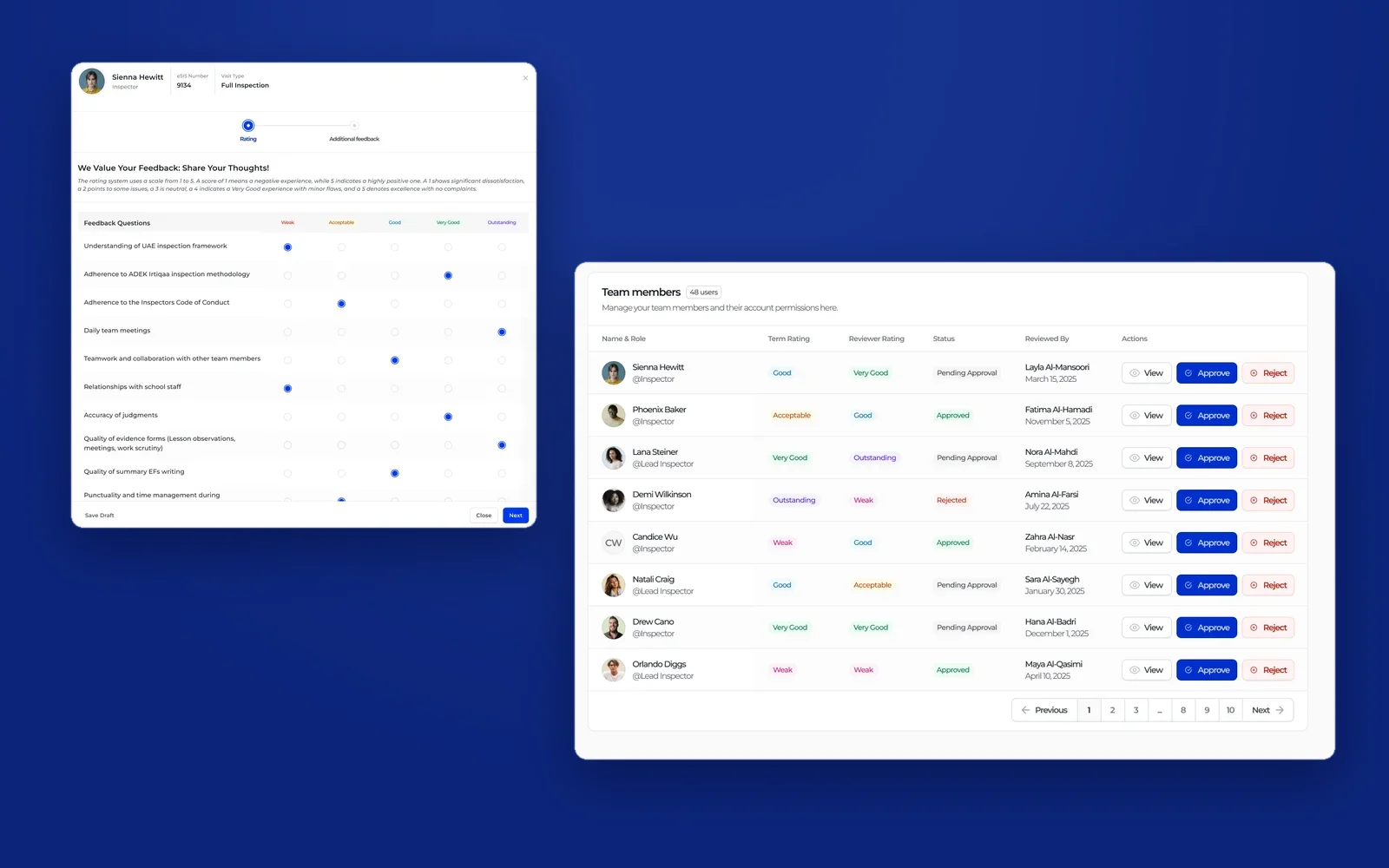
Overview
Irtiqaa is ADEK's school inspection programme. Each inspection is carried out by a team: inspectors led by a lead inspector, with an Initial QA and a Final QA checking the work. Every visit produces a judgement about the school. None of it produced a clear, shared judgement about how the inspectors themselves performed.
Irtiqaa Feedback closes that loop. When a visit ends, the people who worked together rate each other against the programme's own standards. Inspectors see that feedback on their profile. An ADEK reviewer turns it into a term rating and role decision, and a director approves it. I designed all four journeys.
What I owned
- The feedback model: who rates whom, on which criteria, and on what scale.
- The giving journey inside the Inspector Portal, for lead inspectors and for Initial and Final QA.
- The receiving journey on each team member's profile.
- The governance journey in the Inspection System: reviewer changes with evidence, director approval, rejection and rollback.
Feedback that changes someone's career has to be specific enough to act on and traceable enough to defend.
Objectives → Design framing
How might a busy lead inspector give feedback that says exactly what went well and what did not?
How might every inspector be judged on the same criteria and the same scale, by the right people?
How might a role or rating change always carry a reason, evidence and a second pair of eyes?
Key constraints & tradeoffs
Feedback lives as one more tab in each visit, next to the evaluation, evidence and final report, so it happens while the visit is still fresh.
People can only rate colleagues they inspected with, tied to the visit's eSIS number, never the whole directory.
Term ratings and roles follow from this data, so every change needed evidence, a named reviewer and director approval.
Inspectors give feedback after long visits. The form had to be quick to complete, and safe to leave and finish later.
How objectives translated to features
Open text alone produces polite, general feedback. A number alone gives no reason. Useful feedback needs both, against criteria everyone recognises.
Design decisions- A rating matrix built on the programme's own criteria, from the inspection framework to the quality of evidence forms.
- One five-point scale, Weak to Outstanding, with its meaning written at the top of every form.
- A second step for three open questions: main strengths, areas of development, anything else.
- Save as draft, and a confirmation before submitting, because submitted feedback is final.
Two steps instead of one long page. Separating rating from writing keeps each step short and gets better written answers.
Solution
Journey 1
After the visit: giving feedback.
When an inspection ends, the lead inspector and the QA team open the visit's Inspector Feedback tab. Everyone they worked with is already there. Each review takes two short steps.
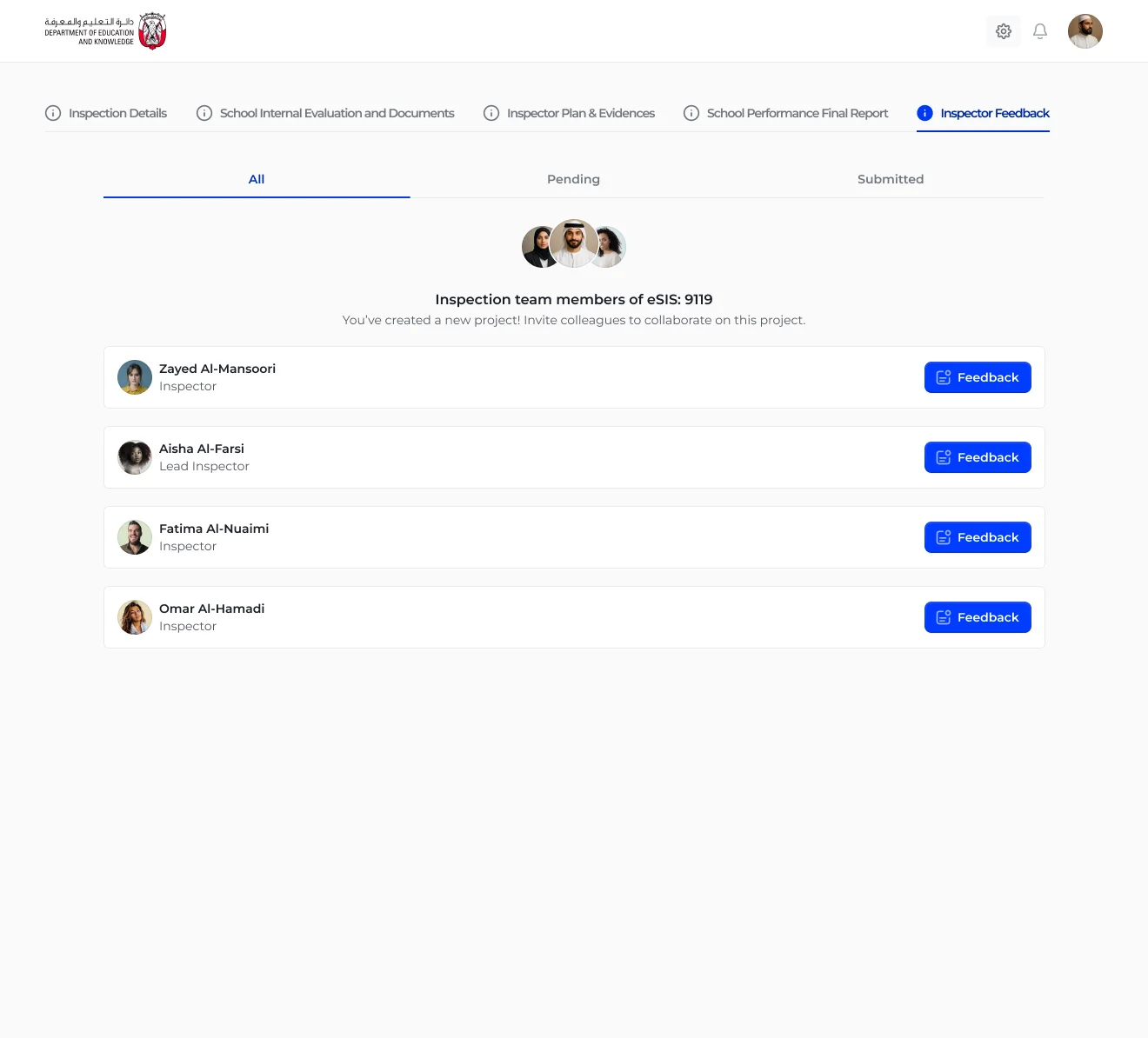
Everyone you inspected with
The visit's team, each with a single clear action.
The tab sits alongside the rest of the visit. It lists only the people on this inspection, with their role, and splits them into All, Pending and Submitted so nobody is forgotten.
- Scoped to the visit's eSIS number
- Pending and Submitted at a glance
- One Feedback button per person
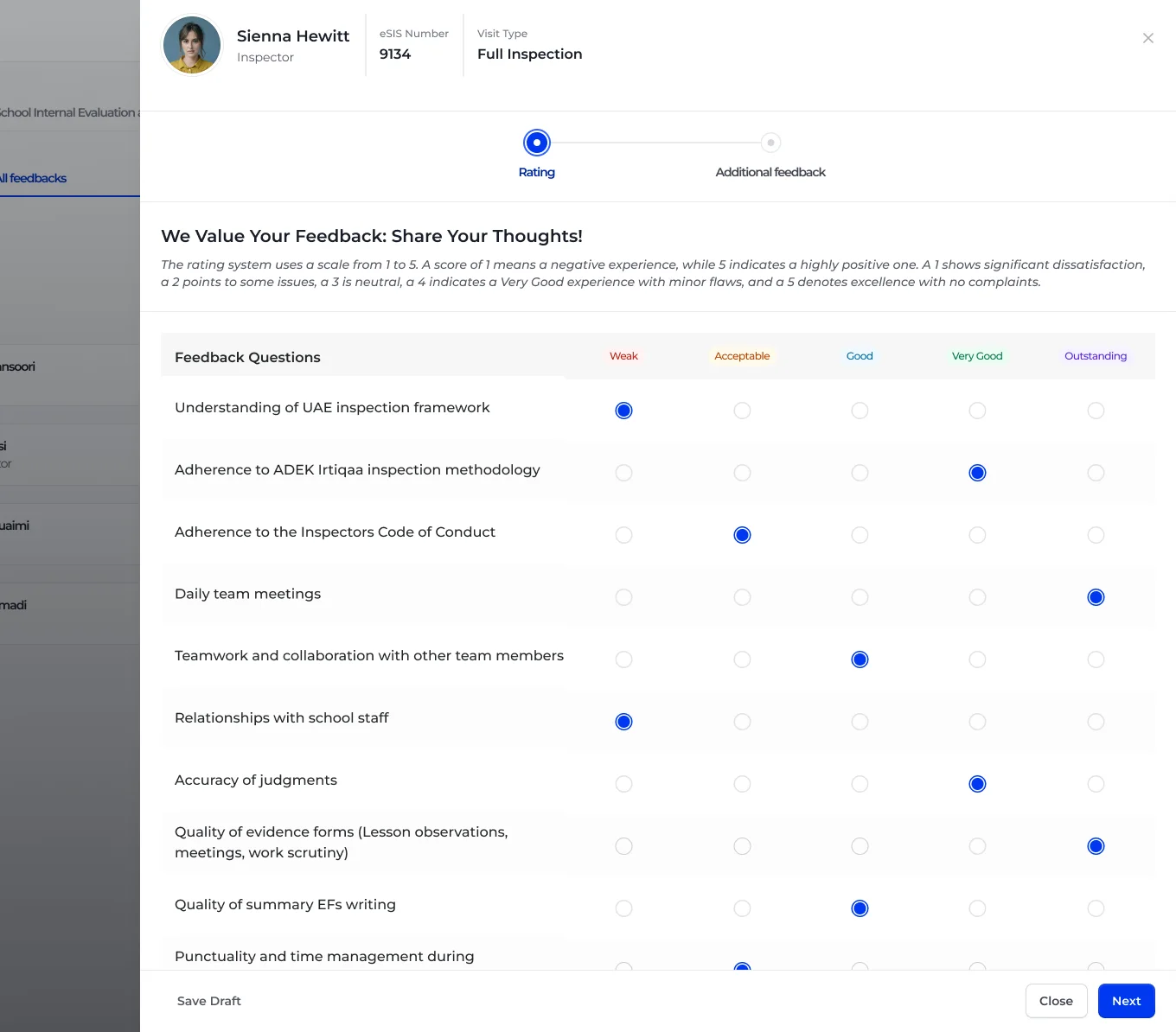
Rate against the standard
Programme criteria in rows, one shared scale in columns.
The first step is a matrix. Each row is a criterion inspectors already know, and each column is a point on the Weak to Outstanding scale, colour-coded and explained at the top. Rating a colleague is a scan down the page.
- Criteria inspectors already work to
- Scale definitions always in view
- Save draft or continue at any time
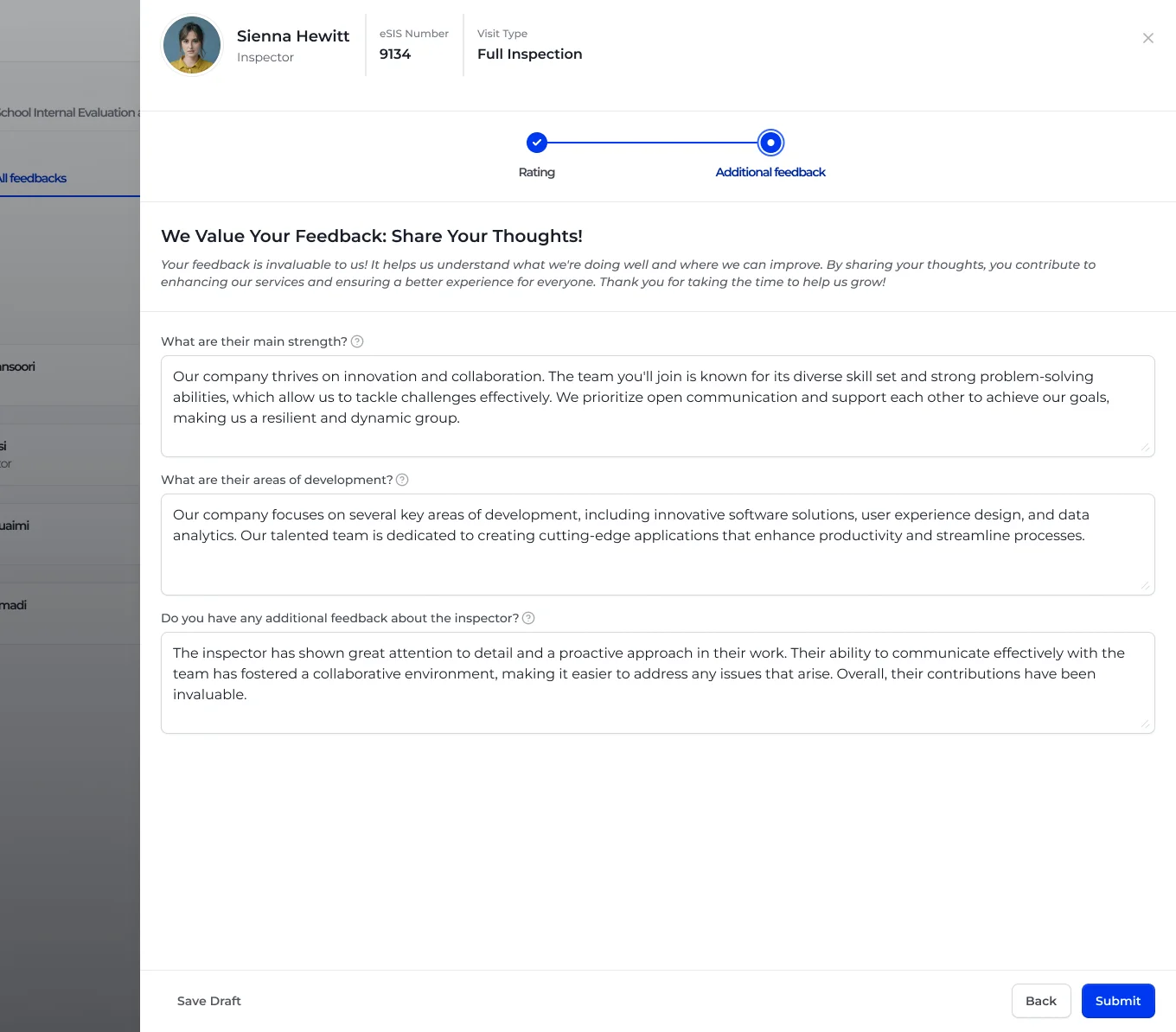
Say it in words
Strengths, areas of development, anything else.
The second step asks three questions. Kept separate from the rating, they get considered answers instead of one-line afterthoughts. A confirmation step makes clear that submitted feedback cannot be edited.
- Three focused prompts
- Progress shown in a two-step stepper
- Confirm before submitting
Journey 2
On your profile: reading feedback.
Feedback is only useful if the person it describes can read it. Every inspector gets a Feedbacks tab on their profile, with everything written about them in one place.
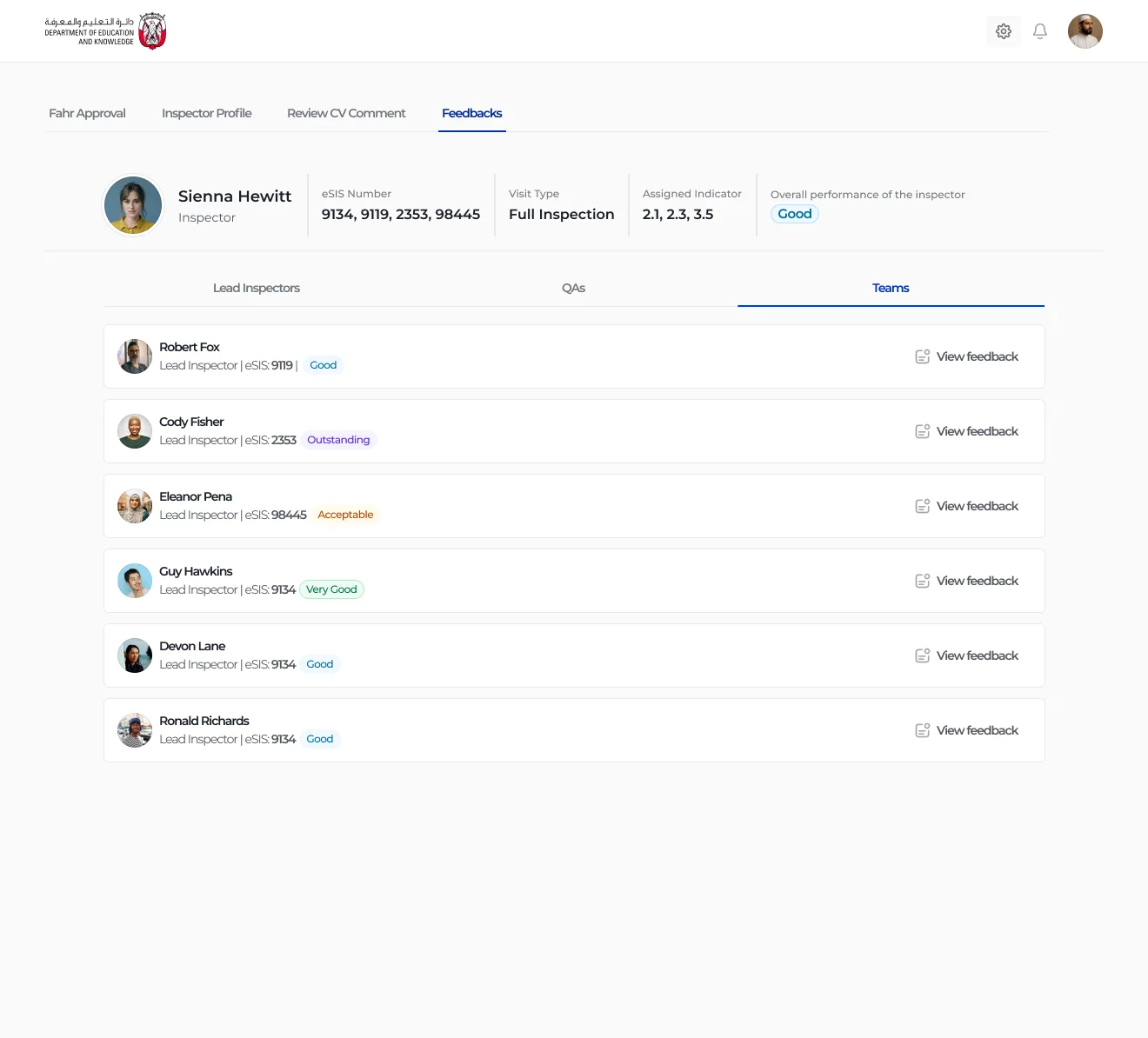
All your feedback, by source
Lead inspectors, QAs and team members in separate tabs.
The profile header shows the inspector's visits, visit type, assigned indicators and overall performance. Below it, each piece of feedback is listed with who wrote it, their role and the rating they gave.
- Overall performance in the header
- Grouped by who gave the feedback
- Rating chip on every entry
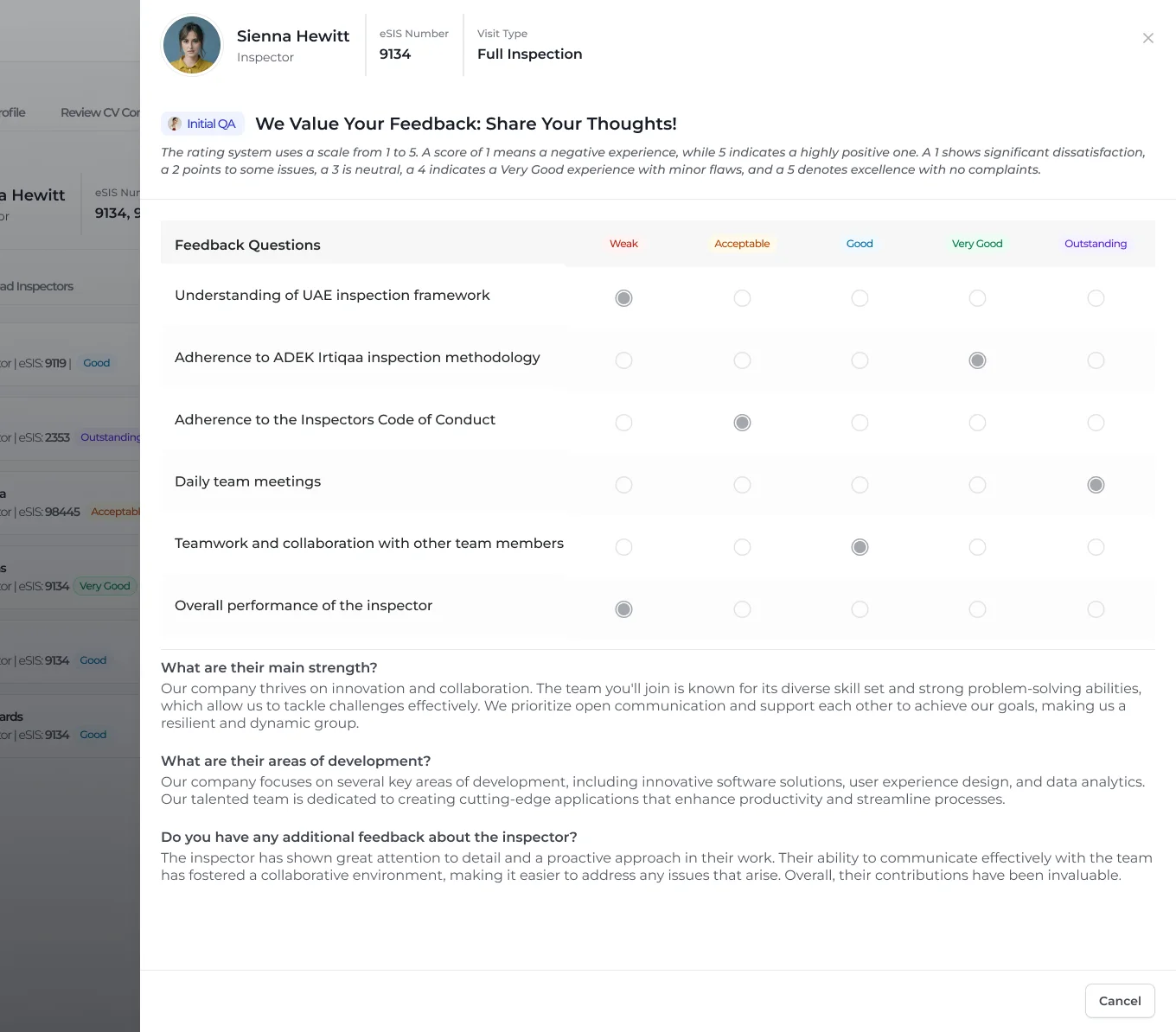
The full picture, read-only
The same form the reviewer filled, now as a record.
Opening an entry shows the matrix and the written answers exactly as submitted, labelled with the role that wrote them. Nothing is summarised away.
- Source role labelled at the top
- Ratings and comments together
- Read-only, so the record cannot drift
Journey 3
At ADEK: reviewing and approving.
Feedback informs decisions about roles and term ratings. An ADEK reviewer proposes those changes with evidence; a director approves or rejects them. Every step leaves a trace.
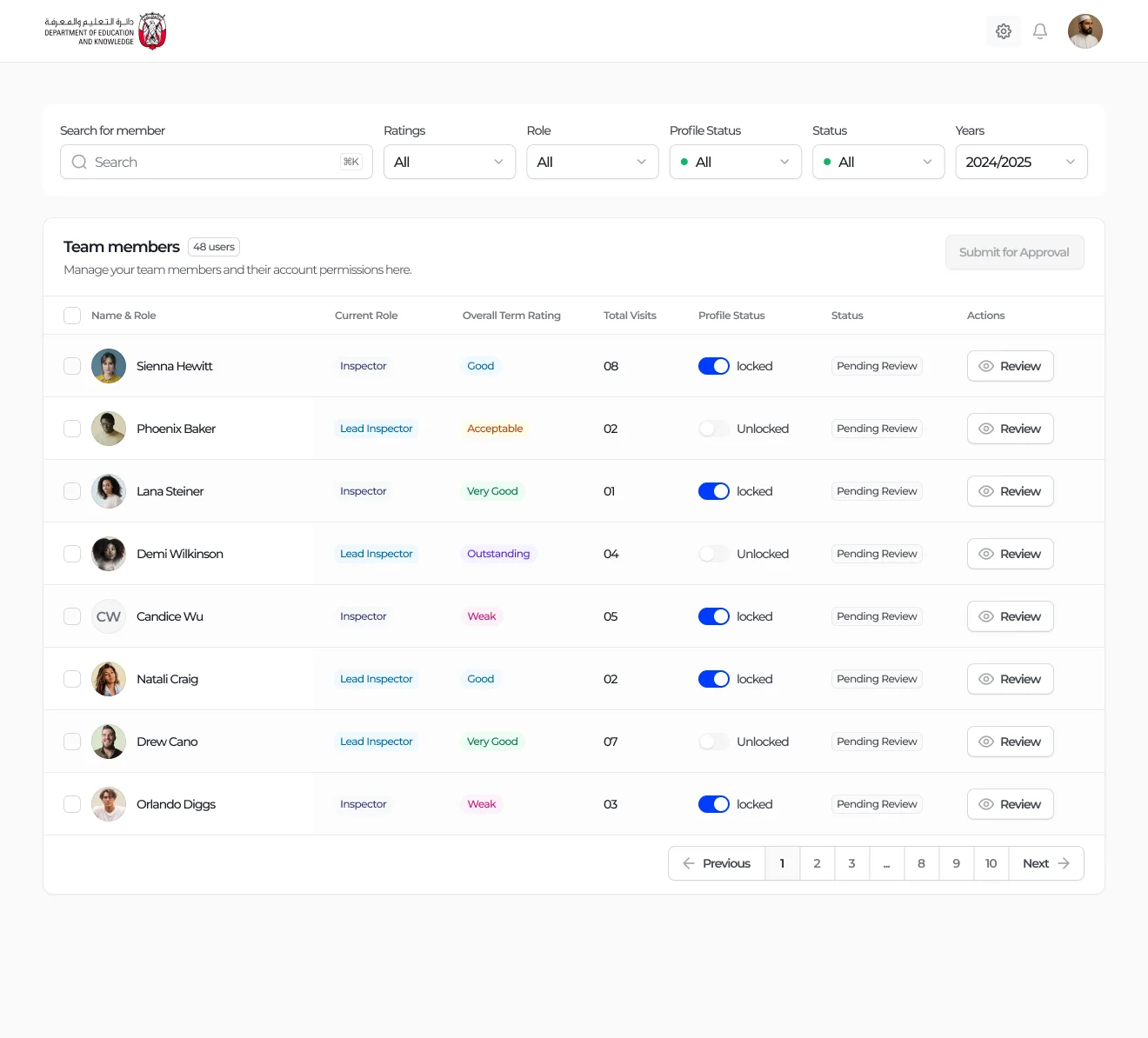
The whole team, one table
Role, term rating, visits, lock state and review status.
The reviewer filters by rating, role, status and year, and sees each person's current role, overall term rating and number of visits. Review opens the person; Submit for Approval sends the reviewed changes on.
- Filters for rating, role, status and year
- Profile lock shown per person
- Batch submission for approval
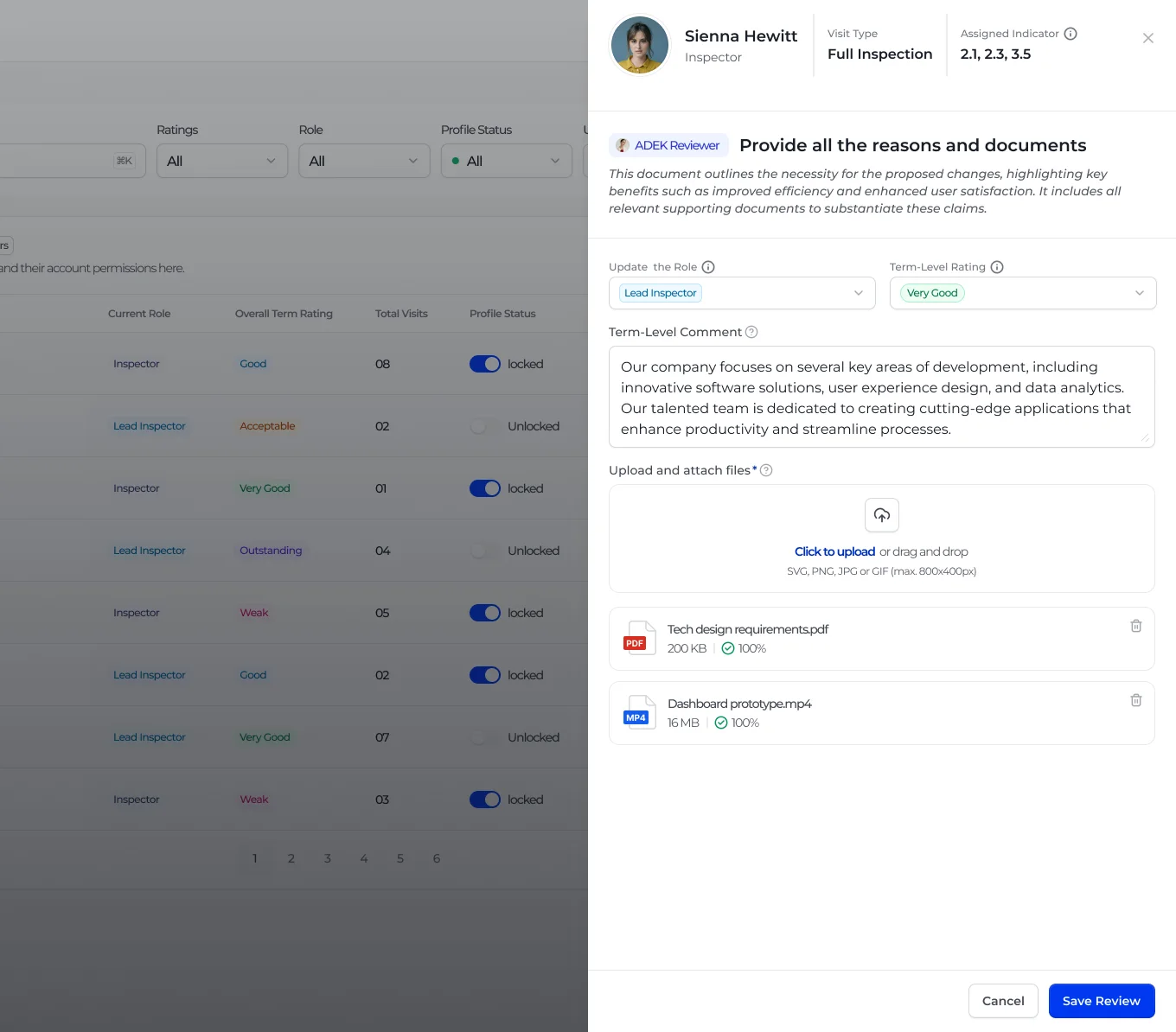
Change with evidence
New role and term rating, a comment and supporting files.
The review panel explains what is needed, then asks for the new role, the new term-level rating, a comment and attached documents. Save stays disabled until the case is made.
- Role and rating side by side
- Comment and evidence required
- Upload progress on every file
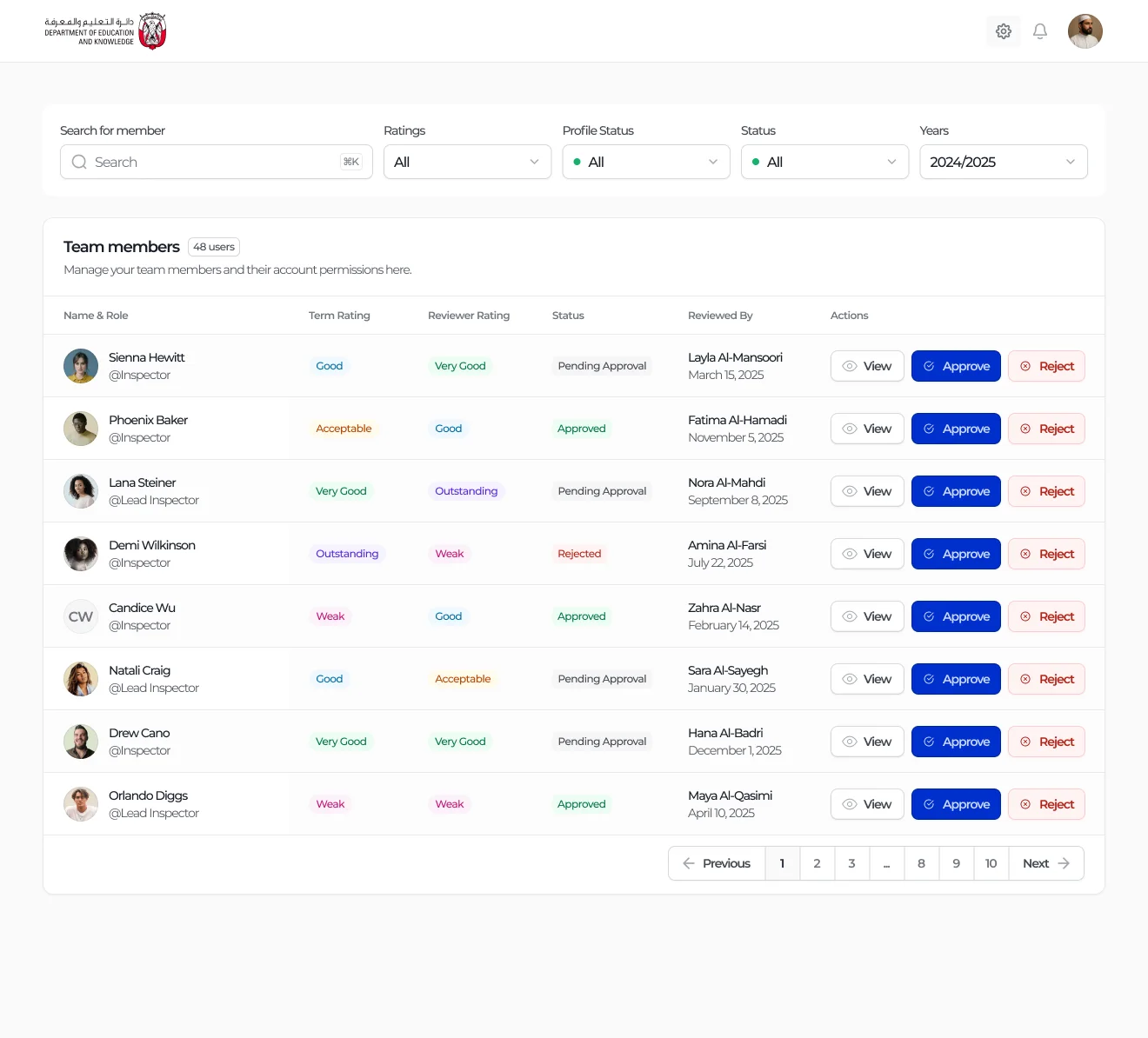
Approve or reject, line by line
The director sees term rating against reviewer rating.
The director's table puts the original term rating next to the reviewer's proposal, with who reviewed it and when. Approve and Reject sit on every row, so each decision is made on its own merits.
- Original and proposed rating together
- Reviewer and date on every row
- Status: pending, approved or rejected
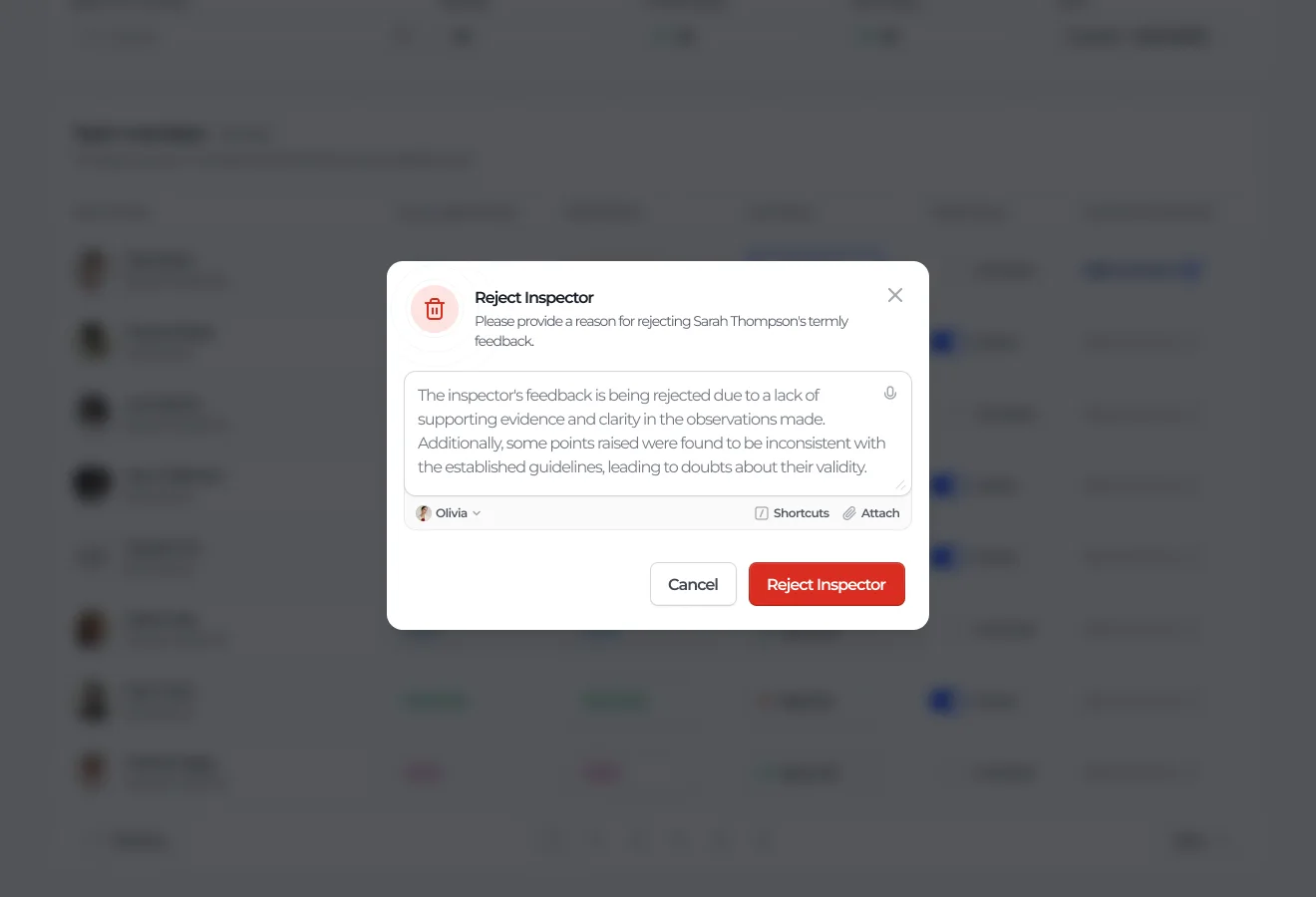
No rejection without a reason
Rejecting asks the director to explain why.
A rejection opens a short dialog that requires a reason before it can be sent. The reviewer never receives a bare no.
- Reason required
- Clear destructive action
- Cancel is always one click away
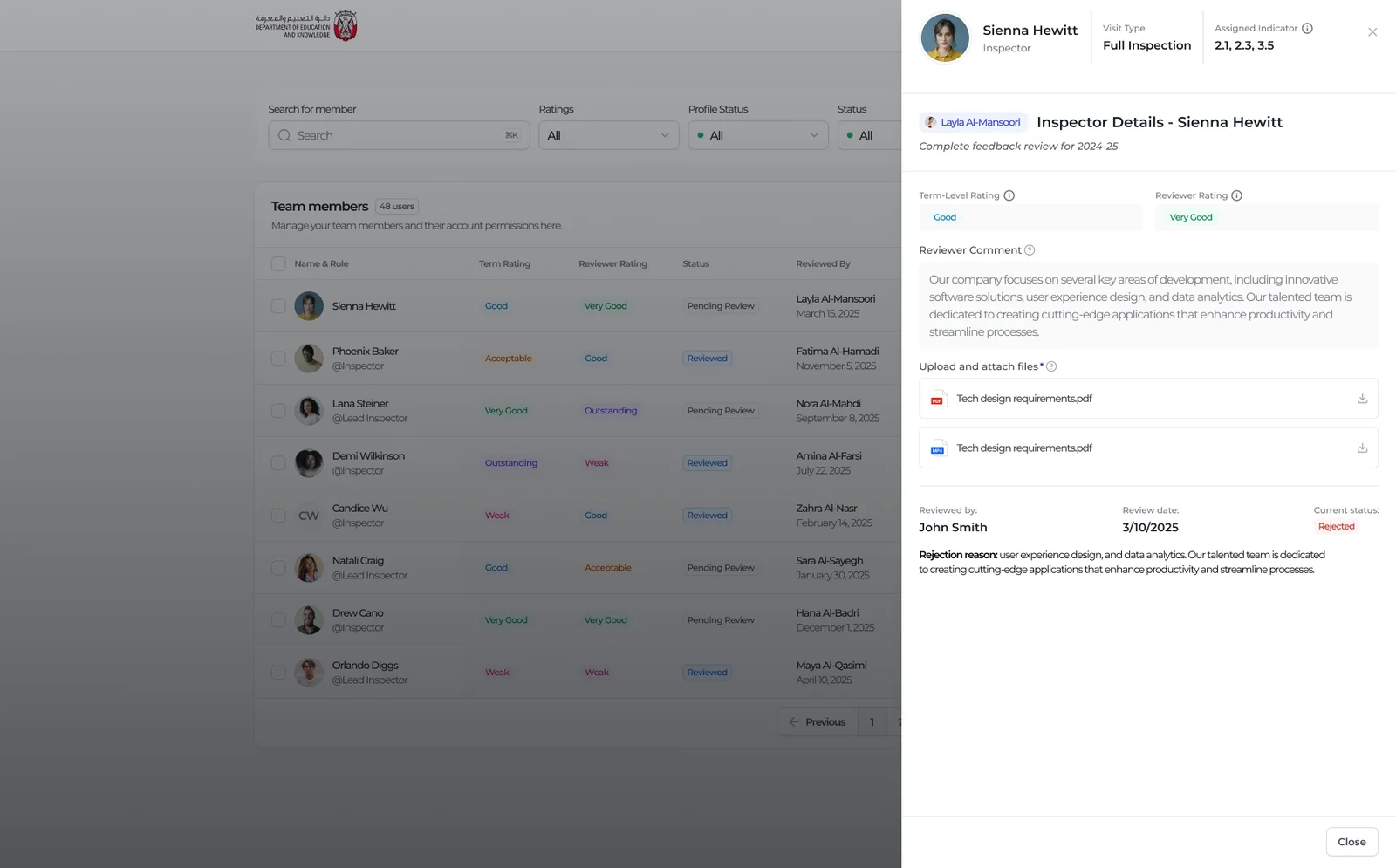
The record stays complete
Ratings, comment, evidence, reviewer, date, status and reason.
Any decision can be opened later and read in full: the term rating, the reviewer's rating and comment, the attached files, who reviewed it, when, and why it was rejected. That record is what makes the rating defensible.
- Evidence files downloadable
- Reviewer, date and status together
- Rejection reason kept with the case
Outcomes
Reflection
Designing feedback about people is different from designing forms about schools. The same rigour applies, but the stakes are personal, so fairness had to be visible: the same scale for everyone, feedback the person can read, and no change without a reason. The most important design decisions here were about who sees what, and when.