National Art Expressions
ADEK
A national arts programme where every school can put its most talented students forward, and every artwork arrives with the student's own words.
- Role
- Product designer, end to end
- Organisation
- ADEK, National Art Expressions
- Timeline
- 2023 to 2025
- Platform
- Web, UAE PASS sign-in, SharePoint uploads
- Users
- Principals, coordinators, art teachers
Overview
National Art Expressions is ADEK's programme for young artists across Abu Dhabi. Every cycle, schools nominate students into art events across six pathways: Visual Arts, Performing Arts, Craft and Folk Arts, Applied Arts, Literary and Digital Arts. Each event has its own rules: gender, age group, minimum and maximum participants, and dates.
Registration used to depend on the few people who knew those rules by heart. I designed a product that carries them instead: a principal builds the team, teachers see only the events that apply, and every student entry is checked, described in Arabic and English, and uploaded before the deadline.
What I owned
- Sign-in with UAE PASS or ADEK credentials, and the role chain from principal to coordinator to art teacher.
- The art list and event pages that turn programme rules into scannable criteria.
- The registration page that handles individual and group entries side by side.
- Artwork submission: bilingual descriptions, consent, secure uploads to SharePoint, and safe deletion.
The rules of an arts programme should protect the art, not stand between a student and the stage.
Objectives → Design framing
How might a principal build their arts team in minutes, without calling ADEK?
How might teachers see, at a glance, which events their students can enter and what each one requires?
How might every artwork arrive with the student's own story, in both languages, and with consent?
Key constraints & tradeoffs
Principals sign in with UAE PASS or ADEK credentials, and staff are added by Emirates ID, so no one invents an account.
Gender, age group, participant limits and dates differ per sub-pathway, and entries outside them cannot be accepted.
Paintings, recordings and films do not fit in a web form. Files had to go to a secure SharePoint folder per student.
Titles and descriptions are required in both languages, with right-to-left input treated as a first-class case.
How objectives translated to features
A programme is only as good as the people running it in each school. If setup needs ADEK's help, schools start late.
Design decisions- Principals sign in with UAE PASS or ADEK credentials.
- Coordinators and art teachers are found by Emirates ID, name or email, and their details fill in automatically.
- Each role unlocks the next: principals add coordinators, coordinators add teachers.
- Clear empty states, so a new school always knows its next step.
Adding people one by one is slower than a bulk import. It keeps every account tied to a verified identity, which matters when minors' work is involved.
Solution
Step 1
Build the team.
Everything starts with the principal. They sign in, add the coordinators who will run the programme in their school, and coordinators add the art teachers who know the students.
A welcome that speaks to artists
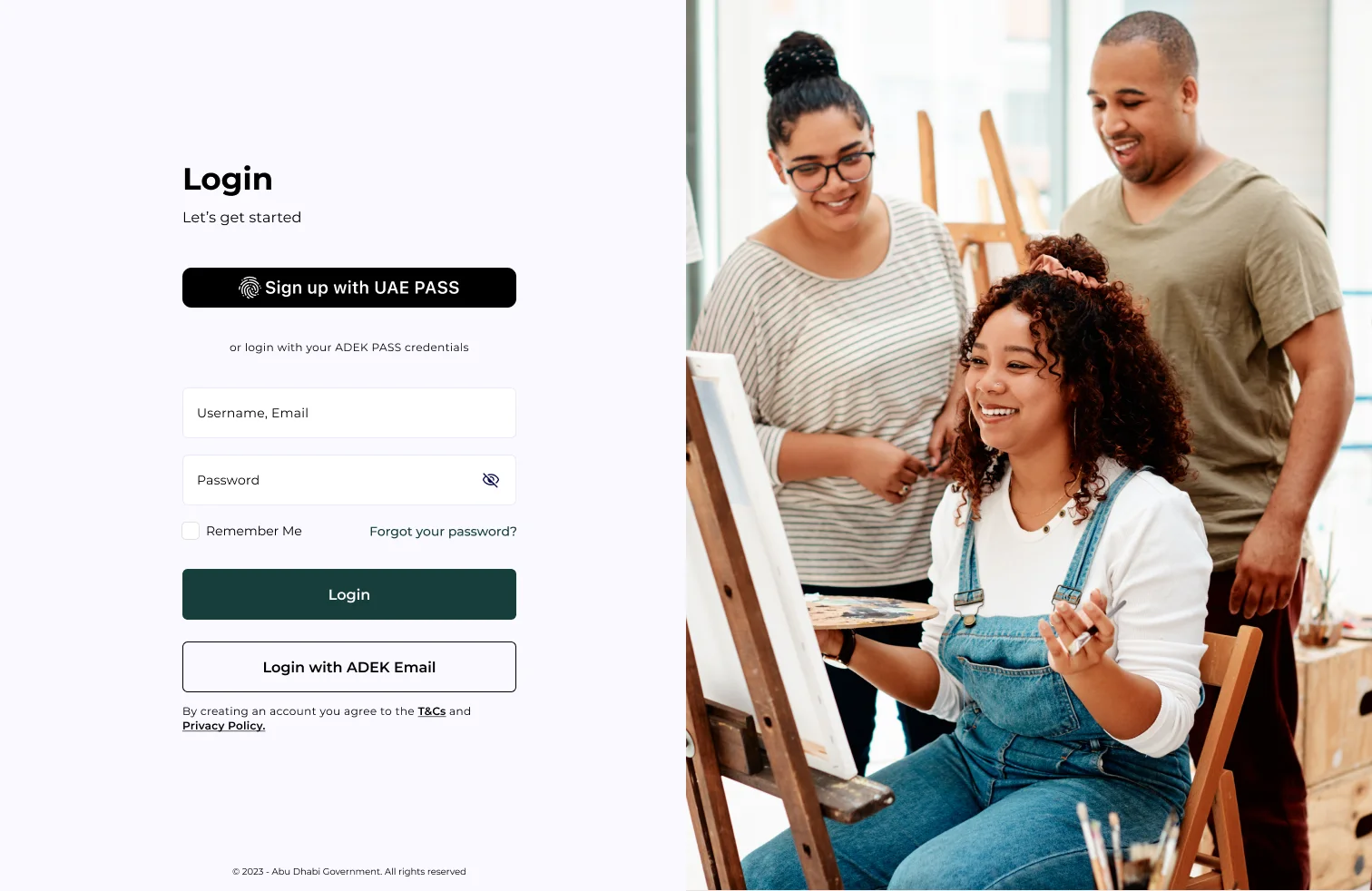
UAE PASS first, ADEK credentials as the alternative.
The sign-in page leads with UAE PASS, the identity every resident already has, and keeps ADEK credentials one click away. The imagery sets the tone: this is a programme about making things.
- UAE PASS as the primary action
- ADEK email and password as a fallback
- Terms and privacy stated upfront
The school's arts team
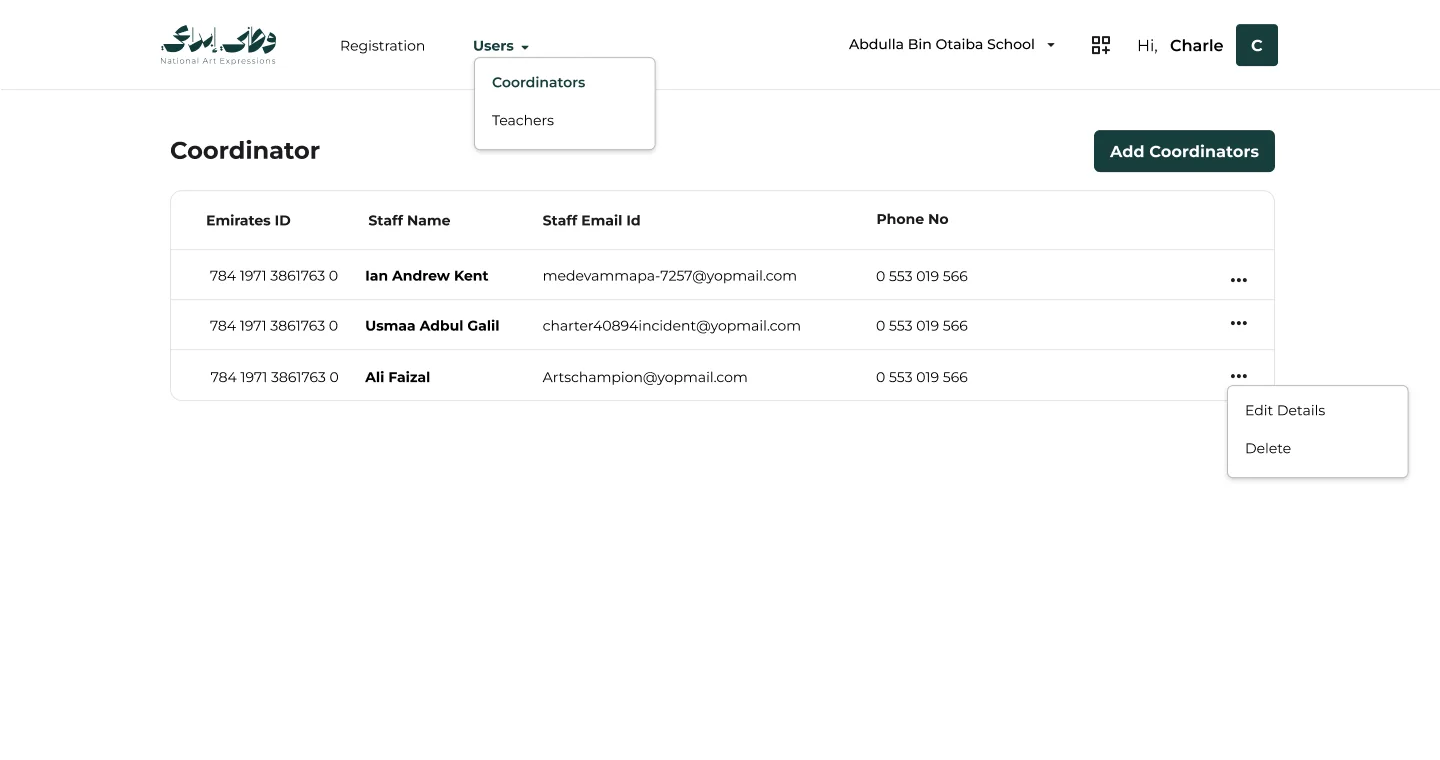
Coordinators listed with Emirates ID, email and phone.
Principals see who is running the programme in their school and add more with one button. Each row can be edited or removed from a small overflow menu.
- Emirates ID as the anchor for each person
- Edit or delete from the row
- Same pattern reused for teachers
Add someone in seconds
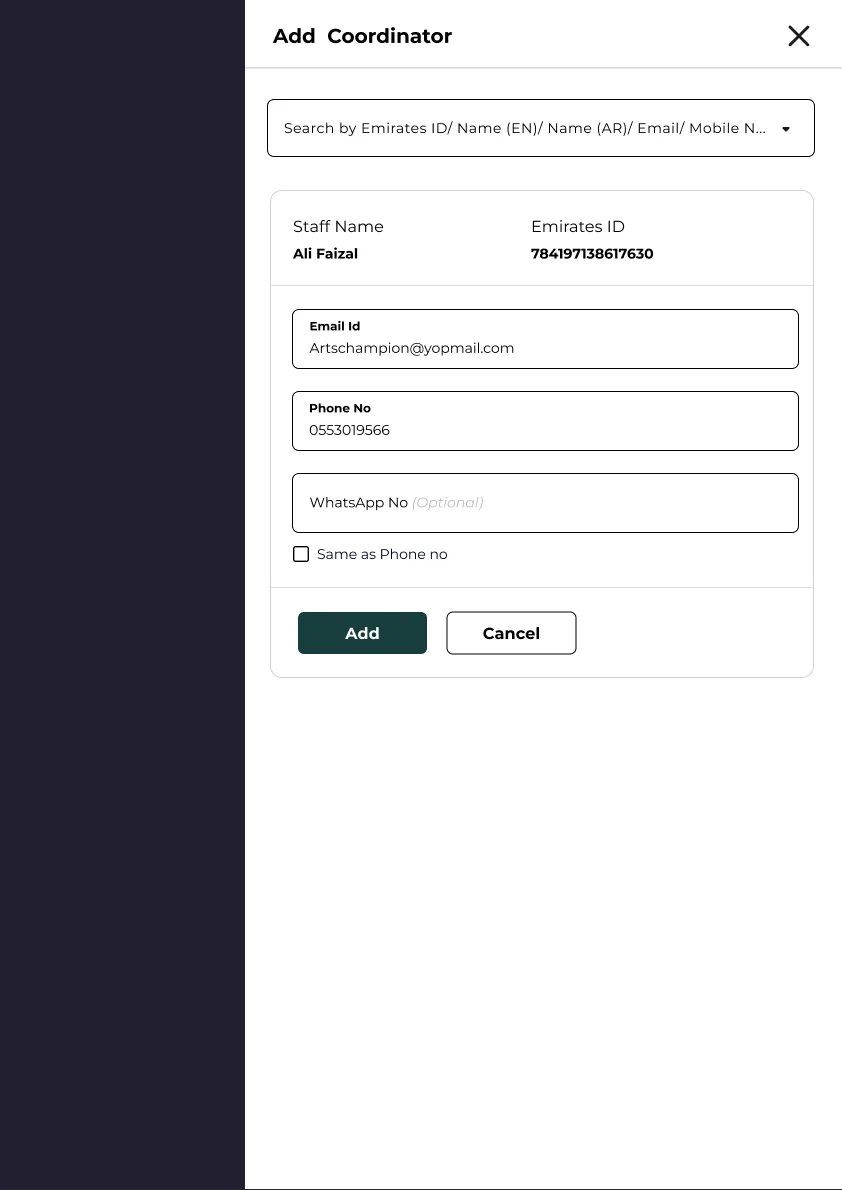
Search by Emirates ID, name, email or mobile.
The side panel finds a staff member and fills in their details. The principal only confirms the email and phone, and can reuse the phone number for WhatsApp.
- One search box, four ways to find someone
- Verified details filled in automatically
- WhatsApp number optional
Step 2
Find the right stage.
Teachers see the programme the way it is organised: pathways first, then the events inside them, each with its rules in plain view.
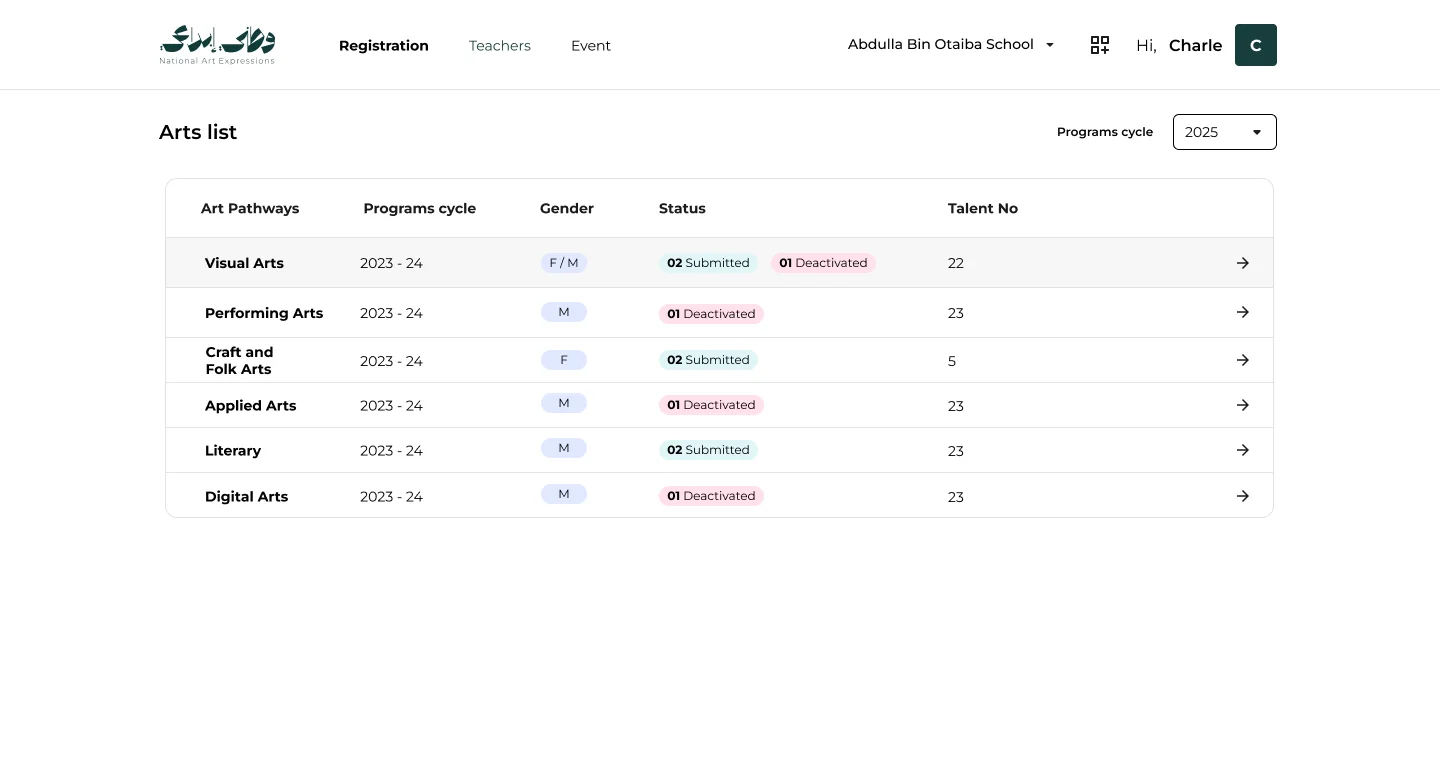
Six pathways, one list
Programme cycle, gender, status and talent numbers per pathway.
The art list shows every pathway for the selected cycle, with how many entries are submitted or deactivated and how many talented students the school has in each.
- Filter by programme cycle
- Status counts on every row
- One click into a pathway
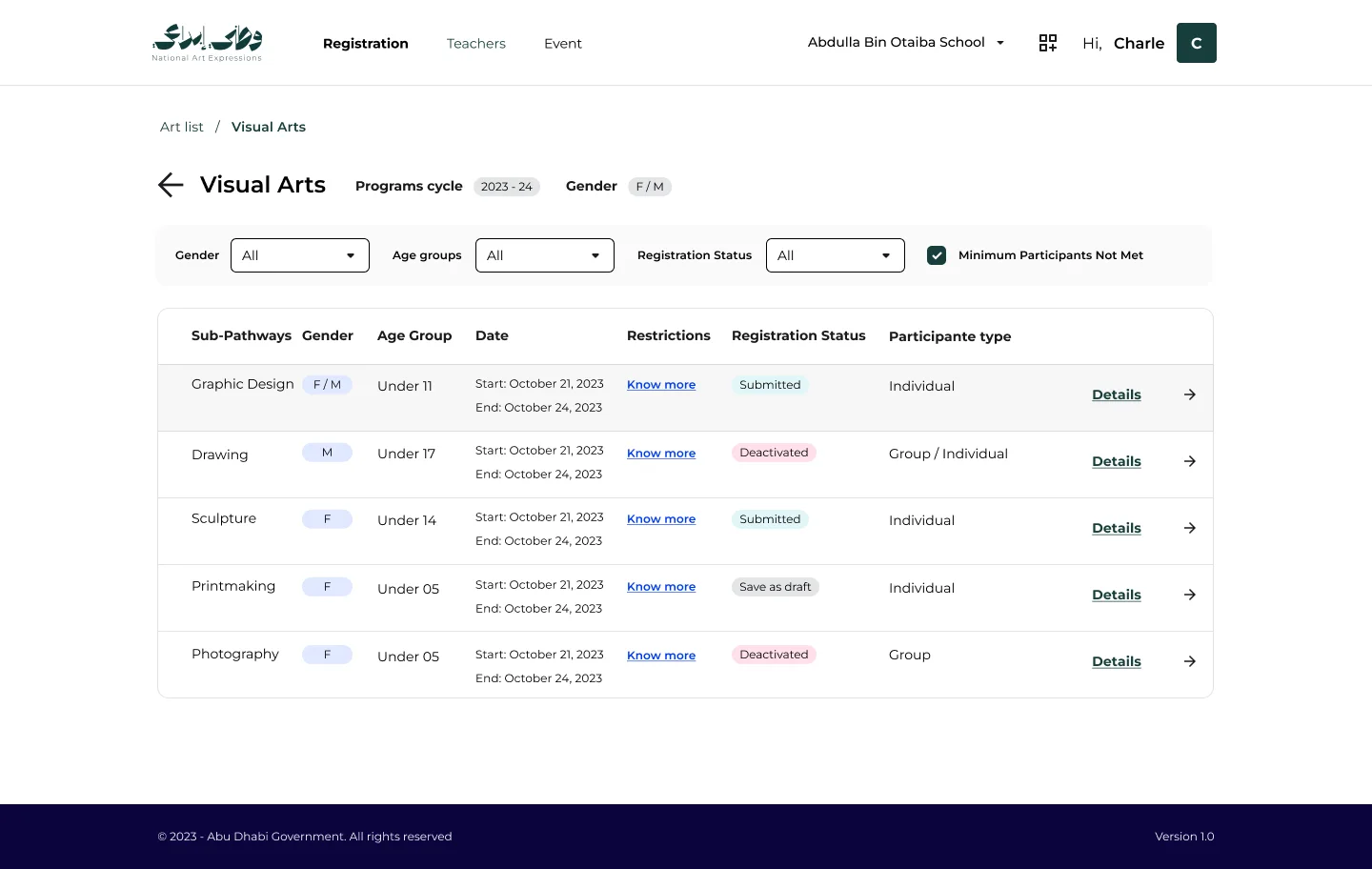
Events with their rules attached
Gender, age group, dates, restrictions and participant type.
Inside a pathway, each event carries its criteria in the row. Filters narrow by gender, age group and status, and a single checkbox shows events still short of their minimum participants.
- Rules readable without opening an event
- Minimum Participants Not Met filter
- Status per event: submitted, draft, deactivated
Step 3
Put the students forward.
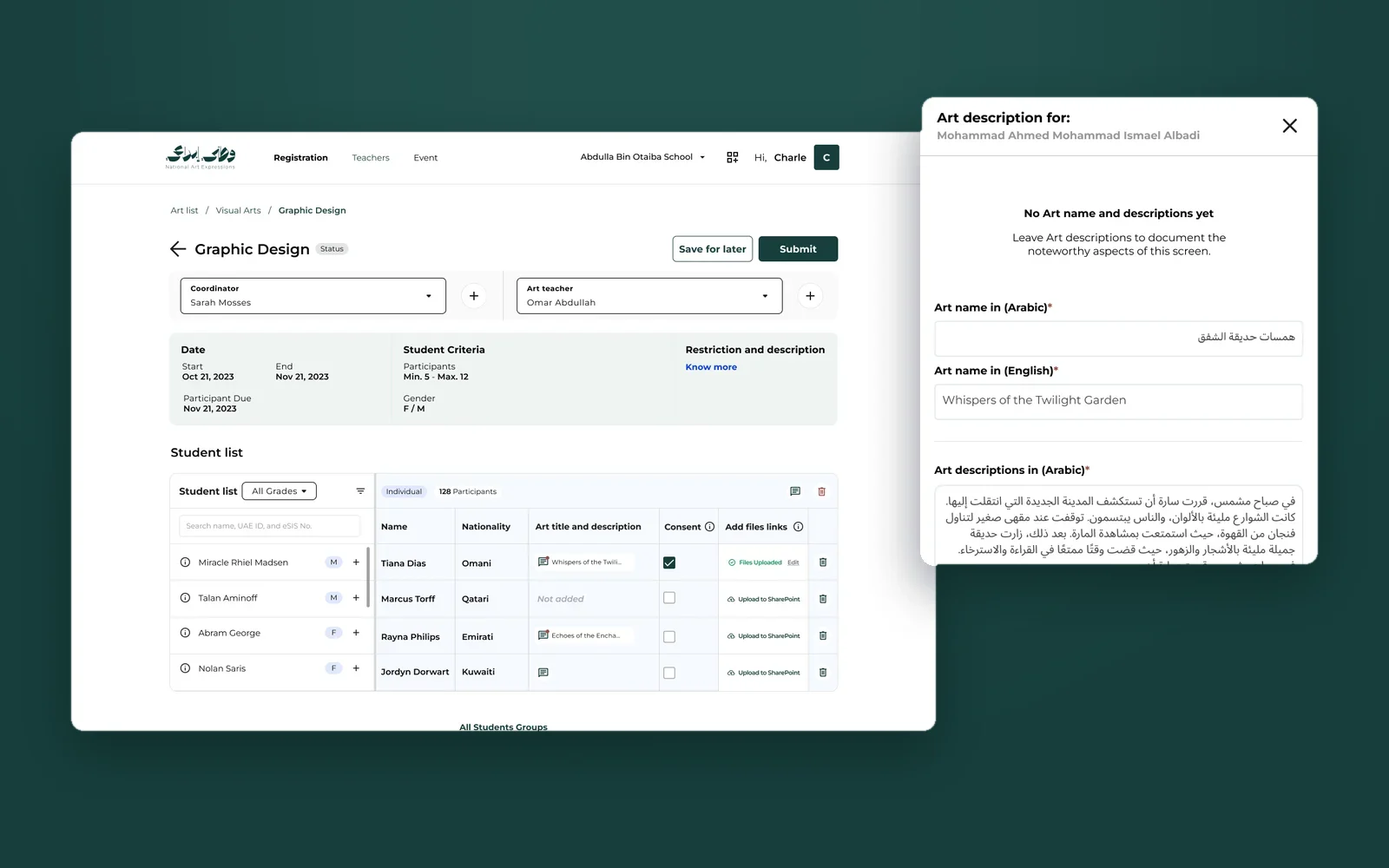
Registration happens on one page. The school's students are on the left, the entries on the right, and every artwork leaves with a title, a story, consent and its files.
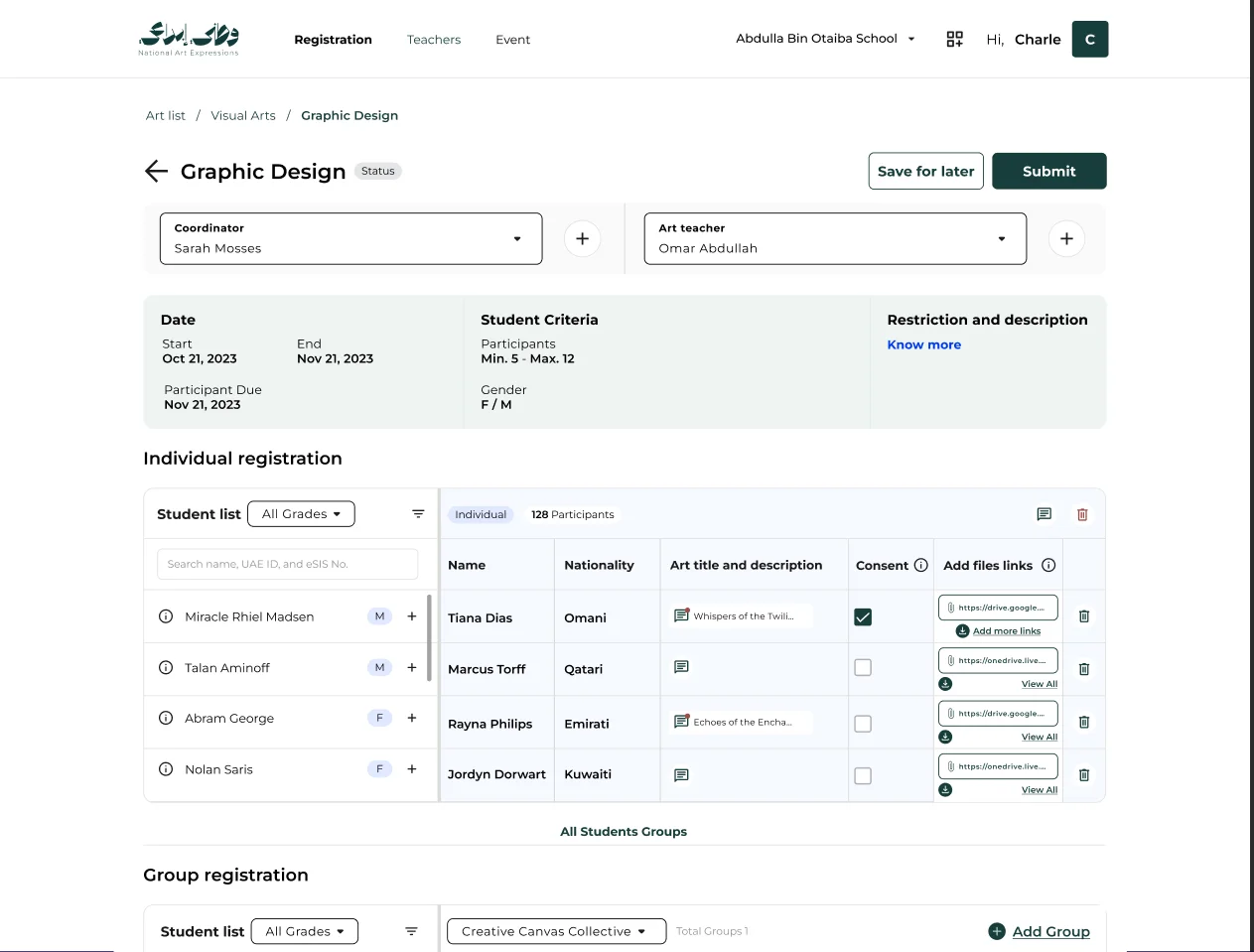
Individuals and groups, side by side
Pick from the school's student list into either table.
The event's criteria sit at the top. Below, the student list feeds individual registration and named groups. Once a student is added, they are disabled in the list, so no one is entered twice.
- Coordinator and art teacher assigned per event
- Group name required before adding students
- Save for later, or submit when complete
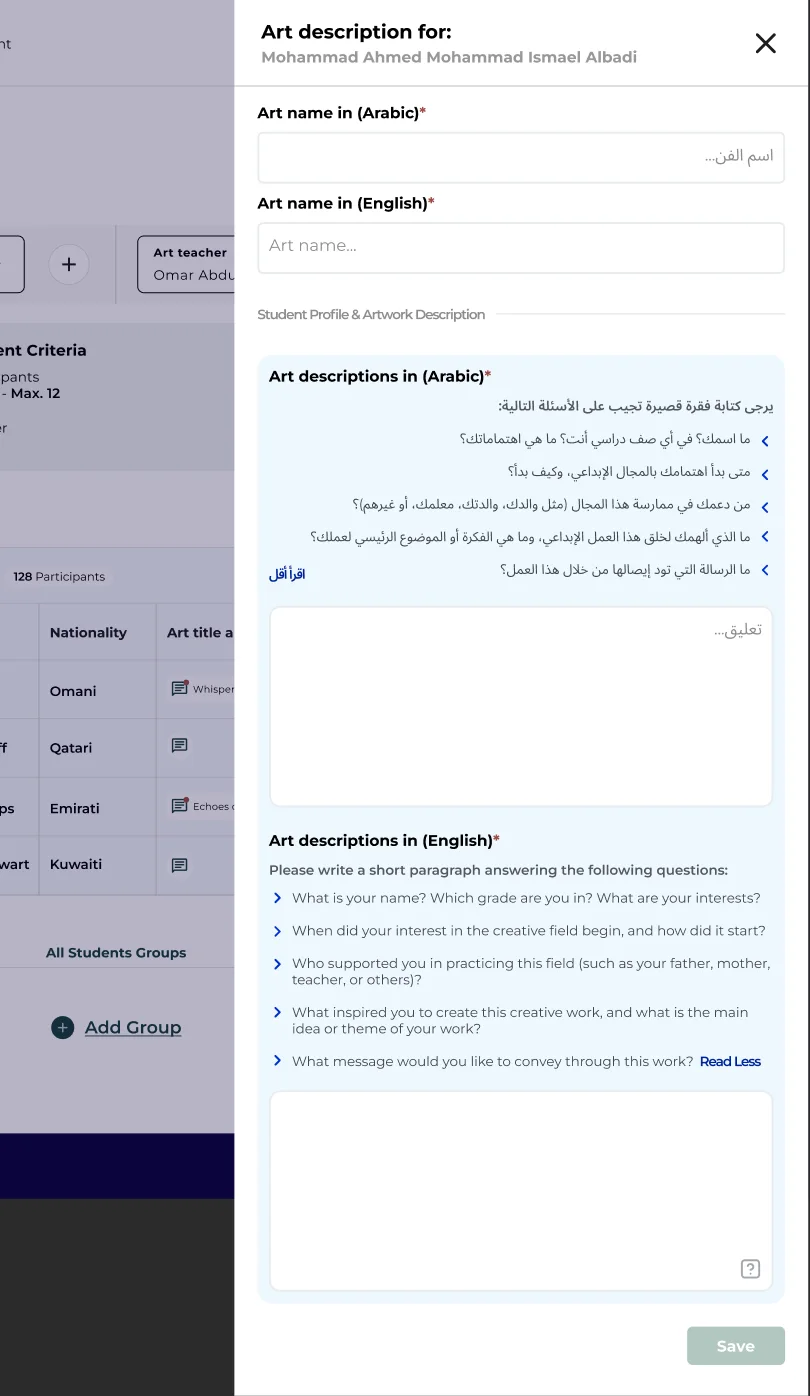
The student's own words
Art name and description, in Arabic and English.
Guiding questions help students describe their work: what inspired it, how they made it, what they want it to say. Arabic comes first, English follows, both required.
- Right-to-left Arabic fields
- Guiding questions, collapsible
- Required fields marked in both languages
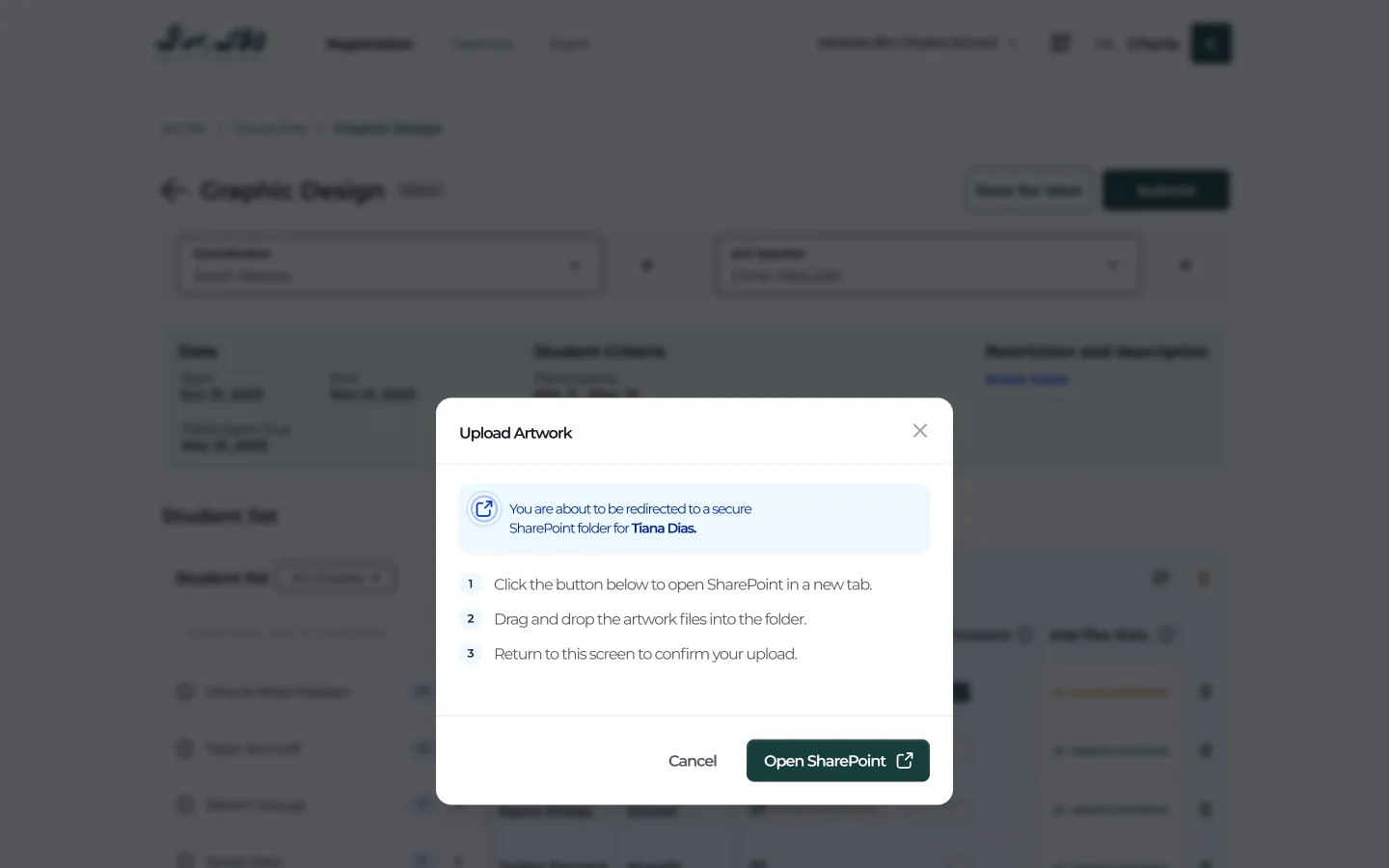
Upload, without surprises
Three steps explained before the SharePoint redirect.
Artwork files go to a secure SharePoint folder for each student. Before leaving, the teacher sees exactly what will happen: open SharePoint, drop the files in, come back and confirm.
- Secure folder per student
- Opens in a new tab
- Upload confirmed on return
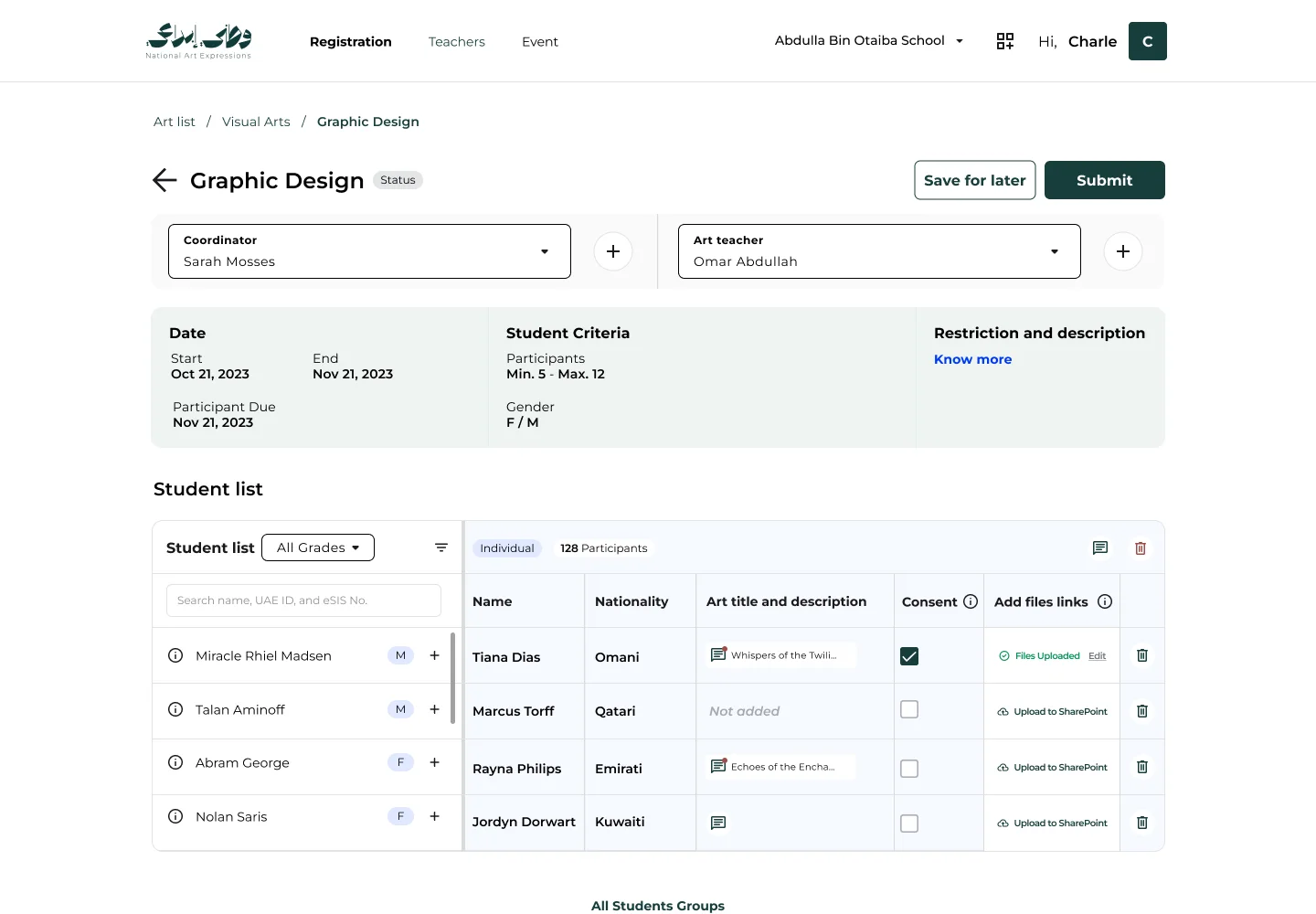
Everything ready, at a glance
Title, consent and file status per student.
Back on the registration page, each row shows whether the art title and description are in, whether consent is given, and whether files have been uploaded, so a teacher can see what is left before submitting.
- Files Uploaded state with edit
- Consent per student
- Missing descriptions clearly marked
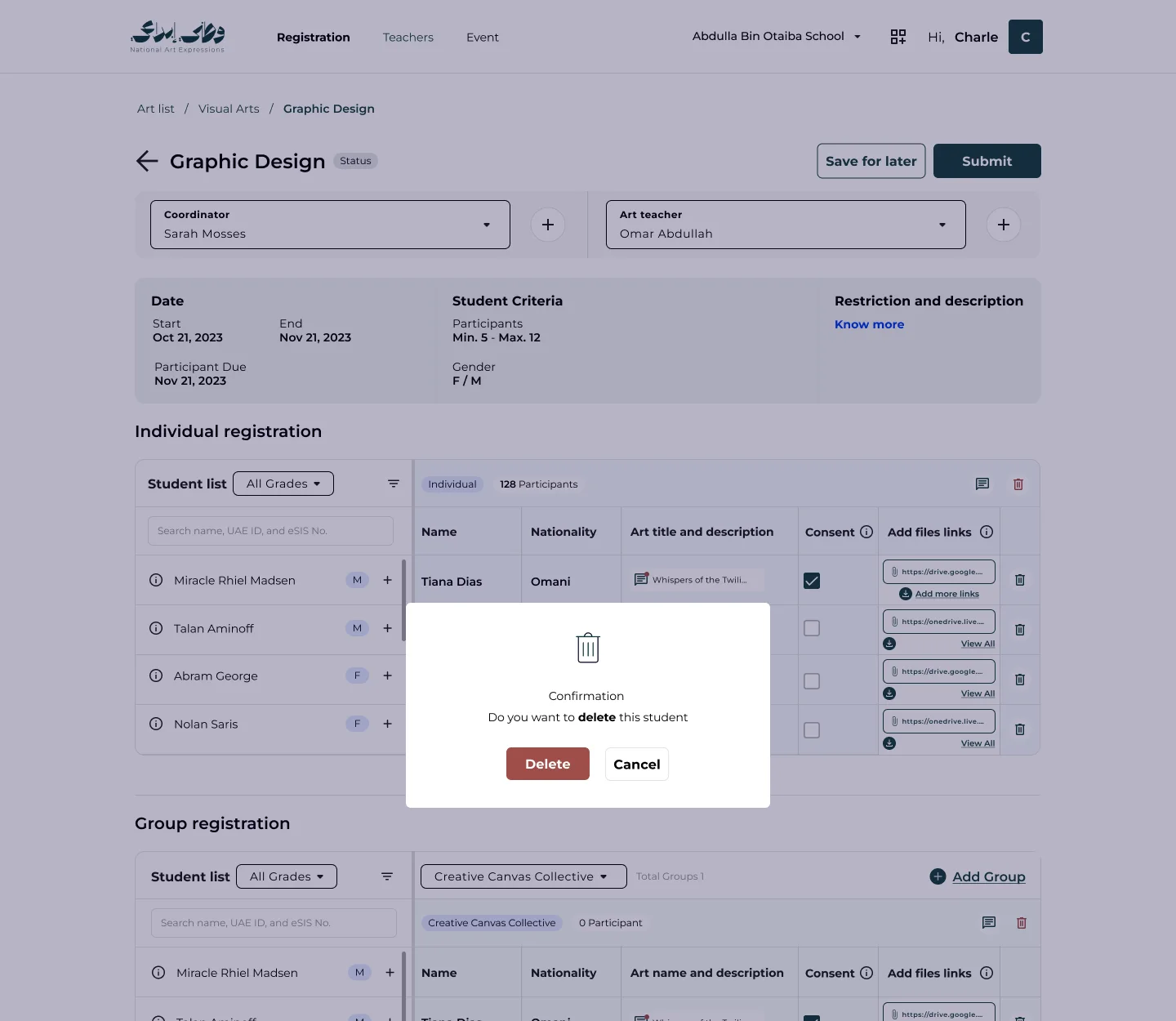
Remove, with a second thought
Deleting a student with uploaded artwork asks first.
When a student already has artwork uploaded, removing them from an entry asks for confirmation, so a stray click cannot throw away a student's work.
- Confirmation only when work would be lost
- Destructive action clearly styled
- Cancel as the easy way out
Outcomes
Reflection
This project was a reminder that administrative software can still feel like it belongs to its subject. The rules of the programme are strict, but the product never lets them become the point: they sit quietly in the page, and the student, their art and their words stay at the centre of every screen.