Abu Dhabi Sports Cup
ADEK
One championship, two audiences: a public home where families follow every match, and a system where schools field their teams without a spreadsheet in sight.
- Role
- Product designer, end to end
- Organisation
- ADEK, Abu Dhabi Sports Cup
- Season
- 2024/25 championship
- Platform
- Public website and school system, English and Arabic
- Users
- Families, schools, universities, coaches
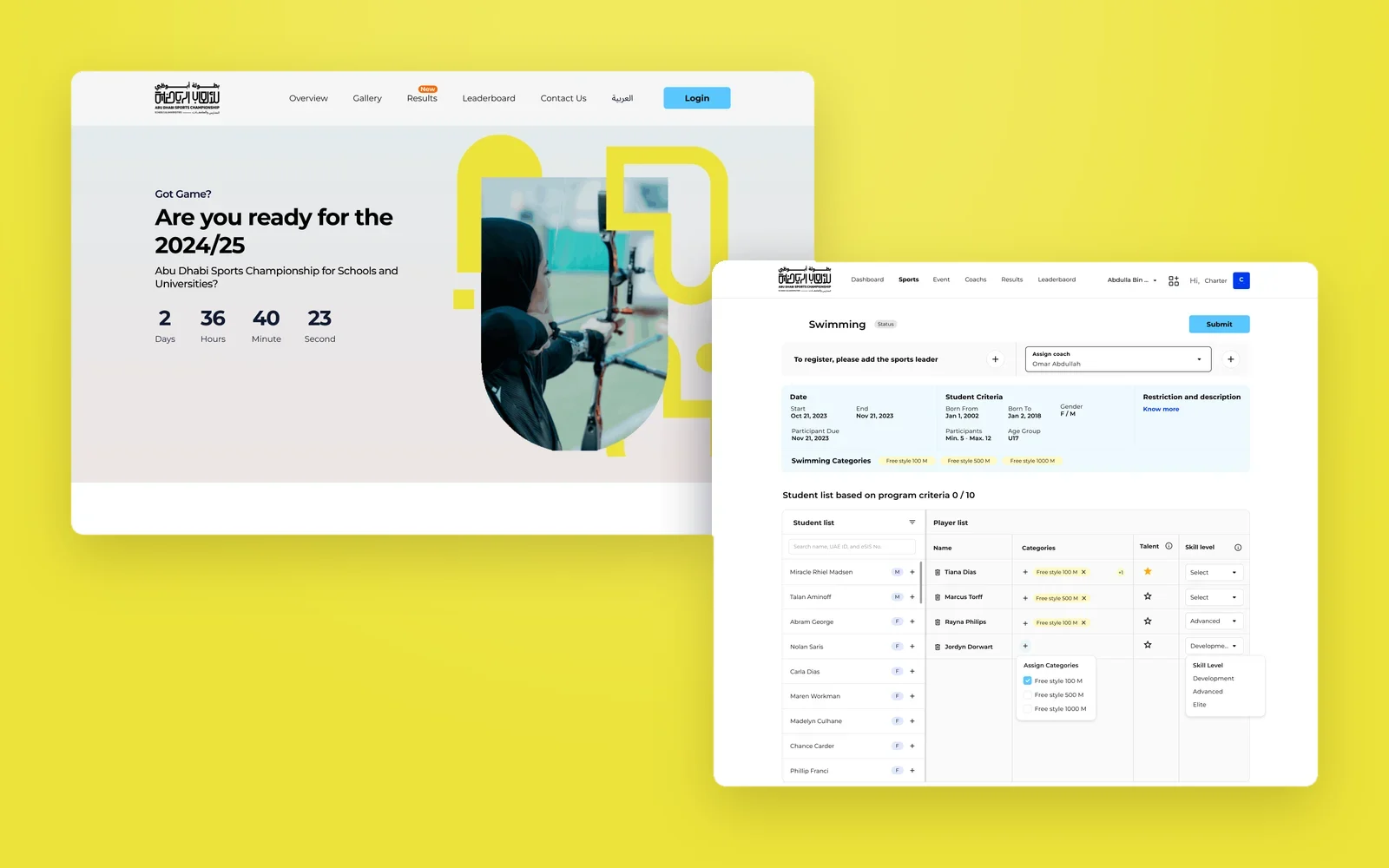
Overview
The Abu Dhabi Sports Cup is ADEK's championship for schools and universities across the emirate. Aligned with Abu Dhabi's National Sport Strategy 2031, it is built around the values of sportsmanship: respect, safety, fairness, dignity, solidarity and excellence.
It needed two things at once. The public needed one place to see what is happening, who won and where their school stands. Schools needed a way to enter teams that is fast for them and reliable for ADEK. I designed both, as one product family with a shared visual language.
What I owned
- The public website: landing page, this weekend's events, results, leaderboards and gallery, in English and Arabic.
- The school system: sign-in, dashboard, sports and programme lists, and events.
- Player registration: assigning a sport leader and coach, building the squad, categories, talent and skill level.
- The coach flow for sport credentials, and the admin screens for adding sports leads.
A championship is a story told every weekend. The product had to tell it to families and run it for schools at the same time.
Objectives → Design framing
How might a parent find this weekend's matches, the latest results and their school's rank in seconds?
How might a school build a squad that already meets every programme rule before it presses Submit?
How might Arabic and English feel equally native across a public site and an operational system?
Key constraints & tradeoffs
Families browse on the go; school staff register dozens of players at a desk. One visual language had to serve both without compromising either.
Birth-date ranges, age group, gender and minimum and maximum participants differ per programme and must hold before a squad is accepted.
The same system serves both, with sports leads and admins added per institution.
Every page ships in English and Arabic, with the Arabic layout mirrored, not just translated.
How objectives translated to features
Results that live in PDFs and social posts are hard to find and impossible to compare.
Design decisions- A landing page led by the season countdown and a carousel of this weekend's events, with time, date, venue and age groups.
- Results with an individual and a team view, filtered by sport, city, gender and date, and searchable by school, player or team.
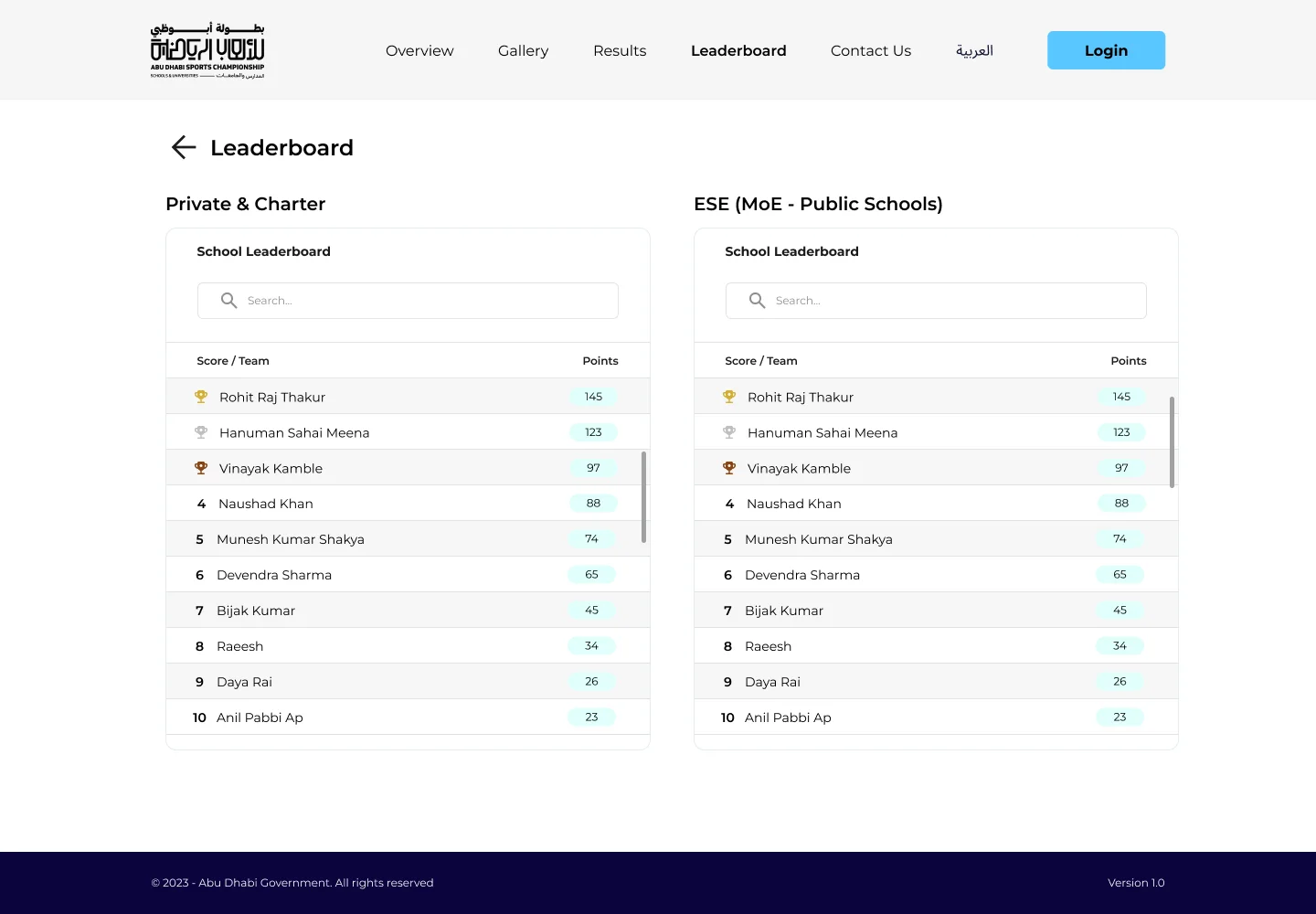
- Leaderboards split by school type, private and charter alongside public schools, so comparisons stay fair.
- A gallery and FAQs, and a full Arabic layout mirrored from right to left.
A calmer, lighter page than a typical sports site. It lets results and dates carry the energy, and keeps the page fast for parents on phones.
Solution
The public site
Follow the season.
For families, students and fans, the site is the championship's front door: what is on, who won, and where every school stands, in English or Arabic.
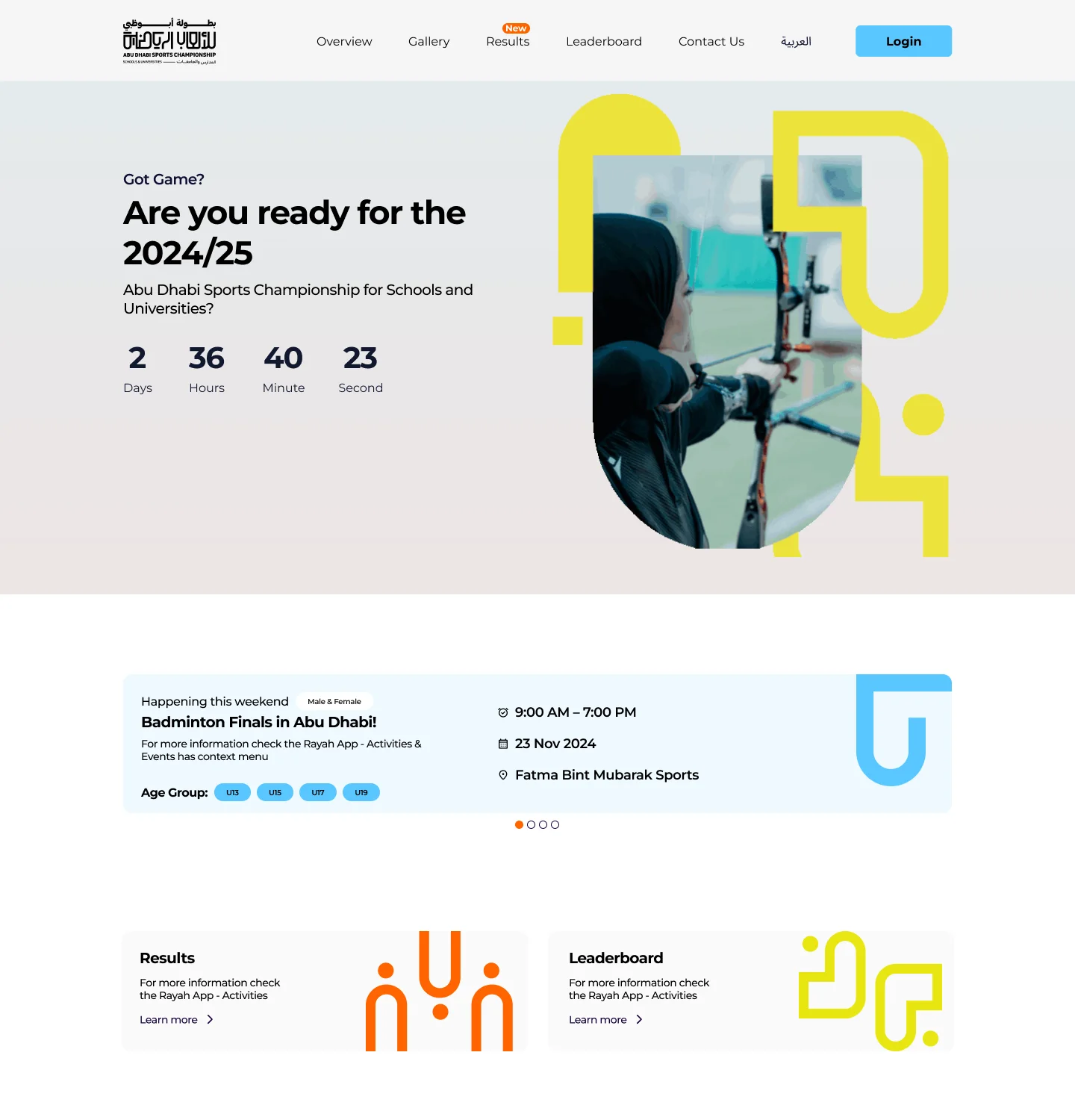
Are you ready for the season?
A countdown, this weekend's events, and a way into results.
The landing page opens on the season countdown and the championship's bold graphic language. Below it, this weekend's events show time, date, venue and age groups, and two cards lead straight to results and the leaderboard.
- Season countdown in days, hours, minutes and seconds
- This weekend's events as a carousel
- Results and leaderboard one click away
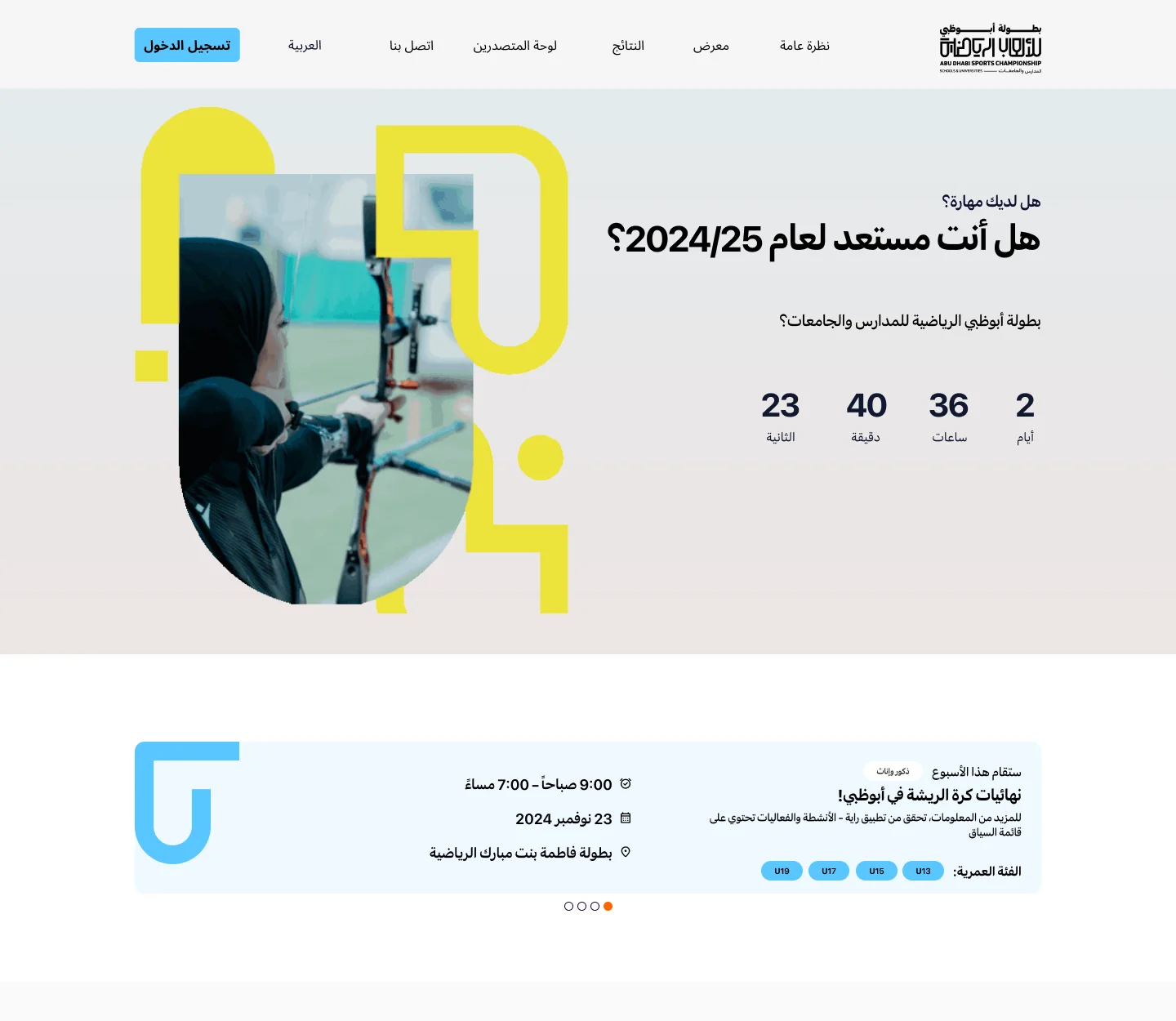
Equally at home in Arabic
The whole page mirrored, not just translated.
The Arabic layout flips navigation, countdown, cards and the weekend carousel from right to left, so Arabic readers get the same hierarchy and rhythm as English readers.
- Right-to-left navigation and content
- Mirrored graphic composition
- Arabic as a first-class language
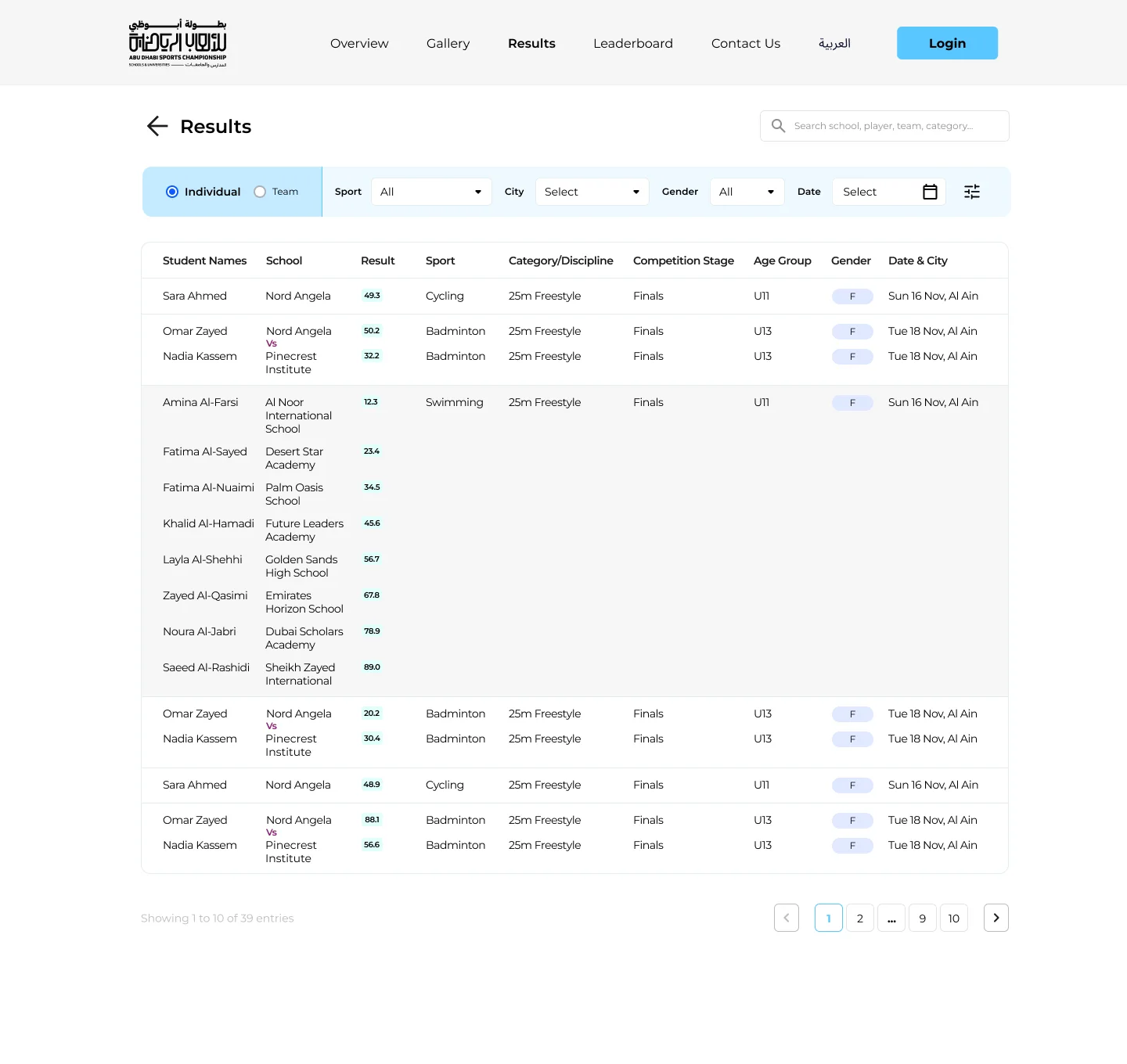
Every result, findable
Individual and team views, with filters that match how people search.
Results switch between individual and team views. Filters for sport, city, gender and date sit in one bar, and a search box finds a school, player or team directly.
- Individual and team toggle
- Sport, city, gender and date filters
- Result, stage, age group and venue in every row
Fair leaderboards
Private and charter schools, and public schools, ranked separately.
The leaderboard shows two tables side by side, one per school type, each searchable, with the top three marked. Comparisons stay between schools competing on similar terms.
- Two leaderboards by school type
- Search within each board
- Top three highlighted
The school system
Field the team.
For principals, sports leads and coaches, the system is where the championship actually runs: programmes, squads, coaches and events, checked against the rules as they go.
Sign in the way people already do
UAE PASS first, ADEK credentials as the alternative.
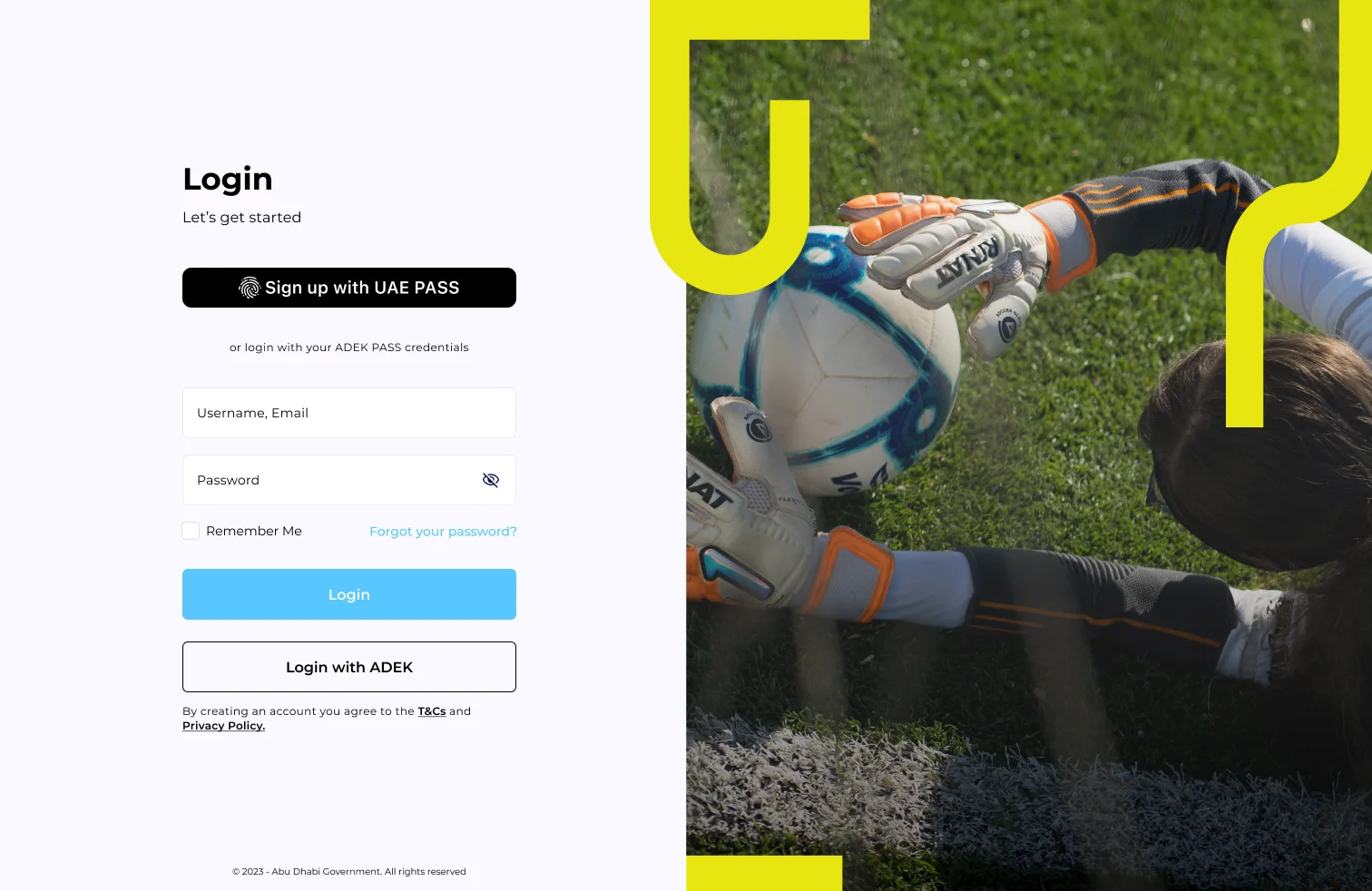
The system shares the public site's graphic language, so staff know they are in the same championship. UAE PASS leads, with ADEK credentials one click away.
- UAE PASS as the primary action
- ADEK login as a fallback
- Same visual identity as the public site
Where the school stands
Coaches, programmes, students and the gaps that need attention.
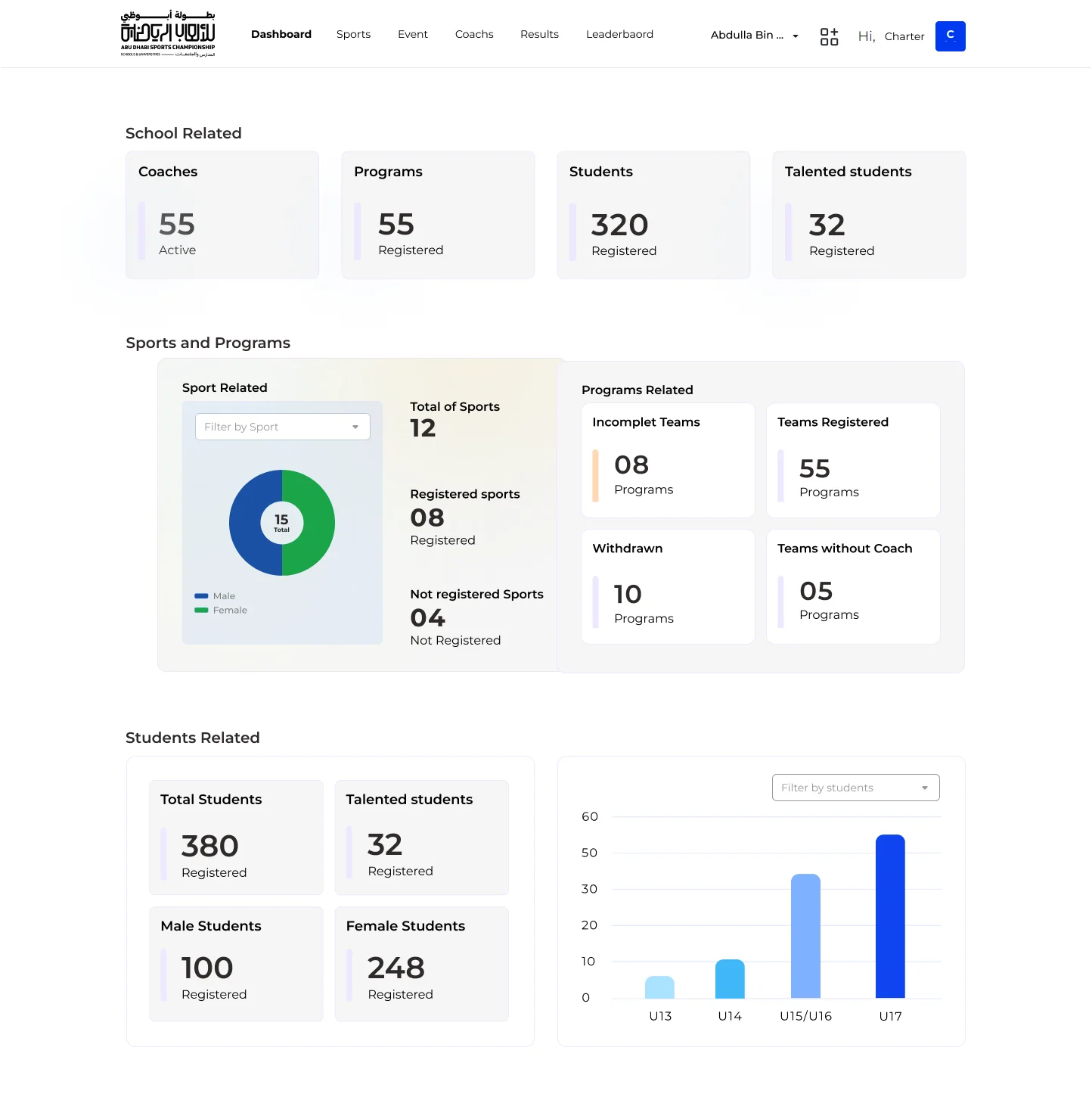
The dashboard opens on four headline numbers, then sports and programme health: registered and unregistered sports, incomplete teams, withdrawals and teams without a coach. Student numbers by gender and age group close the page.
- Gaps surfaced as numbers
- Sports registration at a glance
- Students by gender and age group
Programmes with their rules
Gender, age group, dates, restrictions and participants per programme.
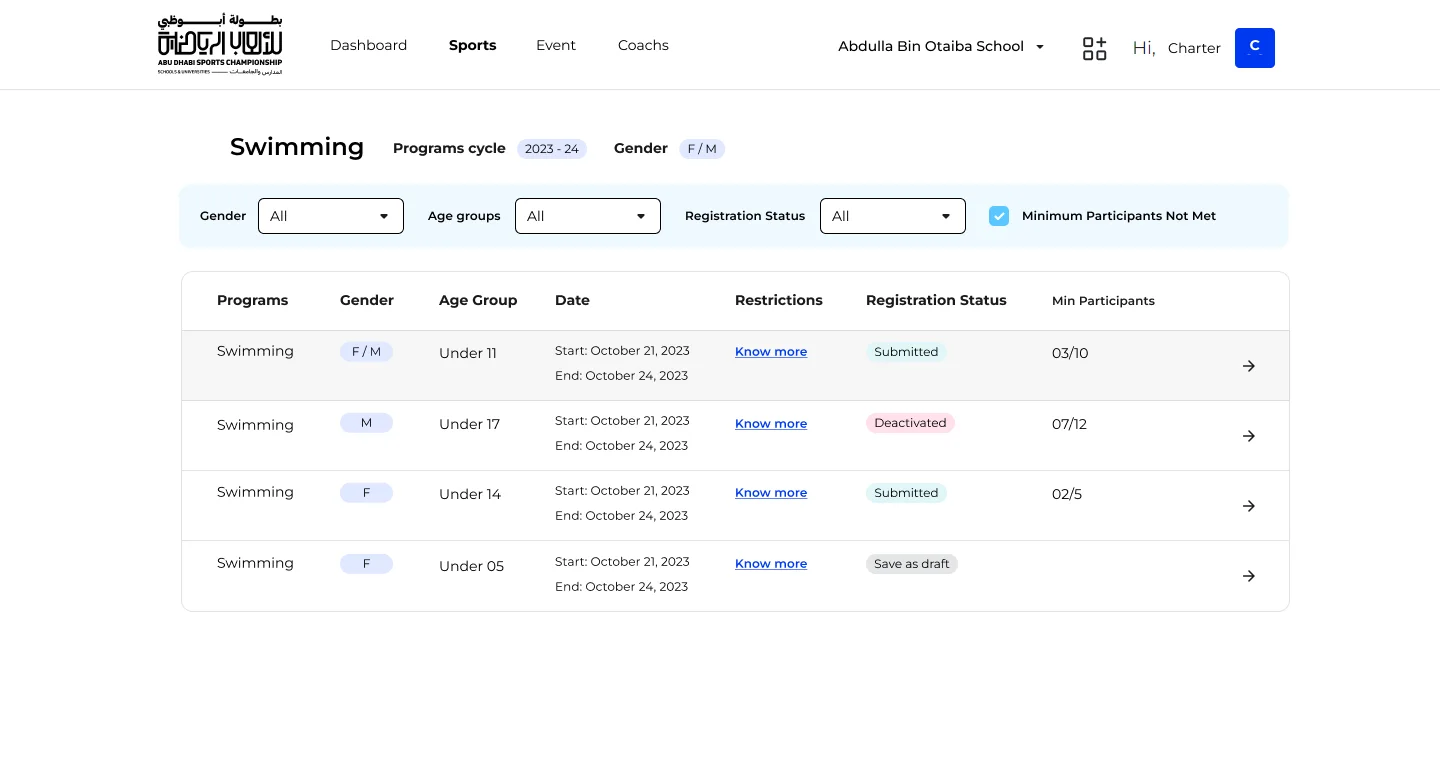
Inside a sport, every programme lists its criteria and registration status, with how many participants are in against the minimum. A single filter shows programmes still short of players.
- Criteria readable in the row
- Participants against the minimum
- Minimum Participants Not Met filter
Build the squad
Eligible students on the left, players on the right.
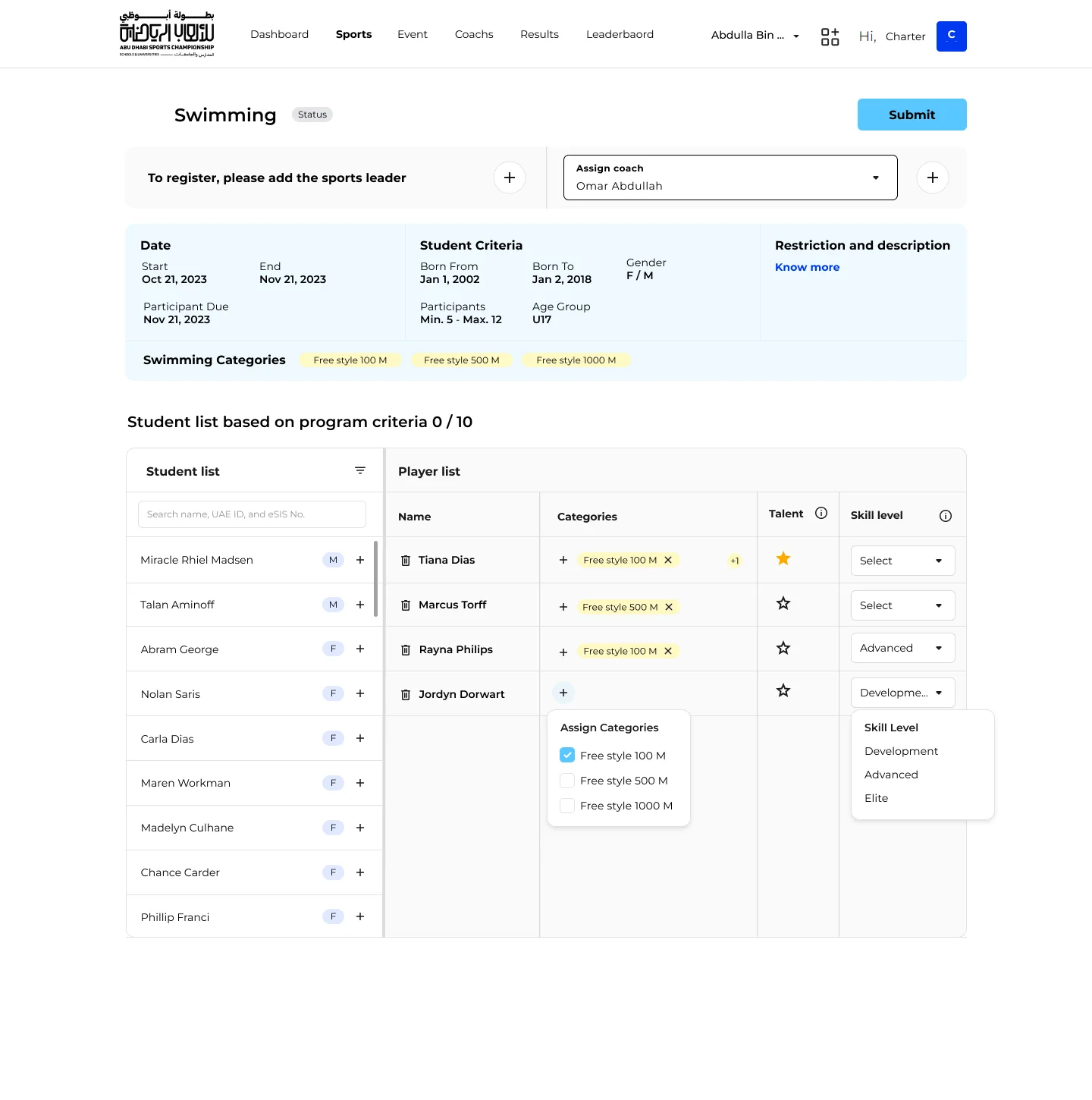
The programme's criteria sit at the top. The student list only shows eligible students, with a live count against the limit. Each player gets categories, a talent star and a skill level in the same row.
- Sport leader and coach assigned at the top
- Categories per player, like 100 m freestyle
- Talent and skill level captured together
Say no early, and say why
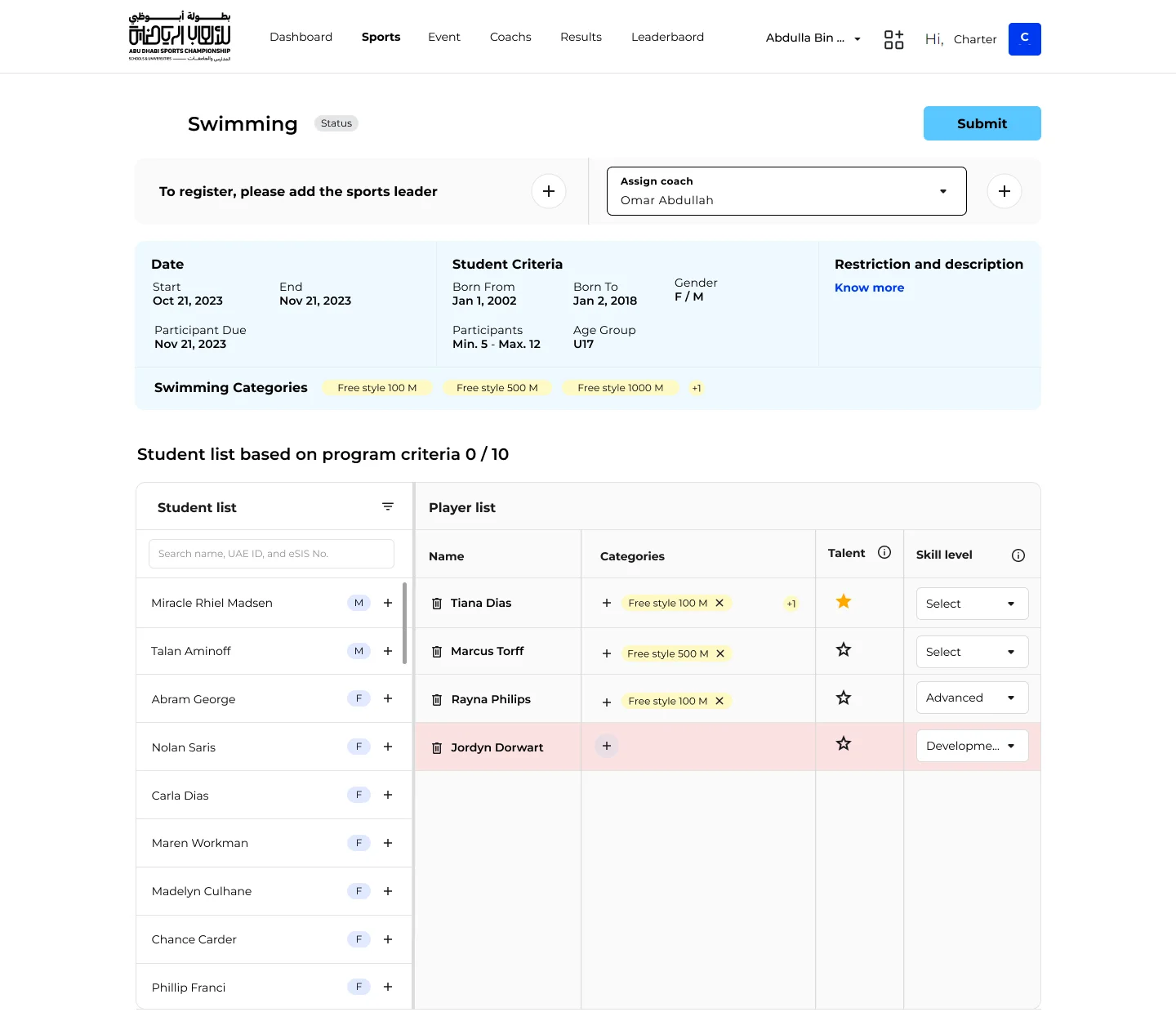
Rows missing a required category turn red; Submit waits.
Submit is disabled by default. If a player has no category, their row is highlighted so the problem is found on the page, not in a rejection email a week later.
- Submit disabled until the squad is valid
- At least one category per player
- The exact row that needs attention
Every event, by sport
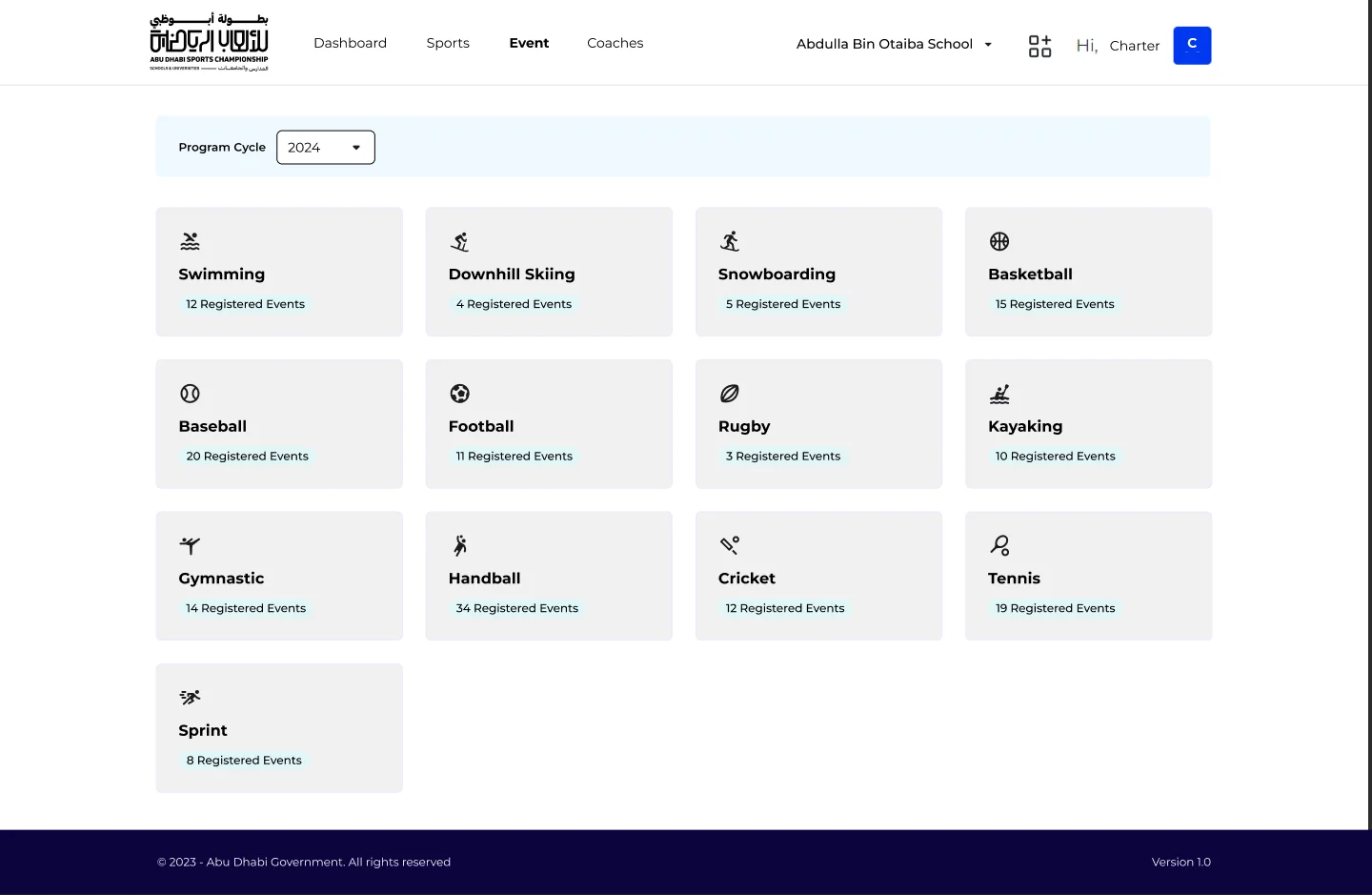
A grid of sports with their registered events.
Events are organised the way schools think about them: by sport, each tile showing how many events are registered for the selected programme cycle.
- Filter by programme cycle
- Registered event count per sport
- One click into a sport's events
Outcomes
Reflection
Designing a public site and an operational system side by side taught me how much a shared visual language can carry. The same yellow shapes that make the landing page feel like a sporting event reassure a sports lead that they are in the right place. The difference is density: the public side breathes, the system side does its work quietly and says no before it is too late.