Tutor and Family Services
ADEK
Private tutoring in Abu Dhabi, brought into the open: licensed teachers publish what they teach, when and for how much, and parents find them on Rayah.
- Role
- Product designer, end to end
- Organisation
- ADEK, Tutor and Family Services
- Timeline
- 2025
- Platform
- Tutor web platform, profiles shown on the Rayah parent app
- Users
- Licensed teachers, specialists and enrichment instructors
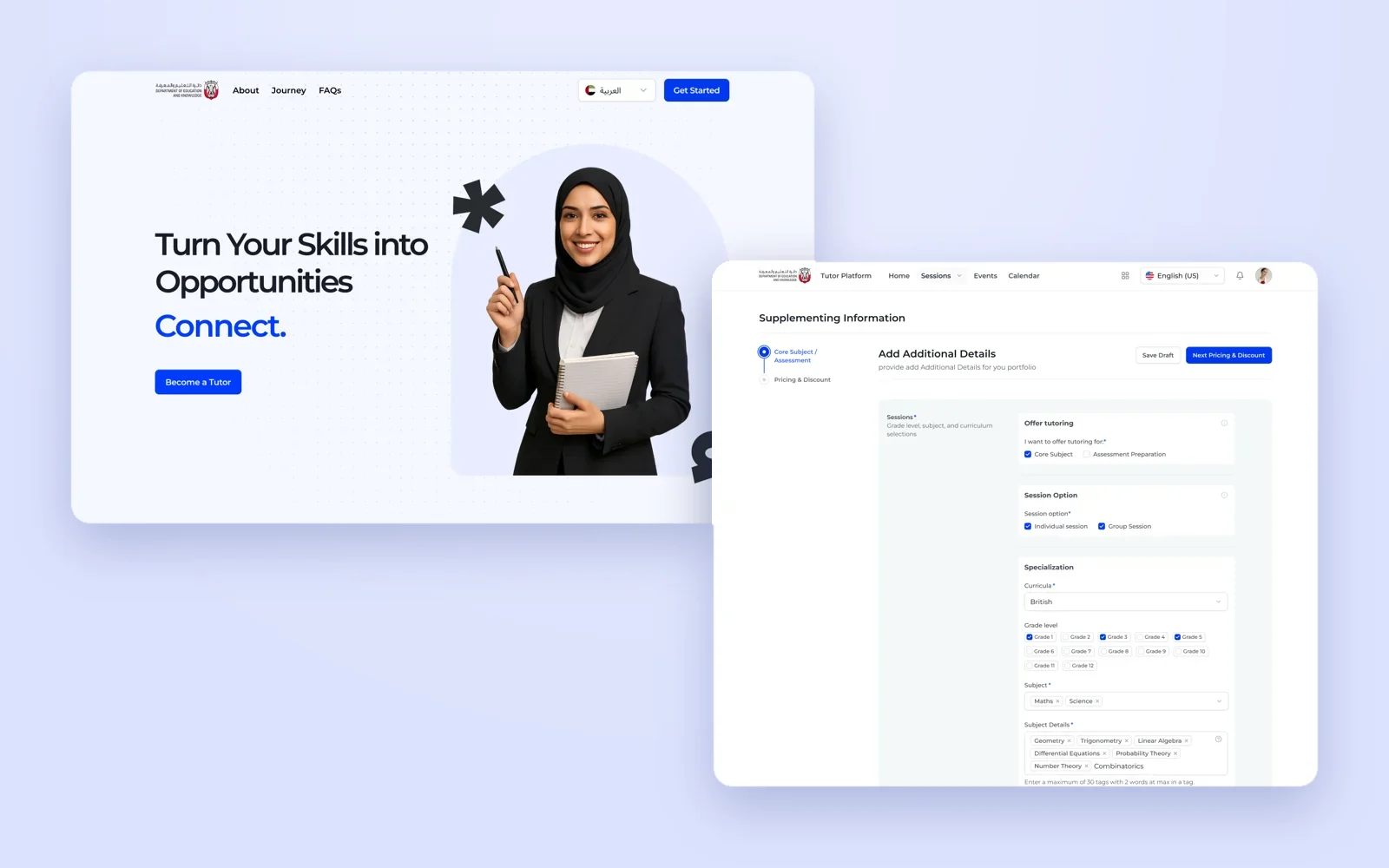
Overview
Private tutoring in the UAE needs a licence from MOHRE, and teachers need a no-objection certificate from their school. Until now, a parent looking for a tutor had no way to know who was licensed, what they taught or what they charged, and licensed teachers had no official place to be found.
The Tutor and Family Services Platform gives them that place. Teachers approved in ADEK PASS create a tutor profile, verify their licence, set their availability and publish sessions: core subjects, assessment preparation and enrichment. Their profile then appears to parents on Rayah, ADEK's parent app. I designed the whole tutor journey, from the first banner to the day-to-day tools.
What I owned
- The tutor landing page and the entry point inside ADEK PASS.
- Profile creation: licence verification, bilingual name and bio, support for students with additional learning needs, languages and weekly availability.
- Session creation for core subjects, assessment preparation and enrichment, with flat or range pricing, bundles, trial sessions and group sessions.
- The sessions list, calendar, archive and delete flows, and profile visibility and contact settings.
A tutor profile is a promise to a parent. The platform's job is to make sure every promise on Rayah is licensed, specific and priced.
Objectives → Design framing
How might we let any ADEK teacher join in minutes, while making sure parents only ever see tutors with a verified MOHRE licence?
How might a tutor describe curriculum, grades, subjects, location and duration precisely enough for a parent to decide?
How might tutors set flat or range prices, bundles and trials without doing the maths themselves?
Key constraints & tradeoffs
The MOHRE licence and the school's no-objection certificate are handled outside the platform. The product had to explain that journey and verify the result, not own it.
Tutors are existing ADEK-approved teachers. They arrive from a banner in PASS or from the landing page, and sign in with the account they already have.
Core subjects follow curricula and grades. Enrichment follows categories and age groups. One creation flow had to handle both without becoming two products.
Names and bios are shown to parents in Arabic and English, so every public field needed both, without doubling the tutor's work.
How objectives translated to features
Teachers are busy. If setup feels like an HR form, the best tutors never finish it.
Design decisions- A welcome that sets expectations: stand out as an expert, set your own schedule and fees, join a community of tutors.
- Two steps only: the tutor profile, then the tutoring schedule, with a stepper that always shows where you are.
- Licence number verified on the same page, with a clear error when it is not valid and a pending banner while it is checked.
- A bio in English with Generate Arabic beside it, and a shared 600-character limit for both.
Asking for the licence at the start adds friction before the tutor sees any value. It prevents the worse outcome: a finished profile that can never go live.
Solution
Step 1
Become a tutor.
Every tutor starts as an ADEK-approved teacher. The landing page explains the path, and a short two-step setup turns a PASS account into a tutor profile.

Turn your skills into opportunities
Who can join, and the three steps to get there.
The landing page speaks to core, non-core and specialised educators, is honest about the requirement to be ADEK-approved in PASS, and lays out the journey: get your licence from MOHRE, create your profile, set up your sessions. FAQs answer the licensing questions before anyone has to ask.
- Who can join, by type of educator
- Licence, profile, sessions in three steps
- Available in Arabic and English
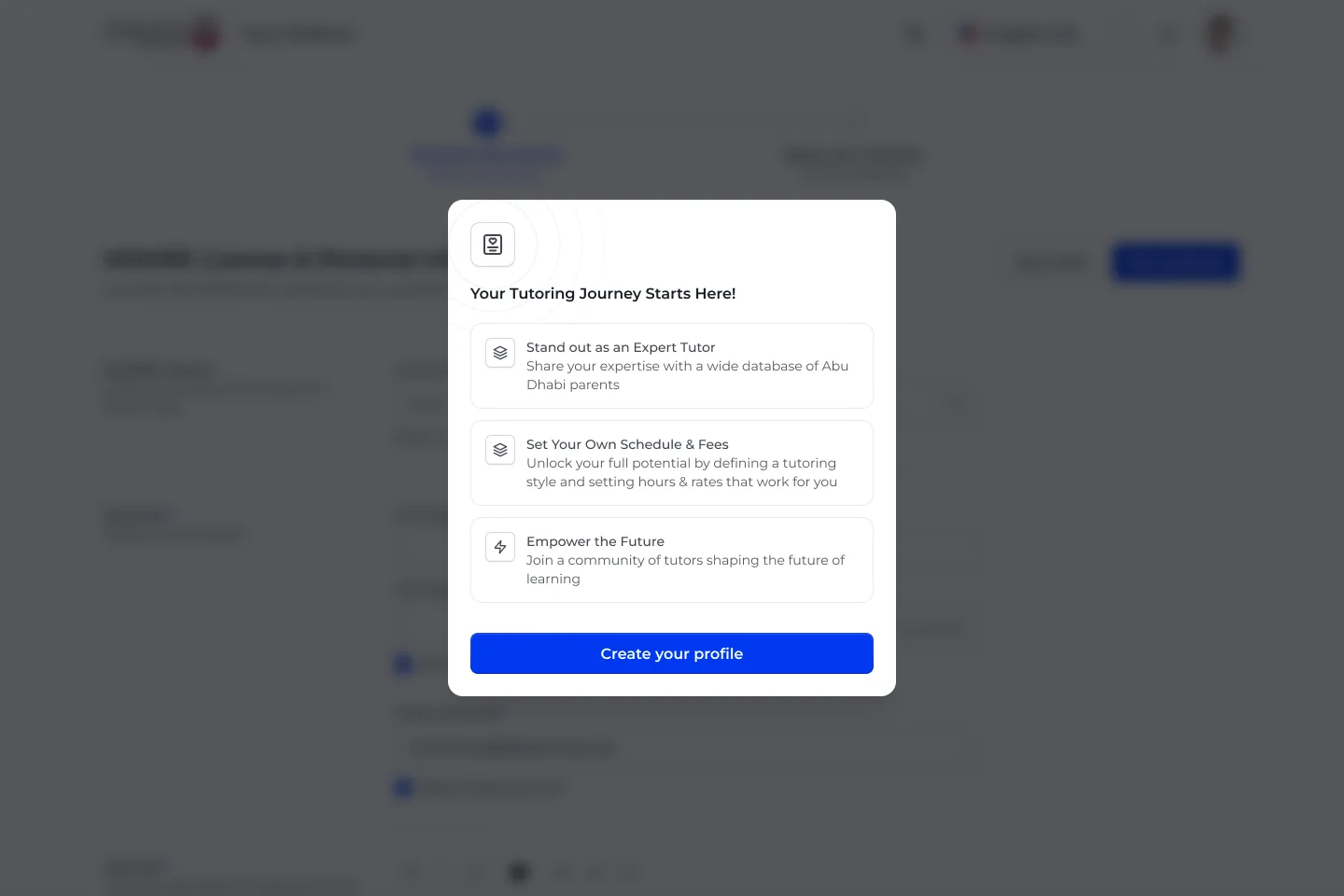
Your tutoring journey starts here
Three reasons to finish, one button to start.
The first thing a new tutor sees is not a form but a promise: stand out as an expert, set your own schedule and fees, and join a community shaping the future of learning.
- Value before effort
- One clear action
- Sets up the two-step flow
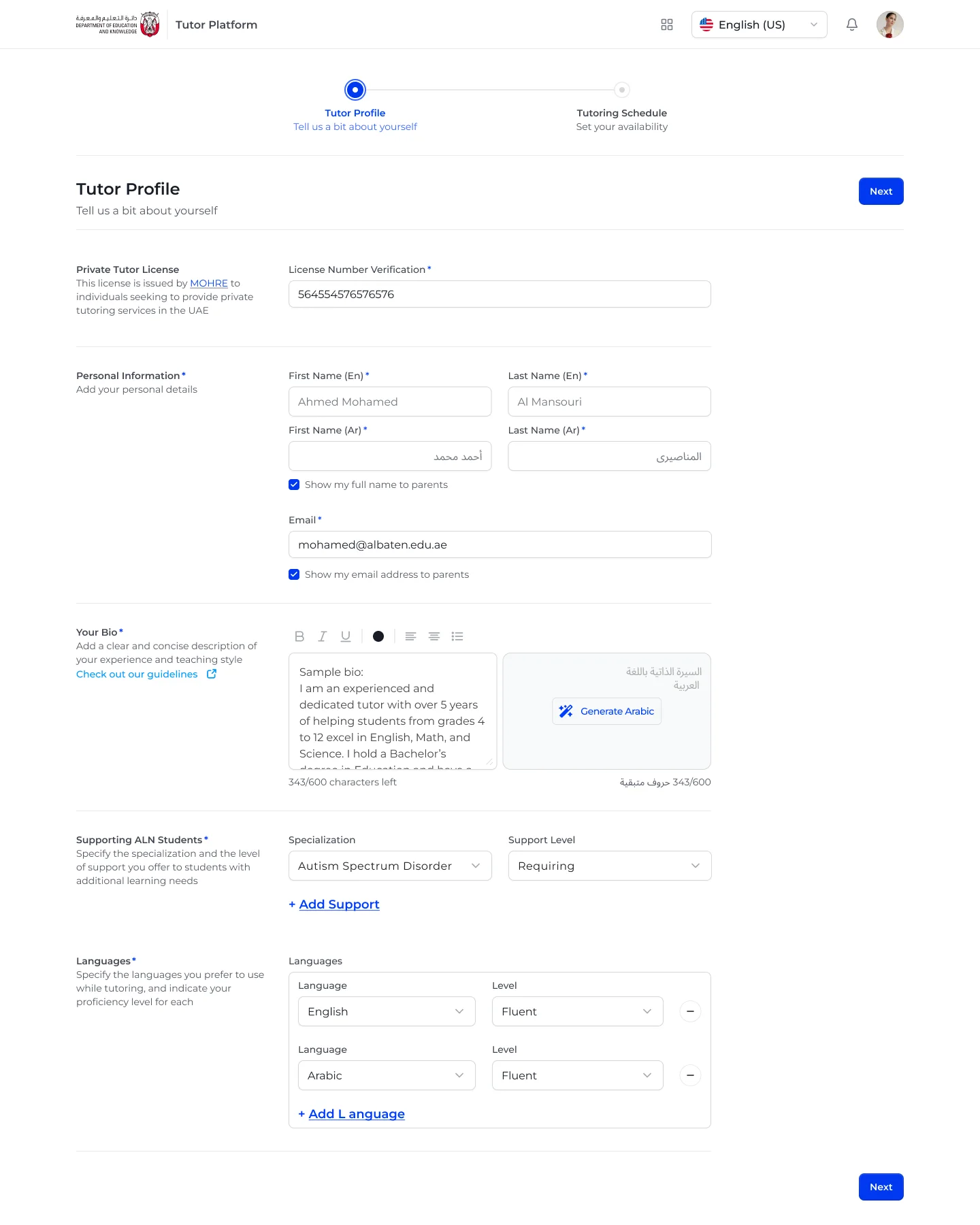
Tell parents who you are
Licence, bilingual name, bio, learning support and languages.
The profile asks for the licence first, then the details parents will see. Tutors choose whether to show their full name and email, write a bio with guidelines and generate the Arabic version, and add the specialisations and support levels they offer students with additional learning needs.
- Licence number verified on the page
- Show or hide name and email
- Generate Arabic bio from English
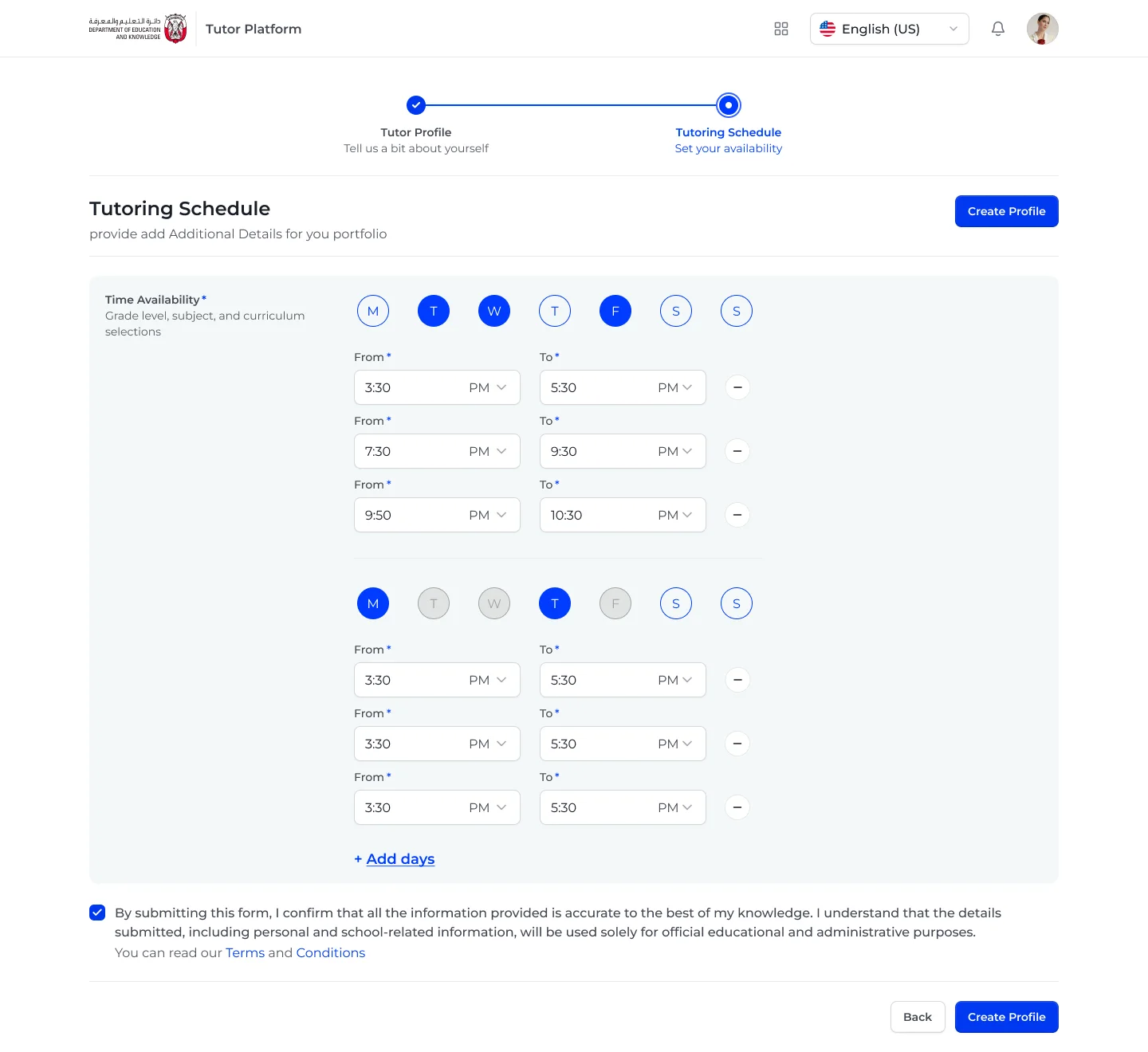
Set your availability
Pick the days, then add as many time slots as you need.
Availability is built from groups of days with their own time slots, so a tutor can offer weekday evenings and different weekend hours without repeating themselves. A single confirmation covers the terms before the profile is created.
- Days grouped by shared hours
- Multiple slots per day
- Terms confirmed once
Step 2
Create a session.
A session is what parents actually book. Creating one takes two steps: describe exactly what you teach, then price it.
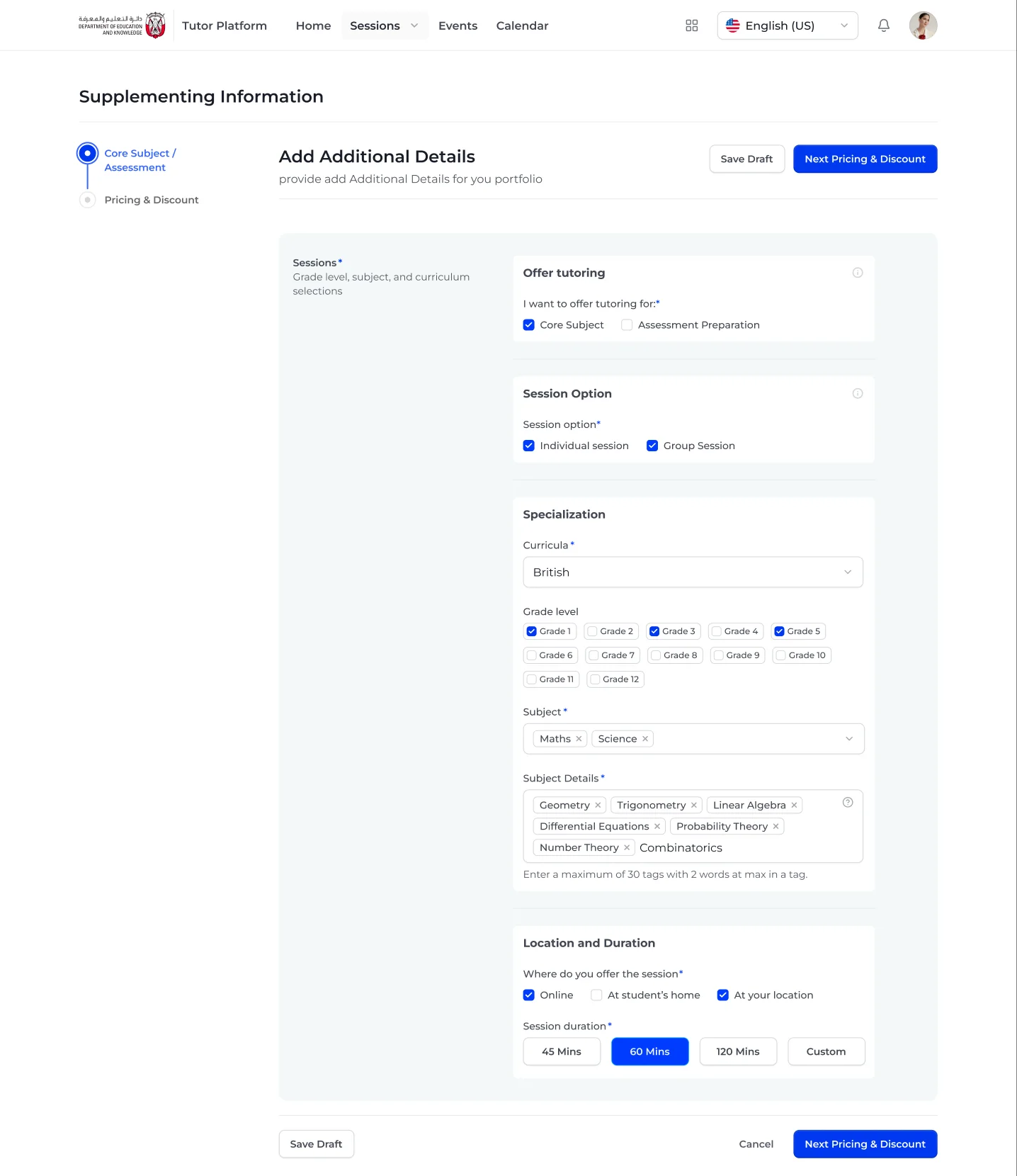
What, who, where and how long
Offer type, session option, curriculum, grades, subjects, location, duration.
Core subjects and assessment preparation share one page. The tutor picks curriculum and grades, adds subjects and up to 30 detail tags, then chooses where the session happens and how long it lasts.
- Individual and group sessions
- Grade chips from 1 to 12
- 45, 60, 120 minutes or custom
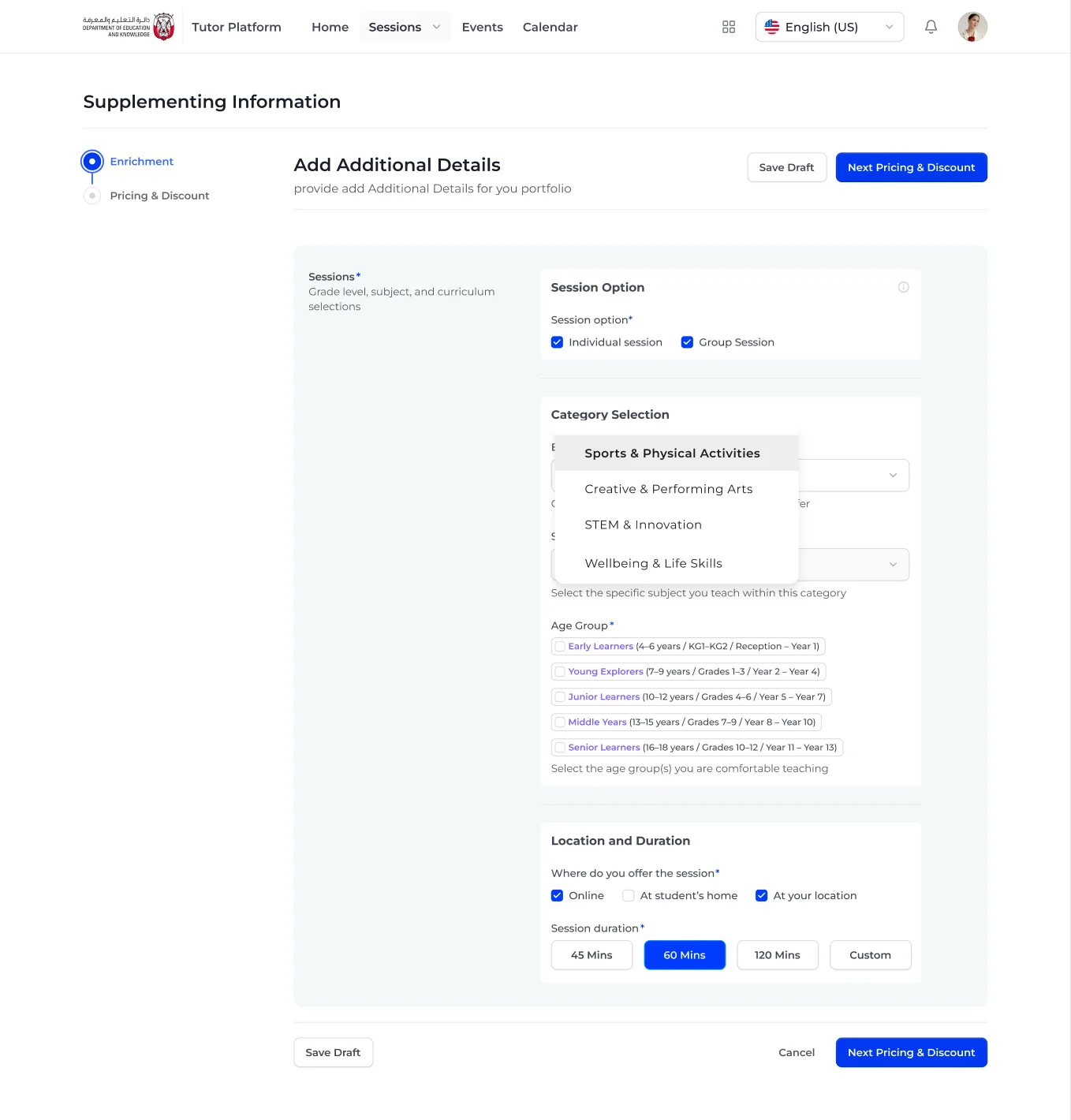
Enrichment, by category and age
Four categories and five named age groups.
Enrichment does not follow a curriculum, so the same page switches to categories (sports, creative and performing arts, STEM, wellbeing and life skills) and age groups described in years, grades and school years, so every parent recognises their child.
- Four enrichment categories
- Age groups spelled out three ways
- Same location and duration controls
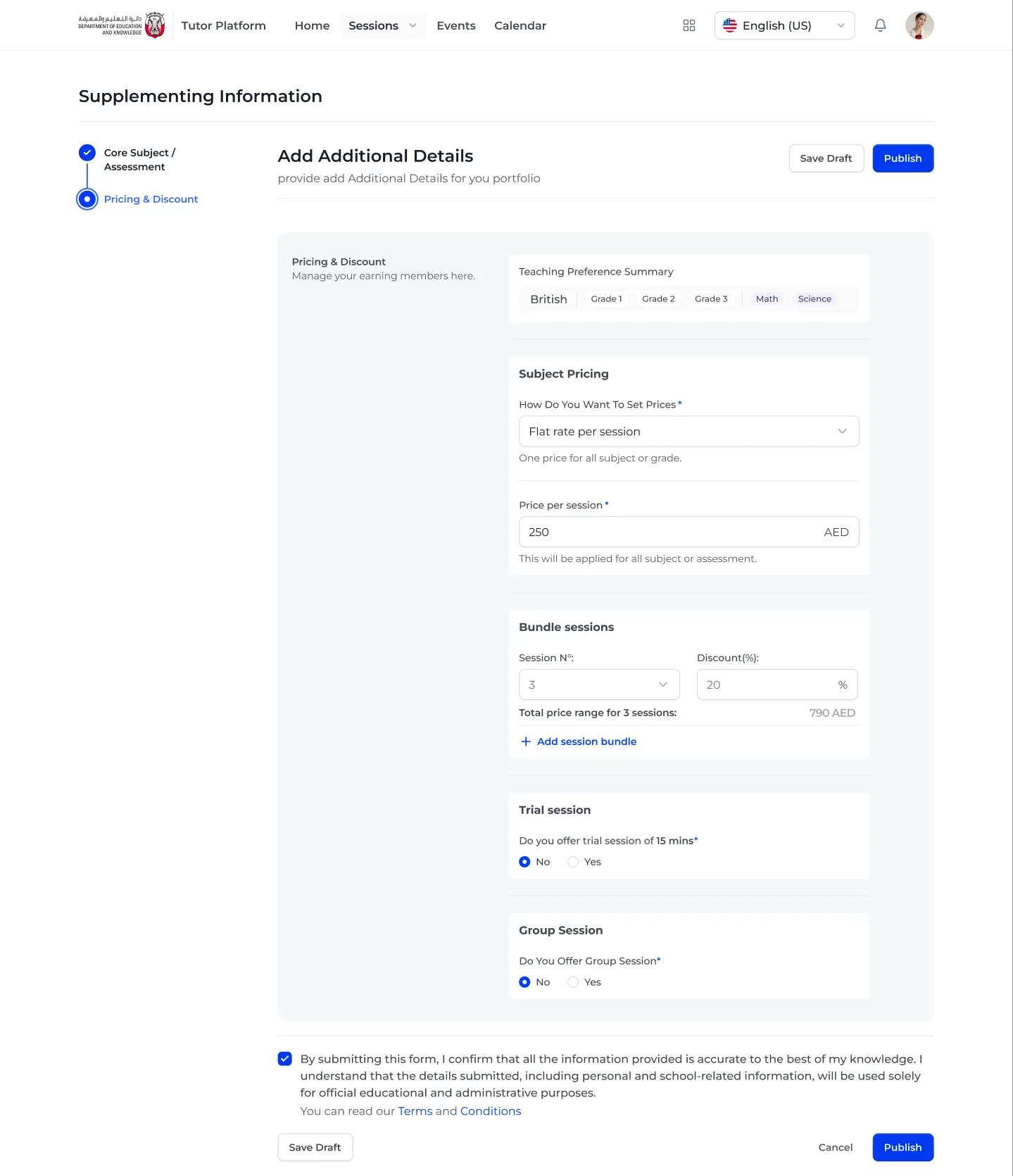
Price it once, bundle it
A summary of what you teach, then price, bundles, trial and groups.
Pricing opens with a summary of the teaching preferences, so the tutor knows exactly what they are pricing. A flat rate or a price range, session bundles with a discount, a trial session and group sessions follow, each as a short, answerable question.
- Flat rate or starting and maximum price
- Bundles with a live total
- Trial and group sessions as yes or no
Step 3
Run the practice.
Once sessions are live, the platform becomes the tutor's workspace: what is published, when they are free, and who can reach them.
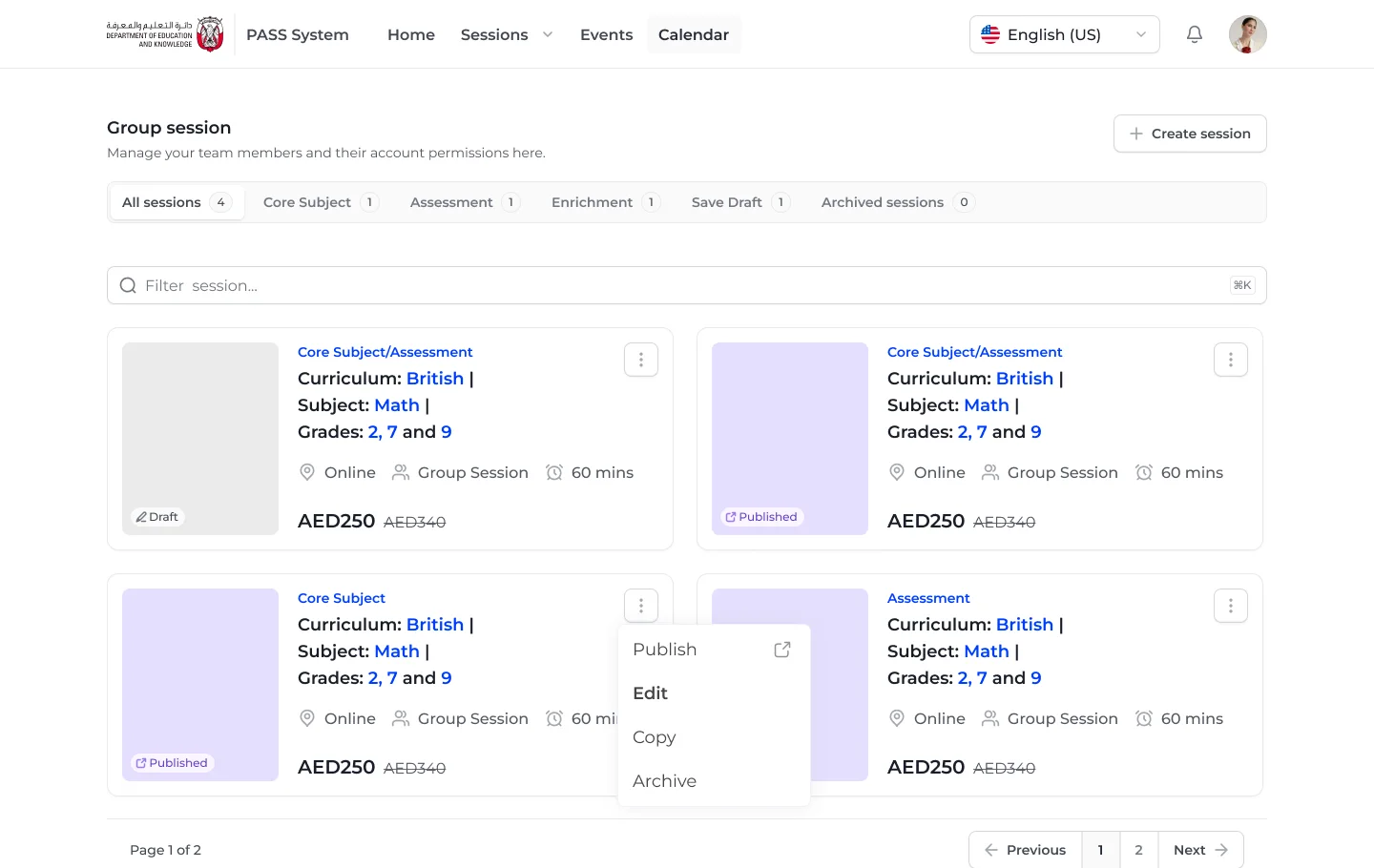
Every session, at a glance
Tabs by type, drafts and archive, with actions on every card.
Sessions are grouped into core subject, assessment, enrichment, drafts and archived, each with a count. Every card shows curriculum, subject, grades, location, format, duration and price, and a menu to publish, edit, copy or archive.
- Draft and published states
- Copy to create similar sessions fast
- Archive instead of delete by default
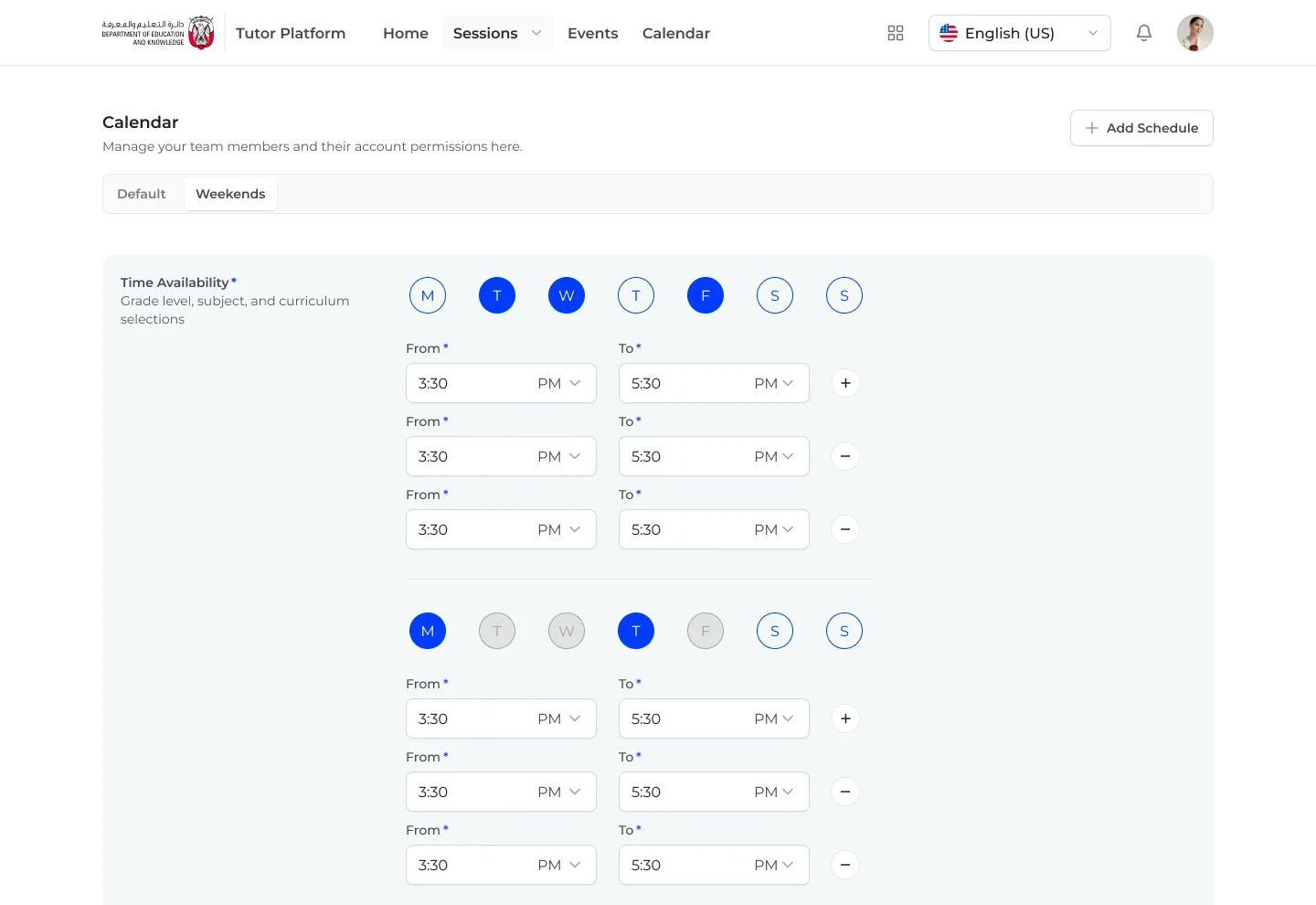
A calendar that fits real weeks
A default schedule, and named schedules like weekends.
The availability set during onboarding becomes the default, and tutors can add named schedules on top, so a different weekend rhythm does not mean rewriting the week.
- Default and named schedules
- Same day and slot pattern as onboarding
- Add a schedule in one click
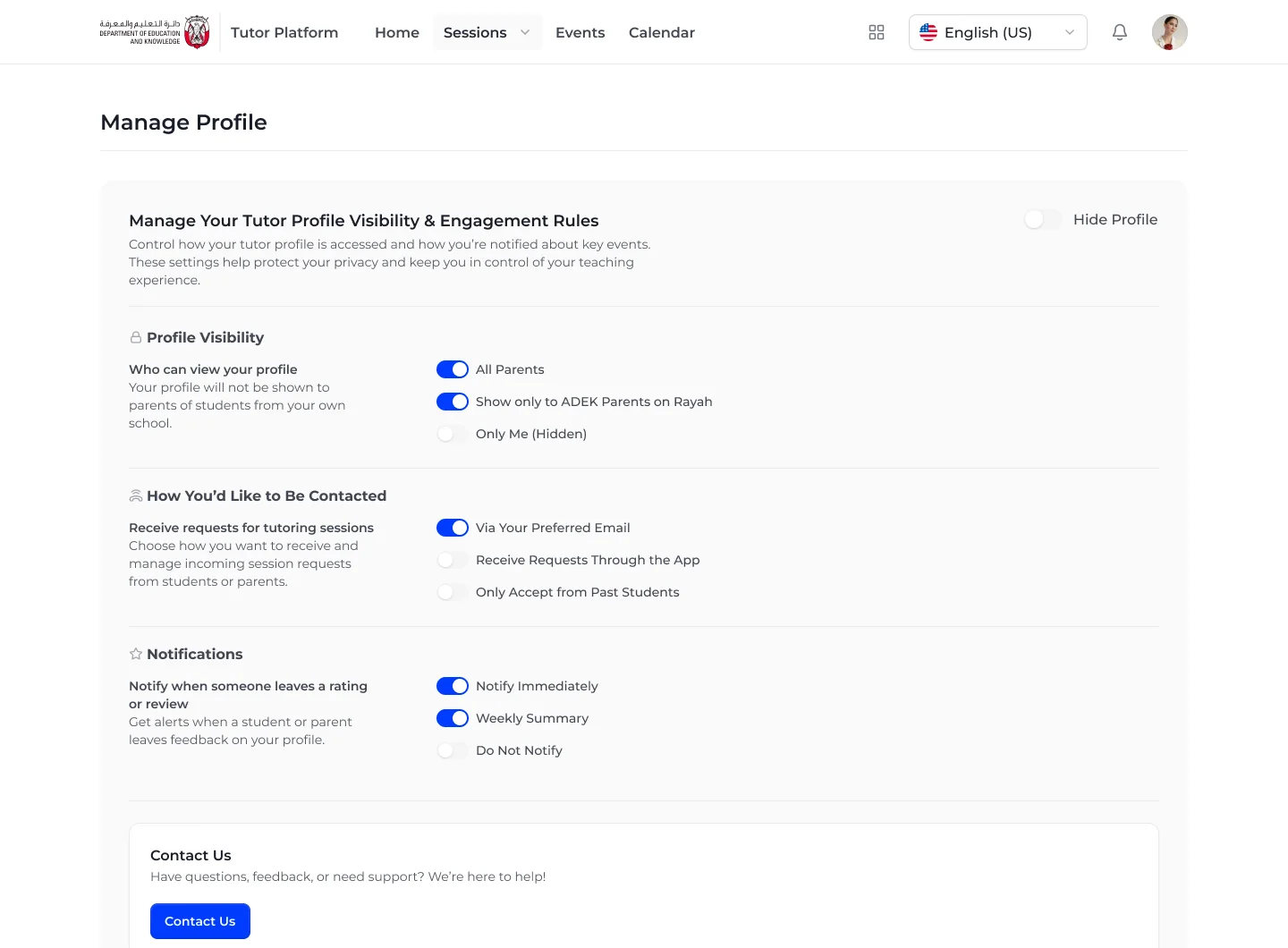
You decide who sees you
Visibility, contact preferences and notifications.
Tutors choose whether all parents can view them or only ADEK parents on Rayah, how they want to receive session requests, and when to hear about ratings. Hide Profile pauses everything without deleting anything.
- Visibility by audience
- Requests by email or in the app
- Hide profile in one switch
Outcomes
Reflection
This project sat on the border between a government service and a marketplace. The licensing rules had to be firm, but the tutor had to feel like a professional building a practice, not an applicant filling in a form. The balance came from order: the rules come first and quickly, then everything after them is about the tutor's teaching, time and price.