TAMM Investor Services
ADEK on TAMM
Closing a nursery is the end of someone's business. On TAMM, it now takes one page, with every fine, rule and next step visible before the investor presses submit.
- Role
- Product designer, service design and design QA
- Organisation
- ADEK on TAMM, Abu Dhabi Government
- Timeline
- 2026, re-launch
- Service
- ADEK/0053 Nursery Licence Cancellation
- Users
- Nursery investors and owners
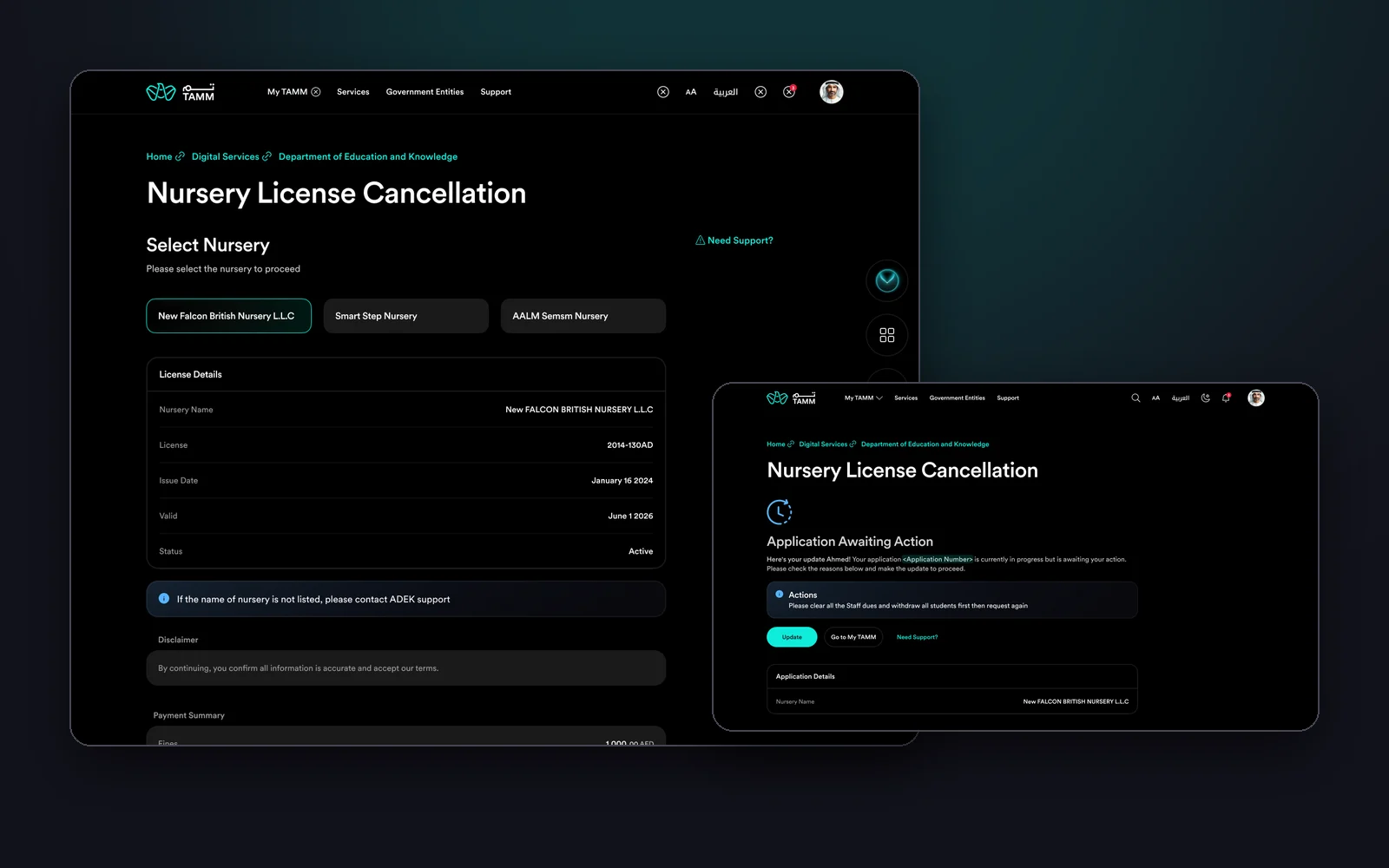
Overview
Nursery Licence Cancellation (ADEK/0053) is one of ADEK's investor services on TAMM, Abu Dhabi's government services platform. Investors who own nurseries use it to cancel an education licence, often at a difficult moment for their business. It is only available from TAMM, and only to profiles registered as investors with ADEK.
The service was being re-launched on TAMM's current design system. My job was to make it short and predictable: pick the nursery, see its licence, settle any fines, submit, and then understand exactly where the application stands. And because a re-launch is only as good as its build, I reviewed the stage implementation screen by screen before it went live.
What I owned
- The service flow: selecting a nursery, licence details, disclaimer, payment summary, and submission.
- Payment handling: the path with outstanding fines, the path without, and payment failure with a retry.
- Every outcome: submitted, completed with a downloadable document, rejected, awaiting action with an update slide-out, and ineligible.
- Web and responsive versions on the TAMM design system, dark theme.
- Design QA of the stage build: a documented review round with every issue pinned to the screen it affects.
A government service is a promise that the next step is always clear, especially when the news is not good.
Objectives → Design framing
How might an investor cancel a licence without hunting for forms, documents or the right office?
How might outstanding fines appear before submission, and be paid in the same flow?
How might every outcome, including rejection and pending actions, tell the investor exactly what to do?
Key constraints & tradeoffs
The service lives inside TAMM, so it had to use TAMM's toolkit components, page anatomy and tone, not an ADEK-specific layout.
The service is only for profiles registered as investors with ADEK, so ineligible visitors needed a clear, respectful dead end.
A nursery cannot close with staff dues unpaid or students still enrolled. The service had to hold applications until those were cleared.
Design and build were separate. The design had to be precise enough to implement, and the build had to be checked against it.
How objectives translated to features
Cancelling a licence should not feel like starting a new application. The investor already knows which nursery; the service should know the rest.
Design decisions- Nurseries owned by the investor shown as selectable chips, with a note to contact ADEK if one is missing.
- Selecting a nursery reveals its licence: name, licence number, issue date, validity and status.
- A single disclaimer to confirm the information, instead of a separate review step.
- Submit sits at the bottom of the same page, next to Exit Service.
A single page is long on mobile. It avoids a multi-step wizard for a service with only one real decision.
Solution
Part 1
Cancel in one page.
The investor picks a nursery, sees its licence, and either submits or pays what is owed. Everything happens on one page, in the order it is needed.
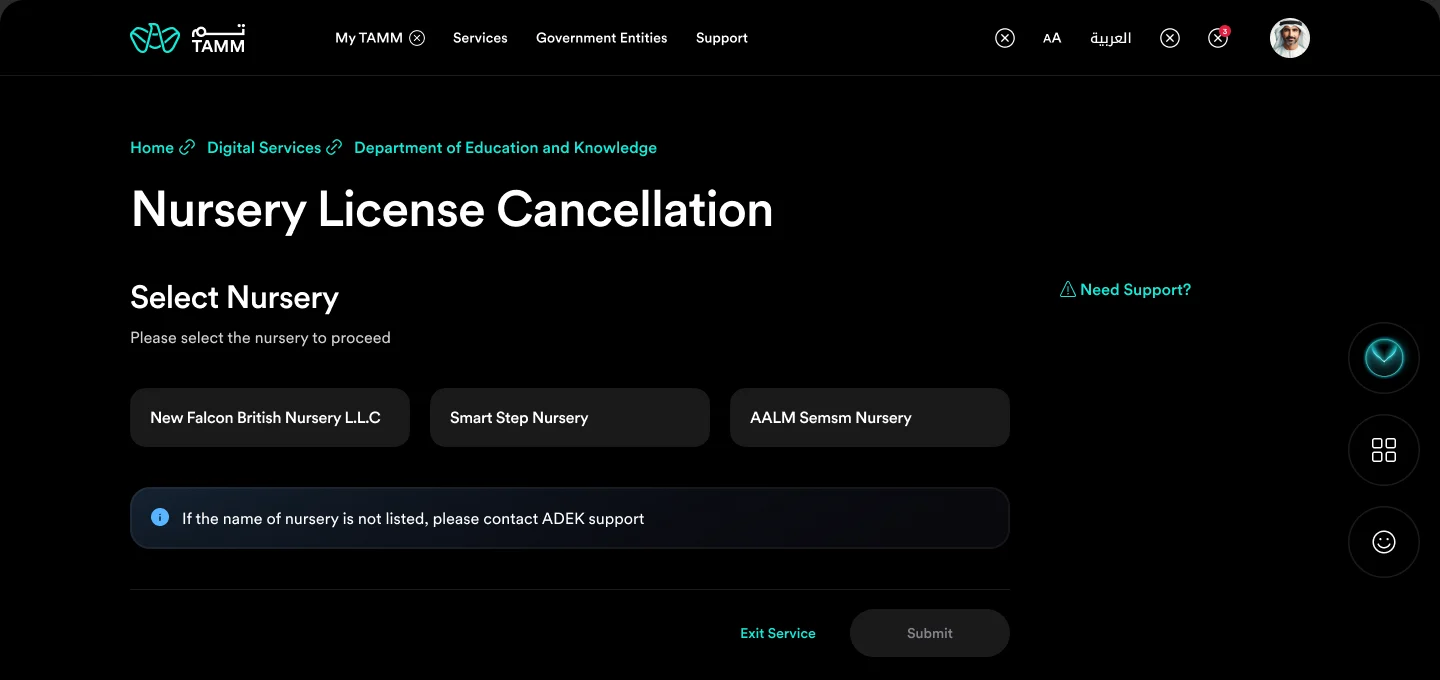
Start with the nursery
The investor's nurseries, ready to pick.
The service opens on the nurseries linked to the investor's profile. There is nothing to type. If a nursery is missing, a note points to ADEK support rather than leaving the investor stuck.
- Nurseries pulled from the investor's profile
- A way out when one is missing
- Submit disabled until a nursery is chosen
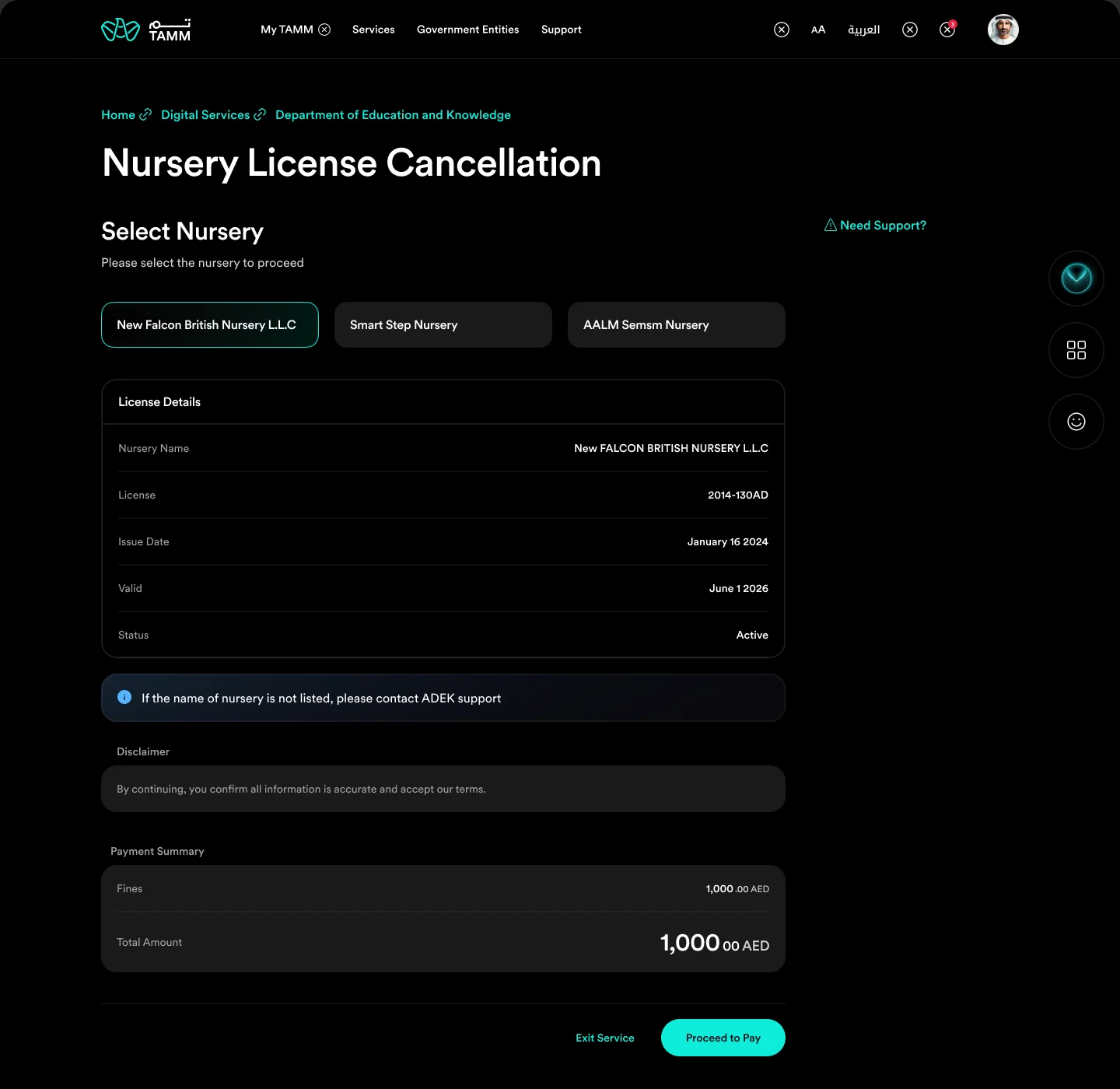
See the licence, and what is owed
Licence details, disclaimer and payment summary.
Choosing a nursery reveals its licence details: number, issue date, validity and status. If fines are outstanding, a payment summary appears with the total, and the main action becomes Proceed to Pay.
- Licence details read from ADEK records
- One disclaimer to confirm
- Proceed to Pay only when fines exist
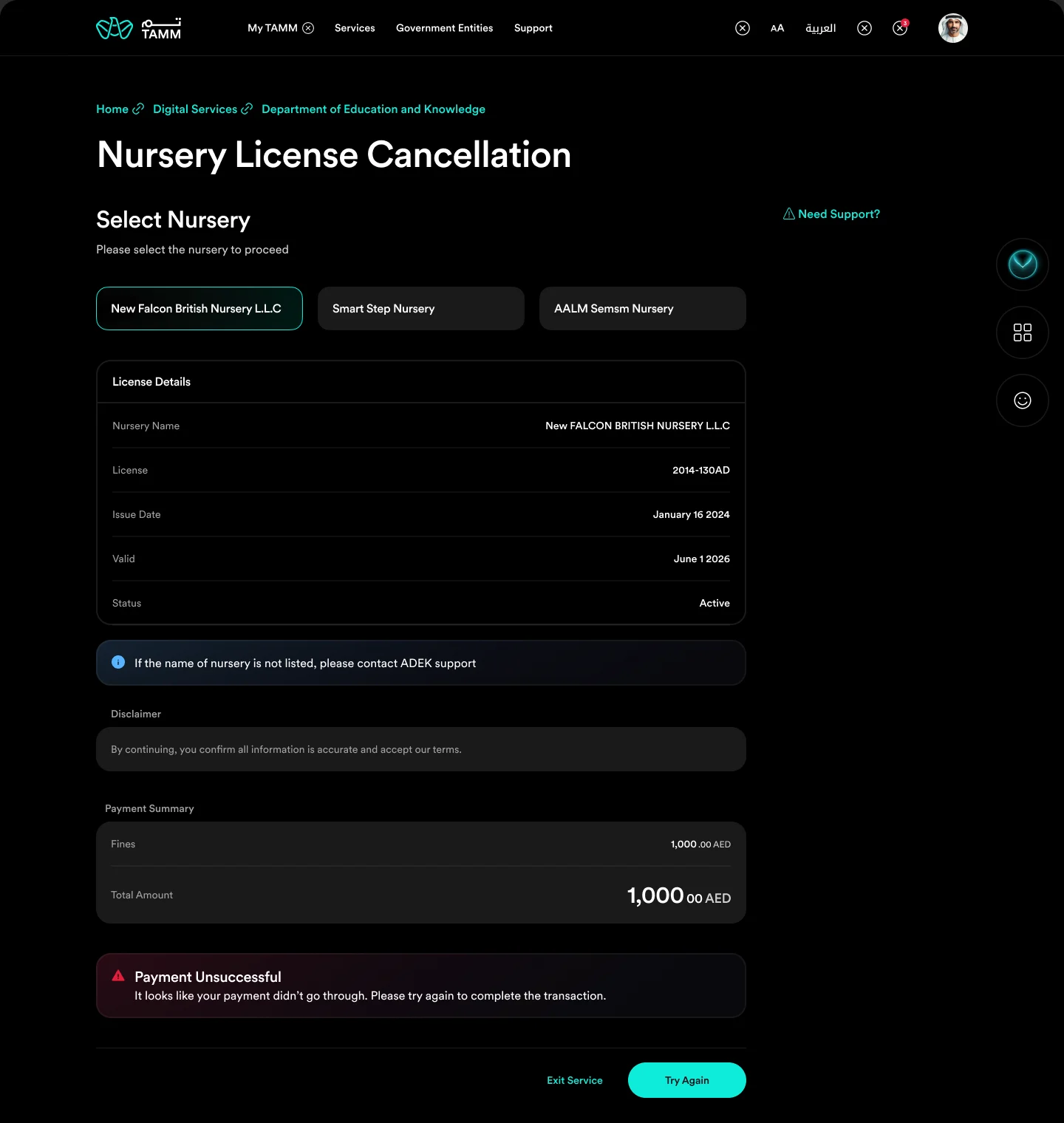
When payment fails
An error in place, and one button to try again.
If the payment does not go through, the page keeps every selection and shows the problem right above the action, with Try Again as the next step.
- Nothing is lost on failure
- The error sits next to the action
- Try Again replaces Proceed to Pay
Part 2
Always know what happens next.
After submission, the outcome page is the service. Each state explains what happened and offers exactly one next step.
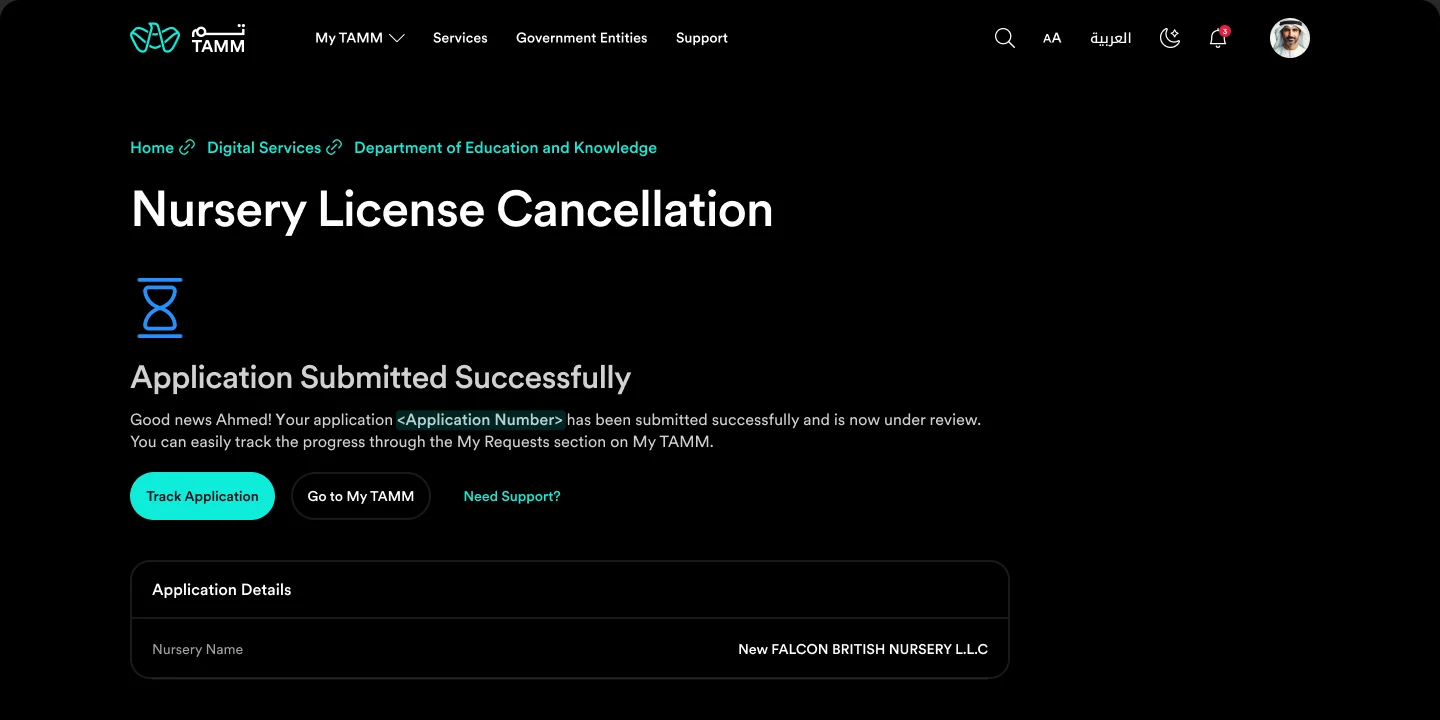
Submitted, and trackable
A clear confirmation with Track Application.
The confirmation names the application, says it is under review, and points to My Requests on My TAMM, with Track Application as the primary action.
- Application number in the message
- Track Application first
- Application details below
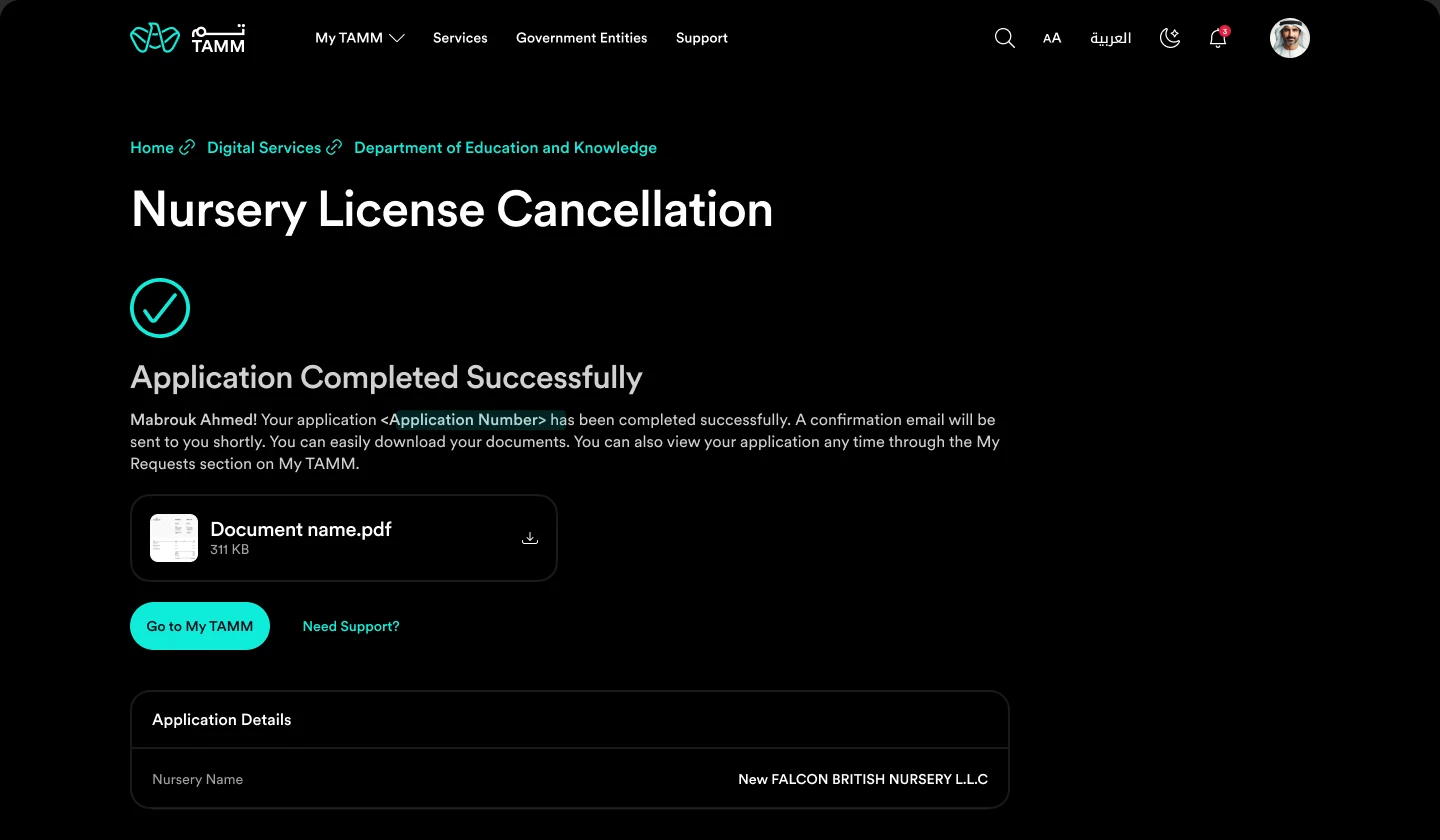
Completed, with the document
The outcome and the file, together.
When the cancellation is approved, the investor can download the document straight from the outcome page, and a confirmation email follows.
- Document download on the page
- Confirmation by email
- Go to My TAMM when done
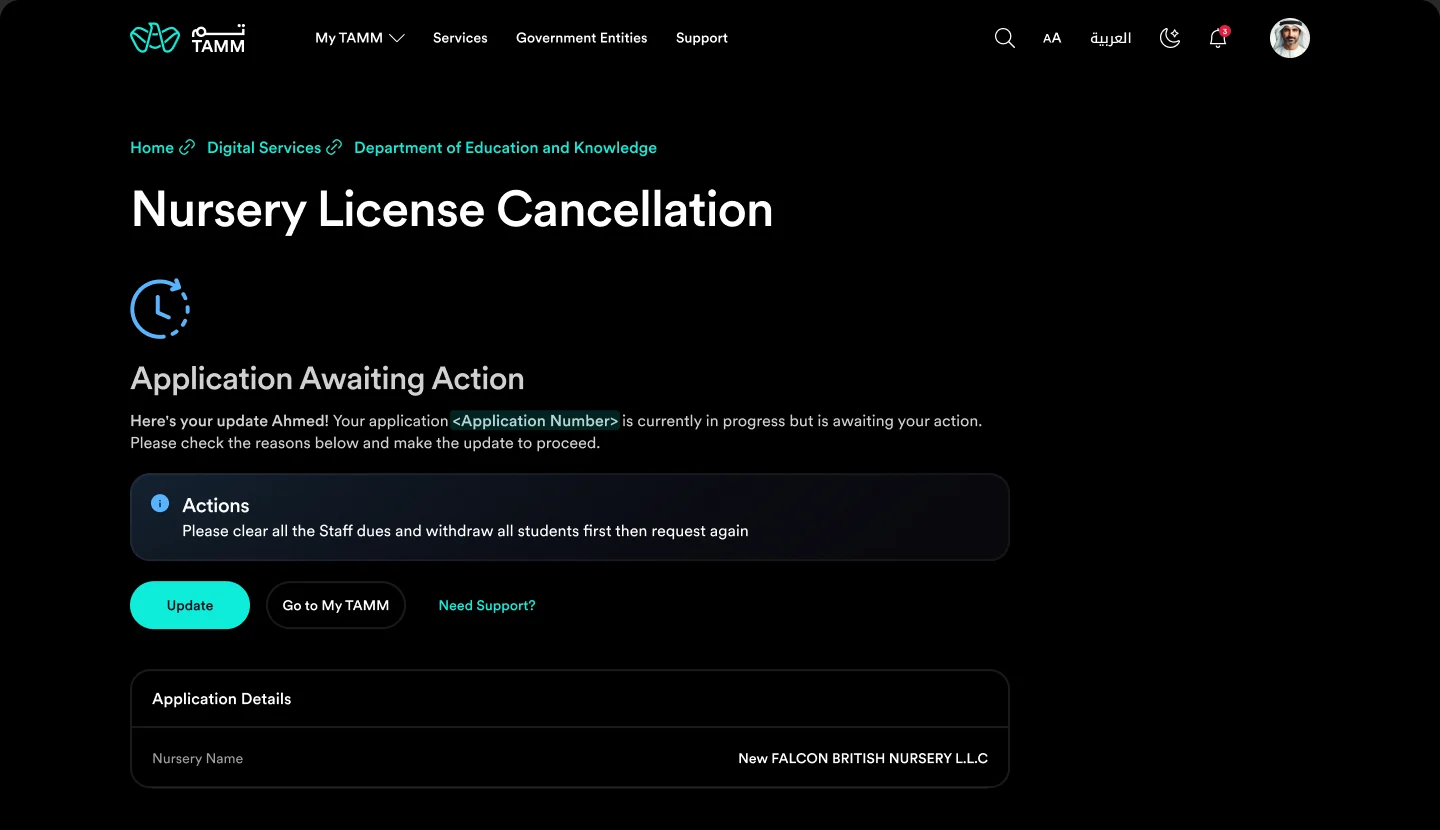
Awaiting action, with the reason
What is blocking the application, and an Update button.
When ADEK needs something first, such as clearing staff dues and withdrawing all students, the outcome page says so plainly and offers Update. Rejected and ineligible states follow the same pattern, each with its reason and next step.
- The blocking reason in plain words
- Update as the single next step
- Same pattern for rejected and ineligible
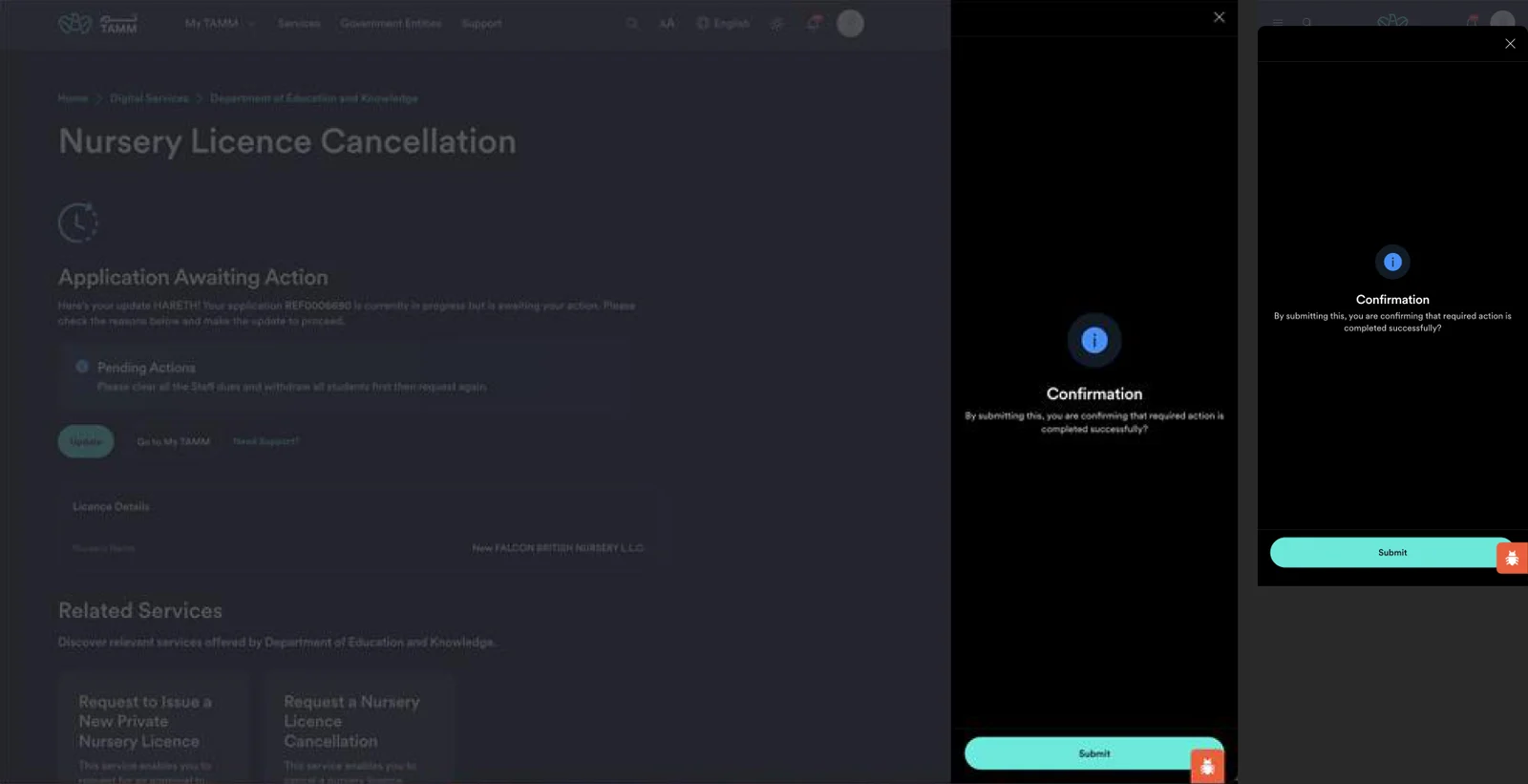
Update, confirm, submit
A confirmation slide-out, on web and mobile.
Update opens a slide-out that asks the investor to confirm the required action is done, then submits. The application returns to the submitted state, so the investor never wonders whether the update went through.
- Confirmation before resubmitting
- Slide-out keeps the context
- Returns to the submitted state
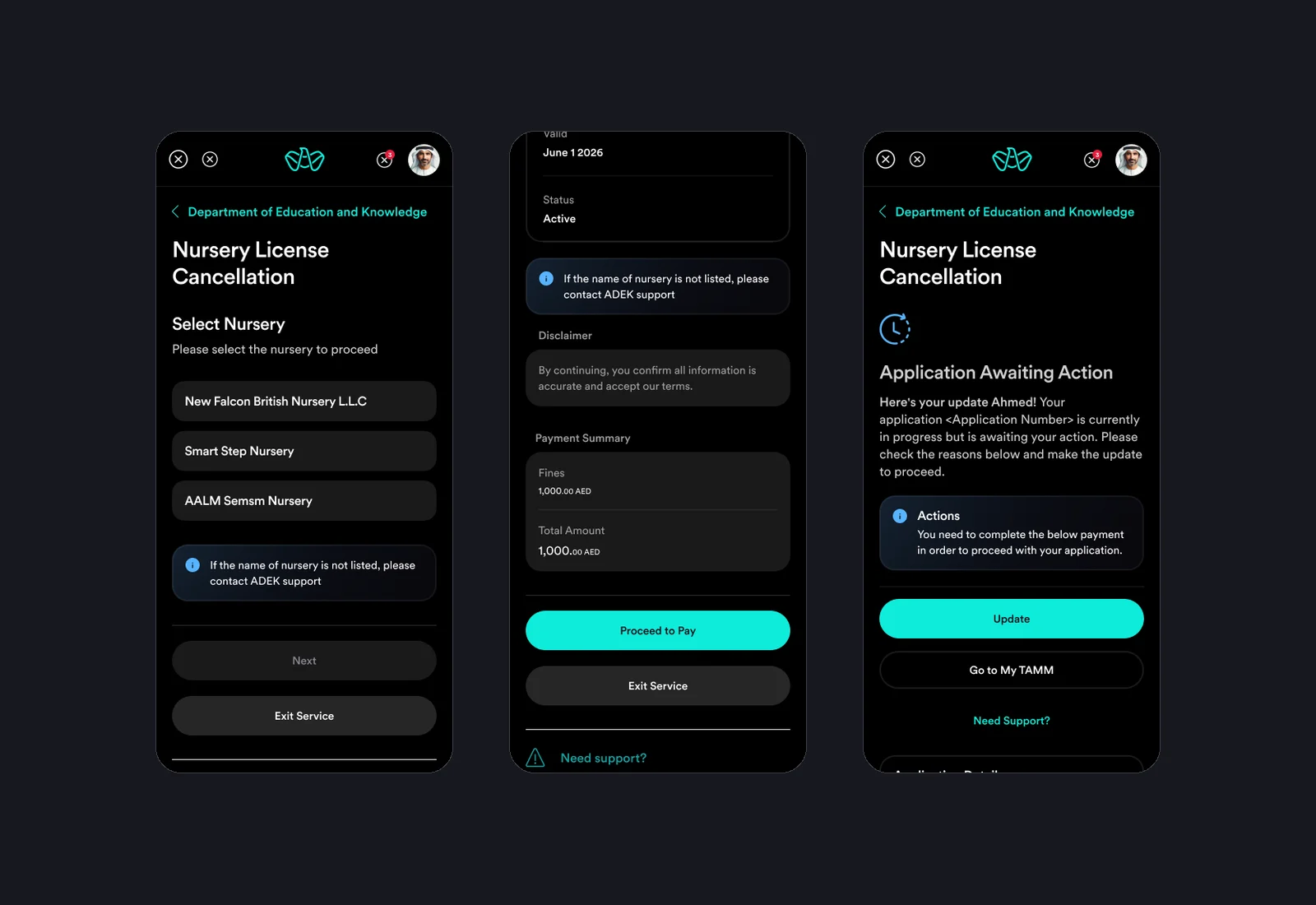
The same service on a phone
Select, pay and follow up at 375 pixels.
Every state was designed for mobile too: nurseries stack as full-width options, the payment summary and actions sit together, and outcome pages keep the same order of message, reason and action.
- Full-width nursery options
- Payment and actions together
- Outcomes in the same order
Part 3
Making sure the build matches.
The vendor's stage build was reviewed in a dedicated round on 22 April 2026. Every gap was pinned to the screen it affects, so it could be fixed without a meeting.
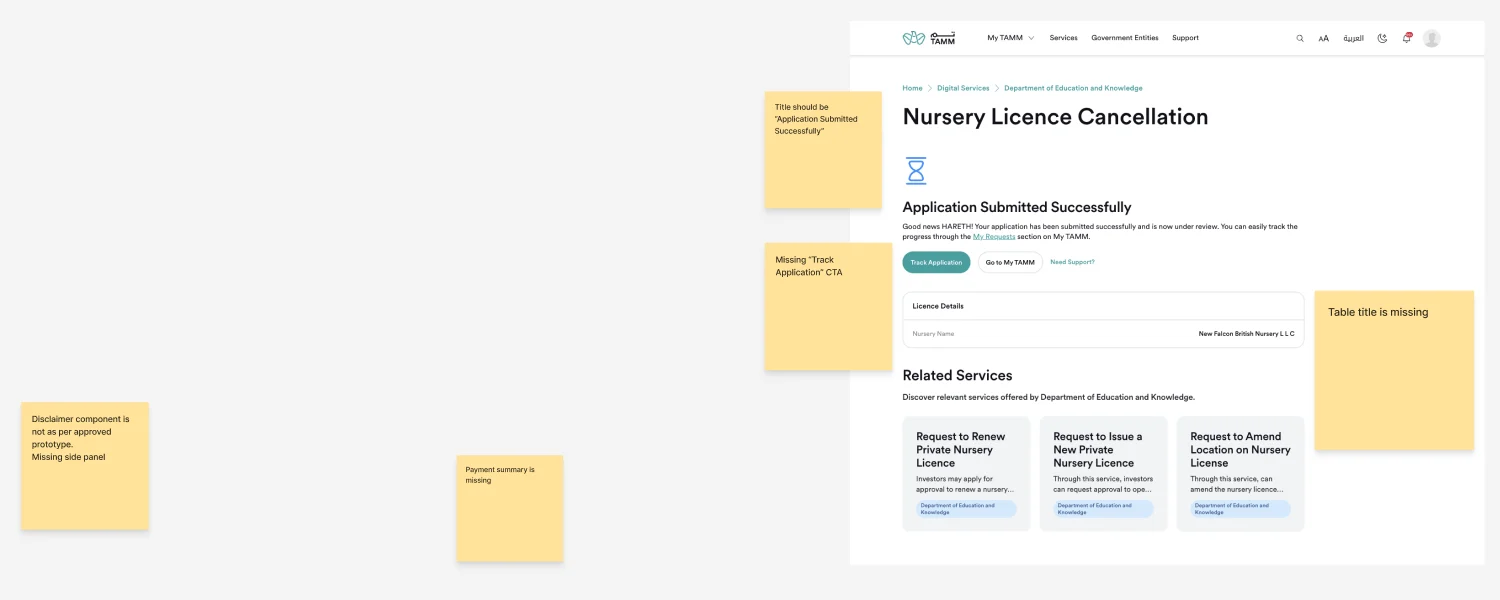
Review notes on the stage build
Missing title, missing CTA, missing payment summary.
On the submitted page, the notes flag the wrong title, the missing Track Application button and table title, a disclaimer without its side panel, and a missing payment summary, each checked against the approved prototype.
- Checked against the approved prototype
- Notes pinned to the exact screen
- Copy, component and flow issues
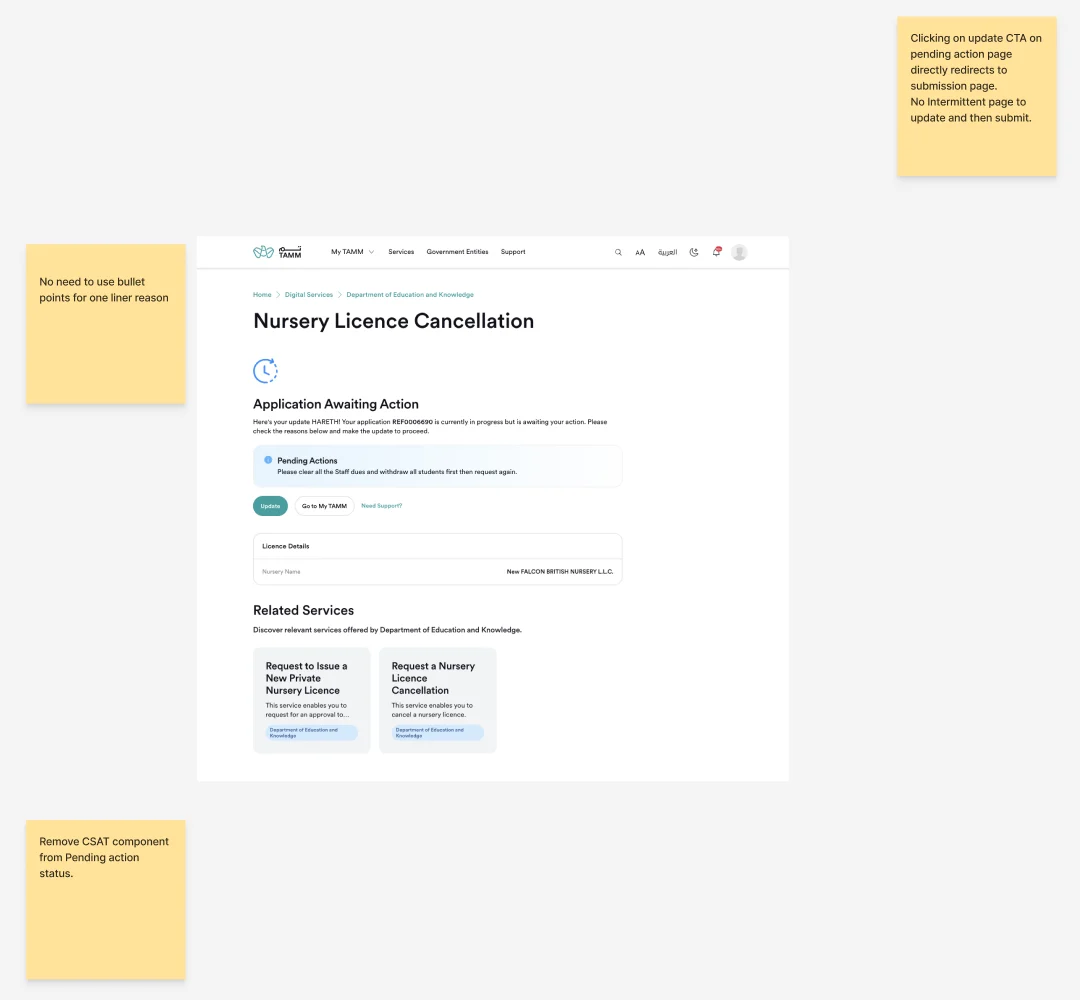
Flow issues, not just pixels
The update step and the CSAT survey on pending actions.
On the awaiting action page, the review caught that Update skipped the confirmation step and went straight to submission, and that a satisfaction survey was shown while the investor still had work to do.
- Missing intermediate update step
- CSAT removed from a pending state
- One-line reasons without bullets
Outcomes
Reflection
Small services teach discipline. There is little room for invention in a licence cancellation, so the value is in the details: showing fines before they become a rejection, saying why an application is blocked, and checking that the build keeps those promises. The review round was as much a part of the design as the screens.